

Businesses can give old computers to charity when the equipment is suitable for reuse. Devices that cannot be reused can instead be recycled. Working computers, laptops and accessories can help charities and non-profits access technology they need. Before donating, plan how stored business data will be securely wiped or destroyed.
Donating surplus technology can support community organizations, but business donations often involve more than a few devices. This guide explains what equipment can be donated, how data wiping and destruction fit into a secure process, and what to consider when organizing a bulk donation in Canada. You’ll also learn how to prepare equipment for pickup or drop-off and how charitable computer donations connect reusable devices with organizations that need them.
Key Takeaways
- Sort equipment by condition and type to identify what may be suitable for donation versus recycling.
- Protect business information by planning secure data wiping or destruction before equipment changes hands.
- Prepare an inventory and coordinate collection or drop-off to make a bulk technology donation easier to manage.
- Explore charitable computer donation and electronics recycling options to help usable devices support Canadian communities.
Data sanitization and destruction
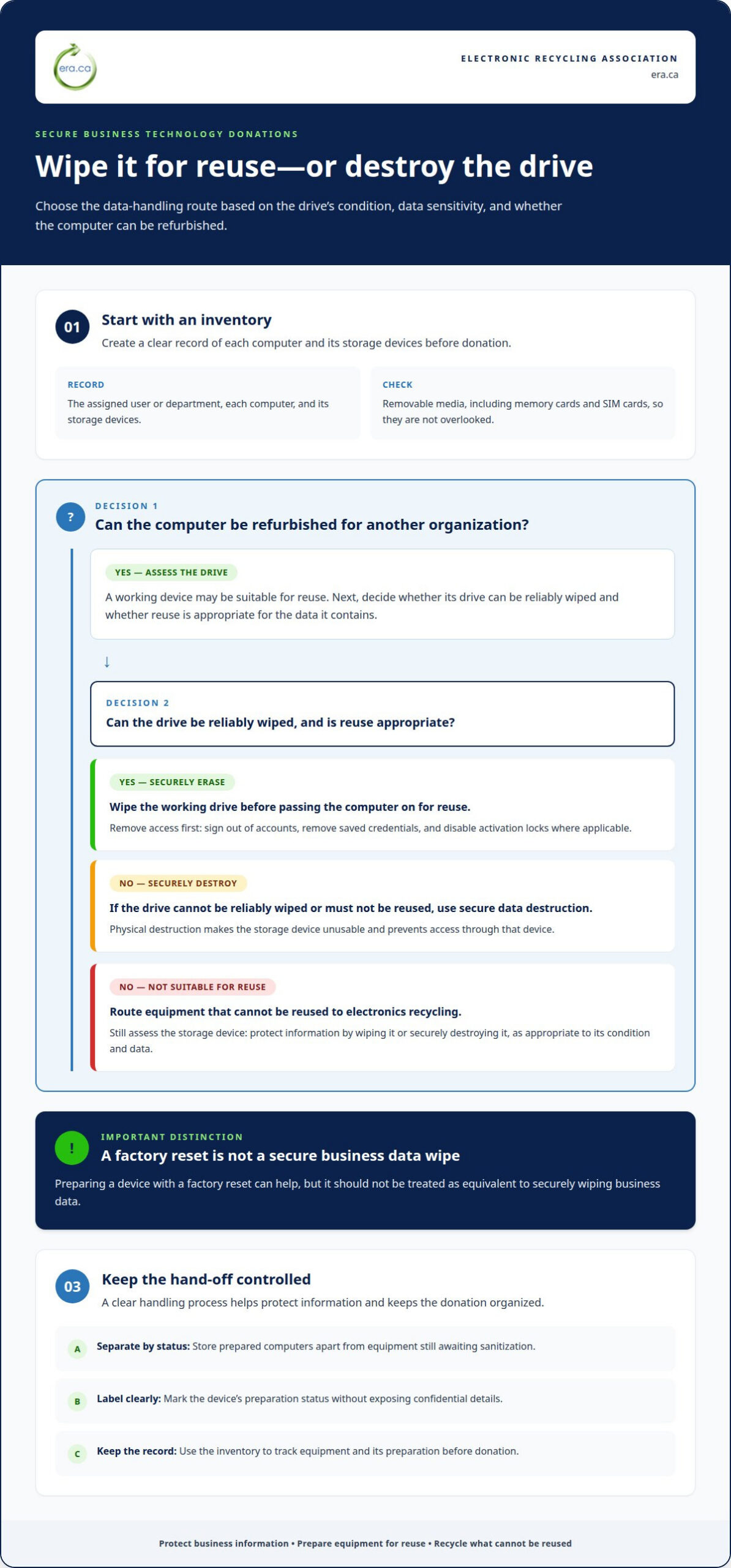
Before a computer is reused, remove information that could expose business records, staff details or client files. Data sanitization makes stored information inaccessible to another user. Secure data erasure wipes the drive, while physical destruction makes the storage device unusable. Choose the method based on the drive’s condition, the sensitivity of its data and whether the computer can be refurbished for another organization.
For business electronics, create an inventory of each computer and its storage devices. Record the assigned user or department, then identify drives that contain information requiring protection. Remove and account for removable media, including memory cards and SIM cards, so they are not overlooked. This gives staff a clear record of what has been prepared and supports careful handling before donation.
- Remove access: Sign out of accounts, remove saved credentials, and disable activation locks where applicable.
- Wipe storage: Use a suitable data-wiping process before a working drive is passed on for reuse.
- Destroy when needed: If a drive can’t be reliably wiped or must not be reused, secure data destruction prevents access through that device.
Organizations like the Electronic Recycling Association (ERA) advise residential donors to remove accounts, turn off activation locks, and factory-reset devices before donating them. Those steps help prepare a device, but a factory reset shouldn’t be treated as equivalent to a secure business data wipe. Across Canada, donors should also clear personal information, including by wiping hard drives and clearing SIM cards.
Keep devices protected during collection or drop-off. Store prepared computers separately from equipment awaiting sanitization, and label their status without exposing confidential details. A clear process helps organizations handle donations consistently, protect information, and make usable equipment available for skills development through a refurbishment program. When reuse isn’t appropriate, electronics recycling can still benefit communities by directing equipment away from another user and into responsible processing.
Accepted and unacceptable equipment
Donation programs assess computer equipment by its condition, usefulness, and handling requirements. To find local computer donation or refurbishment programs in your Canadian city, search your municipality’s waste and reuse information for accepted devices and drop-off locations.
Accepted Computers and Accessories
Usable computers and accessories may be donated in Calgary, where local charities can direct working equipment towards community use. Accessories can include items such as keyboards, mice, and monitors, but acceptance depends on each program’s criteria. Keep devices together by type, and make a simple inventory so staff can assess the equipment efficiently.
Schools and community organizations may need different equipment, so condition matters as much as the item itself. A computer that starts reliably is a stronger candidate for reuse than one with a damaged screen or missing parts. For a business donation, organize the equipment into an inventory and group accessories with their related computers before arranging pickup or drop-off.
Items Not Accepted
Charities may decline equipment that is broken, incomplete, or unsuitable for refurbishment. A Calgary donation program’s acceptance rules can differ from another location’s, so separate unusable devices from working computer equipment before arranging a hand-off. Don’t place electronics in a landfill-bound stream when a designated electronics recycling route is available.
Businesses and organizations must make any special instructions or donation requests at drop-off. If your organization needs a tax receipt, request it at the time of drop-off. Keep the inventory and any donation instructions together, so staff can identify which items need particular handling.
For a local option, use your city’s donation or refurbishment program information to identify locations and their accepted-item criteria. A clear inventory helps you sort equipment for reuse or recycling, and makes it easier to arrange drop-off or pickup. Electronics pickup can help businesses move computer equipment in bulk.
Bulk technology for charities and non-profits
A business donation can equip a charity, school, or non-profit with computers for its digital programs. A pending list has included over 1,000 organizations needing IT devices, showing how donated equipment can meet practical needs. Working computers may support staff, training, or individuals who lack access to technology. Matching a donation to a recipient’s needs helps make each device useful.
Start by grouping equipment into clear categories: working computers, laptops, monitors and accessories. Record each item’s model and condition, and distinguish complete systems from devices missing key components. This gives the receiving organization a clearer picture of what the donation can support and helps your business plan packing and transportation around the equipment.
- Separate by condition: Group reusable devices apart from damaged equipment that may need to be recycled.
- Prepare a list: Record the type and condition of each computer, monitor, and accessory.
- Coordinate the hand-off: Share the inventory and any special donation instructions with the receiving organization.
Non-profit organizations can use computers in different ways. A school may need systems for a learning space, while a community group may use laptops for digital skills development. Ask what types of devices fit the intended program, then organize the donation around those needs. For example, a matched set of working computers and monitors can be easier to distribute than mixed equipment without a clear list.
For a business, thoughtful preparation connects surplus equipment with community benefit while keeping the donation process organized. Charities can direct limited income towards their programs when suitable technology is available for reuse. Equipment that isn’t appropriate for another user can follow a recycling route instead. Sort the donation, document its contents, and coordinate the hand-off so usable computers can move towards organizations and individuals who need them.
Which Canadian charities accept used computers and laptops?
Charities accepting used computers vary by city and equipment condition. In Calgary, Diabetes Canada, Cerebral Palsy, Calgary Drop-In Centre, and Women in Need Society are listed as possible local options for usable computer donations. Businesses can give old computers to charity through a program that directs reusable devices towards community needs. Treat these names as starting points, then match your equipment to the donation criteria available in your community.
For a business donation, make a shortlist using your city and the words “computer donation” or “technology reuse.” Compare each organization’s published equipment criteria with your inventory. Note whether the devices work, whether accessories are included, and whether your donation is a single laptop or a larger batch. Those details help you identify an appropriate route without assuming every charity accepts every device.
- Calgary: Diabetes Canada and Calgary Drop-In Centre are among the possible local options.
- Calgary: Women in Need Society and Cerebral Palsy are also listed for usable computer donations.
Prepare a concise description before arranging a donation. List working laptops separately from desktop computers, and record which devices include monitors or other accessories. This helps ERA assess the equipment for refurbishment and donation. Include any special handling instructions when arranging pickup or drop-off.
A charity’s role may be to distribute equipment directly or connect it with community programs. The intended recipient could be a school, non-profit, or individual who benefits from access to a usable computer. To give old computers to charity responsibly, identify the intended recipients and describe the equipment accurately. For larger donations, a coordinated program can help route suitable devices to organizations with specific needs.
Choose a route that fits the condition and volume of your equipment. Usable computers can support community access, while devices unsuitable for reuse need an appropriate recycling pathway. If your organization has computers ready for charitable reuse, arrange a charitable computer donation to help direct them towards organizations that can use them.
Electronic Recycling Association (ERA): Charitable computer donations
The Electronic Recycling Association (ERA) helps businesses direct reusable computers towards charitable reuse and recycle equipment that cannot be reused. Its computer donation program connects refurbished technology with community organizations, while free electronics recycling provides a responsible route for other equipment.
For organizations preparing a donation, ERA also offers secure data destruction and electronics pickup. Data can be wiped, and hard drives can be physically shredded when that method is needed. Separate reusable computers from items intended for recycling, and prepare an inventory to describe the equipment and any data-handling requirements.
If your organization has computers ready for charitable reuse, or electronics requiring secure handling or recycling, contact Electronic Recycling Association to discuss the next step.
Make your next equipment refresh count
Build computer donations into your organization’s equipment-refresh process. A planned hand-off gives staff time to identify reusable devices, protect business information and prepare equipment for transport. This makes it easier to give old computers to charity while moving surplus technology out of storage and towards community use.
The Electronic Recycling Association (ERA) offers free electronics recycling, secure data destruction and electronics pickup. These services help organizations protect information and give retired equipment a responsible next destination. Review what your business is retiring, then decide whether it is suitable for charitable reuse, needs data destruction or should be recycled.
Take the next step for your organization’s surplus technology. Contact Electronic Recycling Association (ERA) to discuss your equipment and donation needs. Each carefully prepared device can contribute to a more connected community.
Frequently Asked Questions
Where Can Businesses Donate Old Electronics?
Businesses across Canada can donate reusable computer equipment through the Electronic Recycling Association’s charitable donation program. ERA collects computers and related electronics for refurbishment and donation to charities, non-profits, care facilities and educational institutions. Arrange a free pickup or use a depot drop-off. Prepare an equipment inventory first, especially for mixed donations containing desktops, printers, peripherals and accessories.
Where can I donate an old computer to charity in Canada?
You can donate a reusable computer through ERA’s program, which directs refurbished devices to registered charities and community organizations across Canada. Its beneficiaries include non-profits, care facilities and educational institutions. When arranging a hand-off for an individual laptop, describe its condition and included accessories. Clear details help ERA prepare the device for its next user.
Do computer donation programs in Canada accept desktops, monitors, printers, and accessories?
Some Canadian programs accept desktops, monitors, printers, and computer accessories, but accepted equipment varies by program. The Electronic Recycling Association lists these equipment categories, along with laptops, scanners, servers, peripherals, parts, and cables. Keep items grouped by type, such as a desktop with its monitor and cables. This makes it easier to record what your donation includes and organize the equipment for handling.
What condition must a computer be in to be accepted as a donation?
For charitable donation, a computer needs to be suitable for reuse or refurbishment. A device that starts and operates is a stronger reuse candidate, while a damaged computer may need assessment before refurbishment. Describe issues such as a cracked screen, missing power adapter or unreliable startup. Accurate details help ERA determine whether the device can be prepared for another user or should be recycled.
How should I securely erase personal data before donating an old computer?
Remove personal accounts and activation locks before passing on a computer, but do not rely on a factory reset alone to protect business data. Arrange secure data destruction appropriate to the information stored on the device. ERA offers secure data destruction, including data wiping and physical hard-drive shredding for devices requiring that method.
What should I do if a charity cannot accept my computer, and where can I recycle it?
If a charity can’t use a computer, route it to electronics recycling rather than putting it in regular waste. The Electronic Recycling Association offers free electronics recycling and accepts equipment such as computers, laptops, printers, and accessories. Keep devices together by type and separate them from items intended for charitable reuse. For a business with several items, electronics pickup is another available way to manage the equipment.