

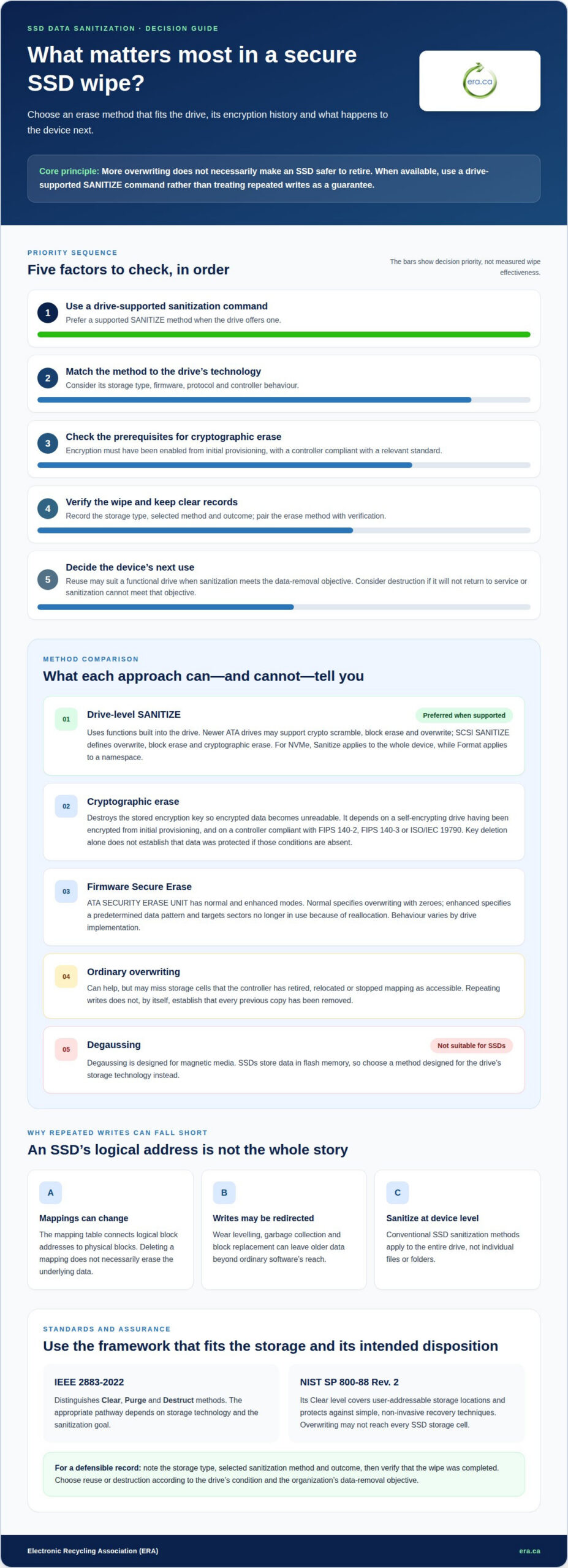
More overwriting does not necessarily make an SSD safer to retire. For secure data removal, use a drive-supported SANITIZE command when available. The right method depends on the device’s capabilities and whether encryption was enabled from initial provisioning. This comparison of enterprise SSD data sanitization methods explains why deleting files or repeating a basic overwrite may leave data behind.
It is reasonable to expect drive erasure to work like erasing a traditional hard disk, but SSDs store and manage data differently. Degaussing, which is designed for magnetic media, is not suitable for SSDs, and overwriting may not reach every storage cell.
You’ll learn how overwriting, IEEE 2883-2022 methods, cryptographic erase and degaussing compare, and why verification matters after a wipe. The article also explains what evidence can support a defensible sanitization process, so your organization can make a responsible decision about sensitive data and the equipment that may be reused or recycled.
Key Takeaways
- For a self-encrypting SSD, cryptographic erase depends on encryption being enabled from initial provisioning and the drive’s controller meeting the relevant standard.
- IEEE 2883-2022 distinguishes clear, purge and destruct methods; the appropriate approach depends on the storage technology and sanitization goal.
- Degaussing is designed for magnetic media, while SSD overwriting can miss cells that the drive’s controller no longer maps as accessible.
- Pair a supported erase method with verification and clear records to strengthen confidence that sanitization was completed.
Can I securely erase an SSD by overwriting it?
Overwriting can help sanitize an SSD, but its controller may leave some stored data untouched. For enterprise erasure, choose a method suited to the drive’s encryption, firmware and storage protocol.
Cryptographic Erase for Self-Encrypting Drives
Cryptographic erase sanitizes a self-encrypting drive by destroying its stored encryption key, making the encrypted data unreadable. This method matters when an organization needs to remove data without relying on repeated writes across NAND cells. For defensible erasure, the SSD must have been encrypted from initial provisioning under a self-encrypting-drive controller compliant with FIPS 140-2, its successor FIPS 140-3, or ISO/IEC 19790 internationally. Without that foundation, key deletion alone doesn’t establish that all stored data was protected by encryption.
Firmware-Level Secure Erase Commands
Firmware-level Secure Erase commands use built-in drive functions to wipe user-accessible storage areas. ATA SECURITY ERASE UNIT provides normal and enhanced modes: normal specifies overwriting with zeroes, while enhanced specifies a predetermined data pattern and targets sectors no longer in use because of reallocation. These commands can reach beyond ordinary file deletion, which removes only a file’s references. Their behaviour still depends on the drive’s implementation, so the command name alone does not describe every internal operation.
Manufacturer Secure Erase Commands
Manufacturer secure erase commands invoke sanitization functions supported by a drive’s firmware and protocol. ATA SECURITY ERASE UNIT implementations vary by manufacturer, so the same command may behave differently across models. Newer ATA drives may support SANITIZE modes for crypto scramble, block erase and overwrite. SCSI SANITIZE also defines overwrite, block erase and cryptographic erase. For NVMe, Format applies to a namespace, while Sanitize applies to the whole device. When available, use SANITIZE rather than treating a basic overwrite as equivalent.
NAND Block Erase and Overwrite
NAND erase blocks can contain hundreds of pages, so changing or deleting a logical mapping does not necessarily erase the underlying data. An SSD’s mapping table connects logical block addresses to physical blocks; after a mapping is deleted, data may remain in storage. Ordinary overwriting can also miss cells the controller has retired or relocated. A write aimed at a file or address may therefore fail to clear every physical copy. Conventional SSD sanitization methods apply to the entire drive, not individual files or folders, so plan erasure at the device level.
IEEE 2883-2022 technology-specific methods
Published on August 17, 2022, IEEE 2883-2022 provides technology-specific methods for sanitizing storage. It distinguishes clear, purge and destruct, giving organizations a framework for matching an approach to the device and its intended disposition.
Sanitization Time and Destruction Comparisons
Cryptographic erase typically takes a few seconds, while physical destruction involves handling and processing the SSD. Destruction time depends on the process, so there is no single duration for every drive or facility. Degaussing is not an SSD sanitization option because it is designed for magnetic media, not flash memory.
The enterprise SSD data sanitization methods compared here differ in both mechanism and outcome. NIST SP 800-88 Rev. 2 says overwriting may not reach every SSD storage cell. Its Clear level covers user-addressable storage locations and protects against simple, non-invasive recovery techniques. Organizations should select a method based on the device’s technology and intended disposition, rather than treating repeated writes as equivalent to every other method.
Reuse or Physical Destruction
An enterprise SSD may be sanitized for reuse when it remains functional and its supported method meets the organization’s data-removal objective. Physical destruction is appropriate when the drive will not return to service or sanitization cannot meet that objective. IEEE 2883-2022 includes both sanitization and destruction pathways, helping organizations connect the method to the asset’s next use.
For Canadian organizations handling personal or regulated data, document the storage type, selected method and outcome before reuse or disposal. NIST SP 800-88 Rev. 2 provides a benchmark for Clear, while IEEE 2883-2022 describes technology-specific approaches. The enterprise SSD data sanitization methods compared in these standards give teams a basis for making and recording decisions; neither point establishes one universal method for every Canadian organization.
Does degaussing work for SSDs?
Degaussing targets magnetic media, while SSDs store data in flash memory. HDD-style overwriting also has limits because SSD controllers manage writes and physical locations.
Degaussing and Overwriting Limitations
Degaussing does not sanitize SSDs because it is designed for magnetic hard drives, not flash storage. Applying a magnetic field cannot replace a command that addresses an SSD’s memory and firmware. Organizations should choose a method designed for the drive’s storage technology rather than assume one process works for every media type.
Overwriting software writes new data to locations the operating system can address, but an SSD controller can redirect those writes. Wear levelling, garbage collection and block replacement can leave older data outside the software’s reach. NIST SP 800-88 Rev. 2 says overwriting does not always reach every storage cell on an SSD. Repeating writes therefore does not, by itself, establish that all previous data has been removed.
Secure Erase or a supported SANITIZE command works through drive-level functions rather than ordinary file deletion. The right option depends on the SSD’s firmware and supported commands; a software overwrite is not interchangeable with those functions.
Overprovisioning, Remapped Blocks, and Encryption Risks
Overprovisioned and remapped blocks can retain data beyond the locations visible to standard software. That creates a gap between what a host computer can overwrite and what the SSD may physically retain. Ponemon Institute research found that 36% of enterprises experienced data exposure due to residual SSD data after attempted sanitization, underscoring the importance of addressing remnants.
Encryption changes the sanitization approach, but only if it protected the data from the start. Cryptographic erase destroys the encryption key, making data unreadable. If encryption was not active from initial provisioning, deleting the key cannot protect earlier unencrypted data. A lost or improperly handled key can also undermine an organization’s erasure process.
For drives that cannot be sanitized through a supported method, shredding is a physical destruction option, not a way to prepare them for reuse. Match the disposition to whether the SSD will return to service, and document the selected method and result.
Verification and reporting of SSD wipes
Verification evaluates whether a sanitization process achieved its intended result, while reporting records the method and outcome. IEEE 2883-2022 and NIST media-sanitization guidance both emphasize verification and auditable practices.
Sanitization Verification and Sampling
Sampling examines selected storage locations for evidence that the erasure worked. IEEE 2883-2022 provides guidance for erasure, verification and reporting across SSDs and hard drives. NIST SP 800-88 Rev.1 also emphasizes verification and auditable processes, helping organizations document how each device was handled.
Representative sampling should cover locations totalling at least 5% of addressable space. For SSDs, the verification approach should account for hidden and over-provisioned areas, not just files visible to the operating system. ISO/IEC 27040 adds requirements to identify the storage form, verify results, document them and produce evidence. These records make a “wipe complete” status more useful for later review.
Software-Based Wiping and Verification
Software-based wiping can initiate an erasure process, while verification checks and records its outcome. When comparing enterprise SSD data sanitization methods, consider how each method is verified, not just which command starts it. Firmware-level erasure, software verification and reporting address distinct parts of the process. Records should identify the device, method and verification result.
A software success message alone does not show that every physical cell was reached. NIST SP 800-88 Rev. 2 notes that overwriting may not reach every SSD storage cell. Accordingly, reports for enterprise SSD data sanitization methods compared should connect the device, sanitization method, verification findings and final disposition. That audit trail helps organizations review asset handling and support accountable decisions.
For devices requiring secure data destruction, arrange secure data destruction with Electronic Recycling Association (ERA) as part of a documented asset-disposition process.
Electronic Recycling Association (ERA): Secure data destruction
Electronic Recycling Association (ERA) offers secure data destruction for organizations retiring SSDs that should not return to service. This is a practical next step when a drive contains sensitive information and physical destruction is the chosen disposition. ERA also offers free electronics recycling and electronics pickup, helping organizations manage retired equipment alongside data-security needs.
Equipment suitable for continued use may support charitable computer donations, extending its value to communities. The right path depends on whether the device can be reused and its data securely removed. Matching secure destruction, recycling or donation to the equipment’s condition supports responsible handling from retirement onward.
Contact Electronic Recycling Association (ERA) to discuss secure data destruction for your organization’s retired SSDs.
Build sanitization into your next asset decision
Make SSD sanitization part of your organization’s asset-disposition planning, rather than a final step after equipment is set aside. Define who approves the method, how the result is recorded and what happens when a drive cannot return to service. A consistent process helps teams make clear, accountable decisions as equipment moves through its lifecycle.
Use this comparison of enterprise SSD data sanitization methods as a foundation for a policy suited to your devices, information risks and reuse plans. Review the policy when storage technology or operational needs change, so security decisions stay connected to how equipment is handled.
For support with retired equipment, contact Electronic Recycling Association (ERA) to discuss a suitable next step. Thoughtful asset decisions help protect information while supporting responsible electronics management.
Frequently Asked Questions
What is the most secure way to destroy data on an SSD?
Use a supported device-level sanitization method and retain evidence of its outcome; physically destroy the drive when it must not be reused. Cryptographic erase is appropriate only when encryption protected the SSD from initial provisioning and the controller meets a recognized standard. The practical choice depends on the drive’s capabilities, data sensitivity and whether reuse is intended.
Does HIPAA, PCI DSS, or GLBA specify a particle size for SSD destruction?
There is no single particle-size figure that can be applied across HIPAA, PCI DSS and GLBA as a blanket rule. PCI DSS v4 Requirement 9.4 concerns media destruction, but don’t treat its identifier as a numeric SSD-fragment specification. For an organization, the useful distinction is whether its documented destruction approach suits the storage media and its security requirements.
How do you destroy NVMe and M.2 SSDs differently from 2.5-inch SSDs?
Choose the sanitization command based on the drive’s supported interface, not its physical shape. NVMe identifies a storage protocol, while M.2 and 2.5-inch describe form factors; an M.2 SSD is typically 2280. For physical destruction, the process must render the flash-memory storage unusable, whether the device is a compact M.2 module or housed in a 2.5-inch enclosure.
Why Isn’t Deleting Files Enough to Protect My Data?
Deleting a file usually removes its directory entry or reference, not every underlying data copy. SSD controllers map logical addresses to physical memory and may relocate data during normal operation. As a result, a deleted file can remain in storage that ordinary file browsing no longer shows. For example, emptying a recycle bin does not sanitize the entire device.
How do SSD secure erase, sanitize, cryptographic erase, and physical destruction compare?
Secure Erase and Sanitize are drive commands that invoke supported firmware operations; available modes vary by protocol and device. Cryptographic erase removes the encryption key, so it depends on encryption having protected the data. Physical destruction prevents the drive from returning to service. The decision depends on reuse plans, drive support and the organization’s required disposition.
How effective are ATA Secure Erase, NVMe Sanitize, and SCSI SANITIZE commands on enterprise SSDs?
Each command can perform device-level erasure, but its modes and implementation depend on the protocol and drive firmware. ATA SECURITY ERASE UNIT has normal and enhanced modes; NVMe Sanitize applies to the whole device, and SCSI SANITIZE defines overwrite, block erase and cryptographic erase. Effectiveness depends on using a supported command and recording its result, not merely its name.