
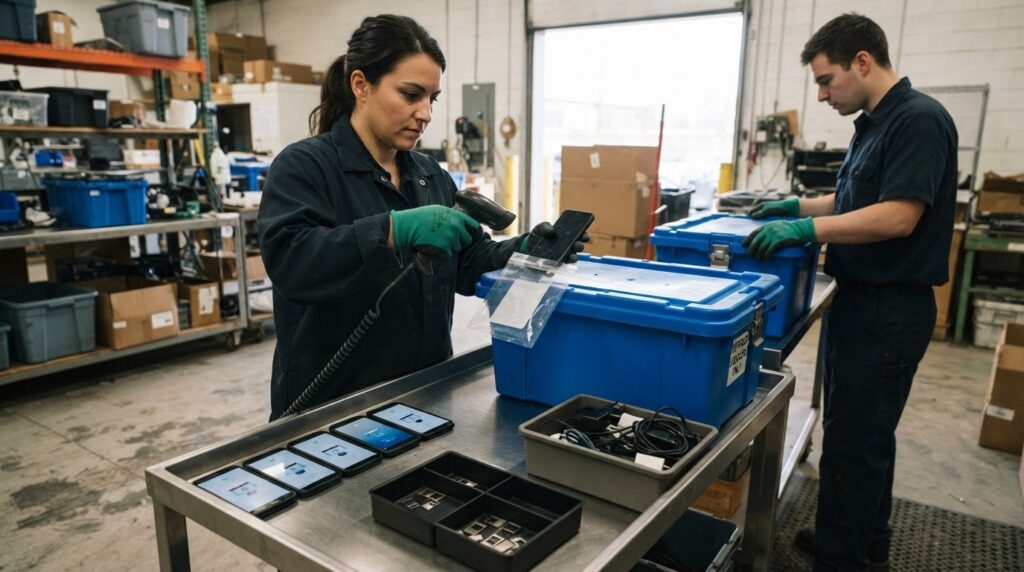
A factory reset alone is not a complete retirement process. A corporate cell phone fleet retirement data wiping protocol should account for both managed work information and personal content, then document what happened to each device. For leased phones, complete sanitization before returning the hardware.
It’s reasonable to want a repeatable way to protect company information without erasing an employee’s personal data by mistake. A selective corporate wipe removes managed work apps, accounts, configurations and associated data, while personal and unmanaged content remain. A full device wipe is different. The right method depends on the phone’s management status, intended destination and applicable retention requirements.
This guide explains how to identify and prepare managed phones, choose a sanitization approach, protect corporate and personal information, and verify that a retired device is no longer in management systems. You’ll also learn what to record for each device, from its identifier and actions taken to its final destination, so retirement is secure, traceable and responsible.
Key Takeaways
- Prepare administrator access and device passcodes before starting retirement, so managed phones can be handled without losing control of their settings.
- Choose a sanitization method that fits the device’s storage, sensitivity and next destination; a factory reset alone may not be sufficient.
- Record each phone’s identifier, last user, actions taken, date and final destination to create a traceable disposition record.
- Separate work data from personal content, then arrange secure data destruction and responsible electronics recycling for devices leaving service.
How Do You Securely Retire a Leased or Managed Device?
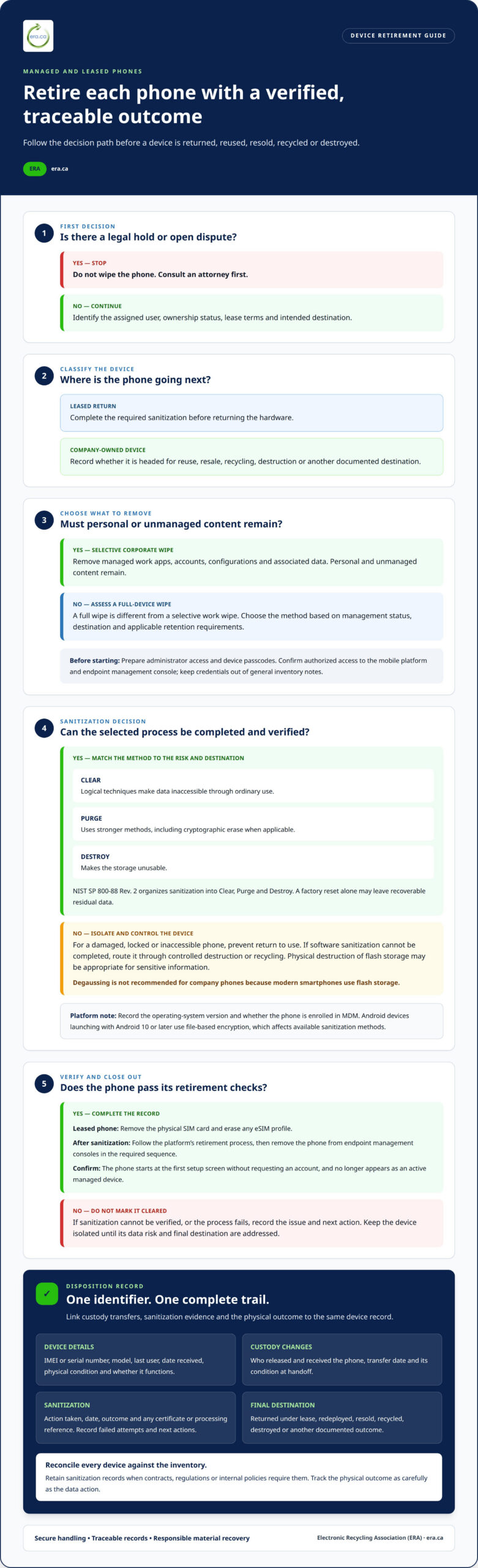
- Pause disposal if there is a legal hold or open dispute involving the device or user. Do not wipe the phone in either case; consult an attorney first. For each device cleared for retirement, identify its assigned user, ownership status, lease terms and intended destination. This distinguishes leased returns from company-owned phones headed for reuse or recycling.
- Prepare administrator access and device passcodes before starting. Confirm authorized access to the relevant mobile platform and endpoint management console, and keep credentials out of general inventory notes. Record whether the phone is enrolled in mobile device management (MDM), along with its operating-system version. Android devices launching with Android 10 or later use file-based encryption, which affects available sanitization methods.
- Complete required sanitization before returning a leased device. Remove its physical SIM card and erase any eSIM profile. A factory reset may not remove an organization’s management enrollment, so follow the platform’s retirement process and confirm the device’s final status. After wiping, verify that it starts at the first setup screen without requesting an account.
- After sanitization, remove the retired device from endpoint management consoles in the platform’s required sequence. Confirm that it no longer appears as an active managed device. Record its IMEI or serial number, last user, actions taken, date and destination. Retain sanitization records when contracts, regulations or internal policies require them.
- Track the physical outcome as carefully as the data action. Record whether each phone is returned under lease, prepared for reuse, recycled or sent to another documented destination. Reconcile the outcome against the inventory so every device has a recorded status. This documentation connects secure handling with responsible material recovery and helps teams identify gaps in future retirement cycles.
Data sanitization approaches: Clear, Purge, and Destroy
Use in-house sanitization only when staff can apply the chosen method and document the result. Otherwise, use a qualified IT asset disposition provider. If a phone cannot be wiped or is damaged, isolate it and route it through a controlled destruction or recycling workflow.
-
Isolate and Systematically Destroy Data
Separate each device from networks and routine handling before choosing its disposition. NIST SP 800-88 Rev. 2 organizes sanitization as Clear, Purge or Destroy. Clear applies logical techniques to make data inaccessible through ordinary use; Purge uses stronger methods, including cryptographic erase when applicable. Destroy makes the storage unusable. Match the method to the information’s sensitivity and whether the phone will be redeployed, resold, recycled or destroyed. A factory reset alone may leave recoverable residual data.
-
Verify Destruction and Address Failures
Choose a verification method suited to the process and record the result for each device. Watch for interrupted operations, unsupported platform features, locked storage or a mismatch between the reported result and the intended method. If a phone is going back into service, confirm that the process supports that destination. If sanitization cannot be verified, don’t treat the device as cleared. A provider workflow should document outcomes, not simply record that a reset was completed.
-
Handle Phones That Cannot Be Wiped
Isolate a damaged or inaccessible phone and prevent its return to use until its data risk is addressed. If software sanitization cannot be completed, physical destruction of flash storage may be appropriate for sensitive information, followed by responsible recycling of the remaining materials. Degaussing is not recommended for company phones because modern smartphones use flash storage. Record the failure, destruction action and final destination so the device remains traceable through disposal.
Chain of custody and serialized disposition records
Create a record for every retired phone, then link each custody transfer and final outcome to its identifier. This serialized trail helps an organization reconcile devices, sanitization actions and environmental outcomes.
- Create an inventory entry before a device leaves its assigned user. Record its IMEI or serial number, model, last user, date received, physical condition and whether it functions. Use the identifier as the record’s main reference, since model names alone may not distinguish individual phones. Keep the inventory status current as the device moves through review, sanitization and disposition.
- Document each custody change as a separate event. Log who released the phone, who received it, the transfer date and its condition at handoff. If a phone arrives with a cracked screen or missing SIM tray, record that before processing. These details help locate gaps when an inventory shows a device in storage but no later action.
- Link the sanitization result to the same device record. Capture the action taken, date, outcome and any related certificate or processing reference. If an attempt fails, record the failure and next action rather than marking the phone complete. This makes the documentation useful for internal review and supports a clear account of how sensitive information was handled.
- Confirm the final destination for each identifier. Record whether the device was redeployed, resold, recycled or destroyed, and include its condition and function when assessed. Summarize outcomes to track material recovery and identify unresolved devices. Do not describe a phone as recycled or reused until its disposition has been recorded.
- Reconcile the inventory against the final records and investigate every unmatched device. One regional office had 800 retired iPhones and Android phones left unreconciled in a closet for fourteen months. A regular exception review can surface similar backlogs before they become difficult to trace. Close each record only when its last documented action and destination agree.
Securely wiping corporate and personal data
- Separate managed work information from personal content before choosing a wipe. A selective corporate wipe removes managed apps, accounts, configurations and associated work data, while personal and unmanaged content remain. This matters when an employee-owned phone contains company email alongside personal photos. A corporate cell phone fleet retirement data wiping protocol should make this distinction clear before processing begins.
- Check the device’s management status and ownership before acting. Mobile device management (MDM) identifies enrolled devices and applies the organization’s configured controls. Confirm whether the intended action is a selective wipe, full factory reset or another approved sanitization method. A factory reset can affect personal and corporate information together, so don’t treat it as equivalent to removing managed work data. Document the chosen action in the corporate cell phone fleet retirement data wiping protocol.
- Revoke access to company accounts as part of offboarding, then remove work profiles and associated credentials using the appropriate management controls. For a remote wipe, confirm that the device is online and enrolled; otherwise, the command may not reach it. Track the command’s status and follow the established process rather than assuming that issuing it means it has completed.
- Match the final wipe to the phone’s next use. A device being redeployed or resold needs sanitization suited to its sensitivity and destination, while a phone kept by its employee may need only selective removal of company content. If personal and work data cannot be reliably separated, use the organization’s approved full-device process and explain its effect to the user before proceeding.
- Document what was removed, the method, date and outcome. Keep evidence that the work profile and corporate accounts are no longer accessible, and record any failed or pending remote action. For devices requiring secure data destruction instead of reuse, arrange secure data destruction as part of the retirement workflow. Review the corporate cell phone fleet retirement data wiping protocol when processing exceptions, so the records reflect what actually happened.
Electronic Recycling Association (ERA): Secure data destruction
The Electronic Recycling Association (ERA) can help when retired phones need secure data destruction and responsible end-of-life handling. Its secure data destruction and free electronics recycling services support organizations whose devices are leaving service rather than returning to employees or being redeployed.
For fleet retirement, coordinate device disposition with the records already prepared, including identifiers, sanitization actions and intended outcomes. ERA’s electronics pickup service can help move equipment into the next stage of handling. Its charitable computer donation service offers another route for eligible computer equipment, while phone disposition decisions should be managed separately.
ERA states that it is certified to ISO/IEC 27001, ISO 9001, ISO 14001 and ISO 45001 standards. These certifications relate to information security, quality, environmental management and occupational health and safety systems.
Contact Electronic Recycling Association (ERA) to discuss secure data destruction and electronics recycling for retired equipment.
Make device retirement part of the next refresh
Make each phone’s retirement part of procurement refresh and employee offboarding. Assign an owner for exceptions, and include disposition records in the device-return workflow. That way, the corporate cell phone fleet retirement data wiping protocol becomes a routine process, not a last-minute response to equipment accumulating in storage. A consistent approach also helps teams apply lessons from one device cycle to the next.
For devices leaving service, the Electronic Recycling Association (ERA) provides secure data destruction, free electronics recycling and electronics pickup. These services help organizations connect information security with responsible equipment handling. Choose the next step that fits the phones’ condition and intended disposition, then include it in the organization’s regular retirement process.
Contact Electronic Recycling Association (ERA) to discuss the next step for retired devices. Each well-managed retirement supports a more secure and responsible technology lifecycle.
Frequently Asked Questions
What’s the Difference Between a Factory Reset and a Selective Wipe?
A factory reset prepares a phone for fresh setup, while a selective wipe removes managed work content. For example, selective removal on a personally owned phone can clear company email and settings while leaving personal photos and apps. A full reset affects the device more broadly, so choose based on ownership, intended reuse and whether personal content must remain accessible.
Can mobile devices be wiped remotely?
Yes. An enrolled mobile device can receive a remote wipe command through its management platform. Success depends on the device remaining enrolled and able to receive the command; a phone without network access may not process it right away. Track the command status, then use an approved follow-up process for devices that remain offline or cannot report completion.
Is a factory reset on a modern phone secure?
A factory reset may not be sufficient on its own, because recoverable residual data can depend on the platform and storage implementation. Android devices launching with Android 10 or later use file-based encryption, which affects how their stored data is protected. For sensitive information, select a sanitization method suited to the device and verify the result before reuse or resale.
What Actually Happens to Data When a Device Is Retired?
Retirement must address both information stored on the phone and access connected to it. Sanitization may remove data logically, make encrypted data inaccessible by sanitizing its keys, or destroy the storage. Wiping a phone does not automatically remove separate cloud copies or records held in company systems, so manage those through their own retention and access processes.
What Common Mistakes Put Retired Devices at Risk?
Common mistakes include treating a reset as proof of sanitization, overlooking a pending remote command or sending a phone onward before processing is complete. For example, an offline phone may not receive its remote wipe before collection. Also account for SIM and eSIM profiles, management enrollment and legal holds, all of which can affect whether a device is ready to leave custody.
What Documentation Should You Keep After Retiring a Device?
Keep a record that links the device’s identifier to its handling and final outcome. Include its IMEI or serial number, last user, condition, sanitization method, date, result and destination. Add custody-transfer details and any processing reference or certificate. Retain records when contracts, regulations or internal policies require them, and reconcile open or failed actions before closing the device record.