

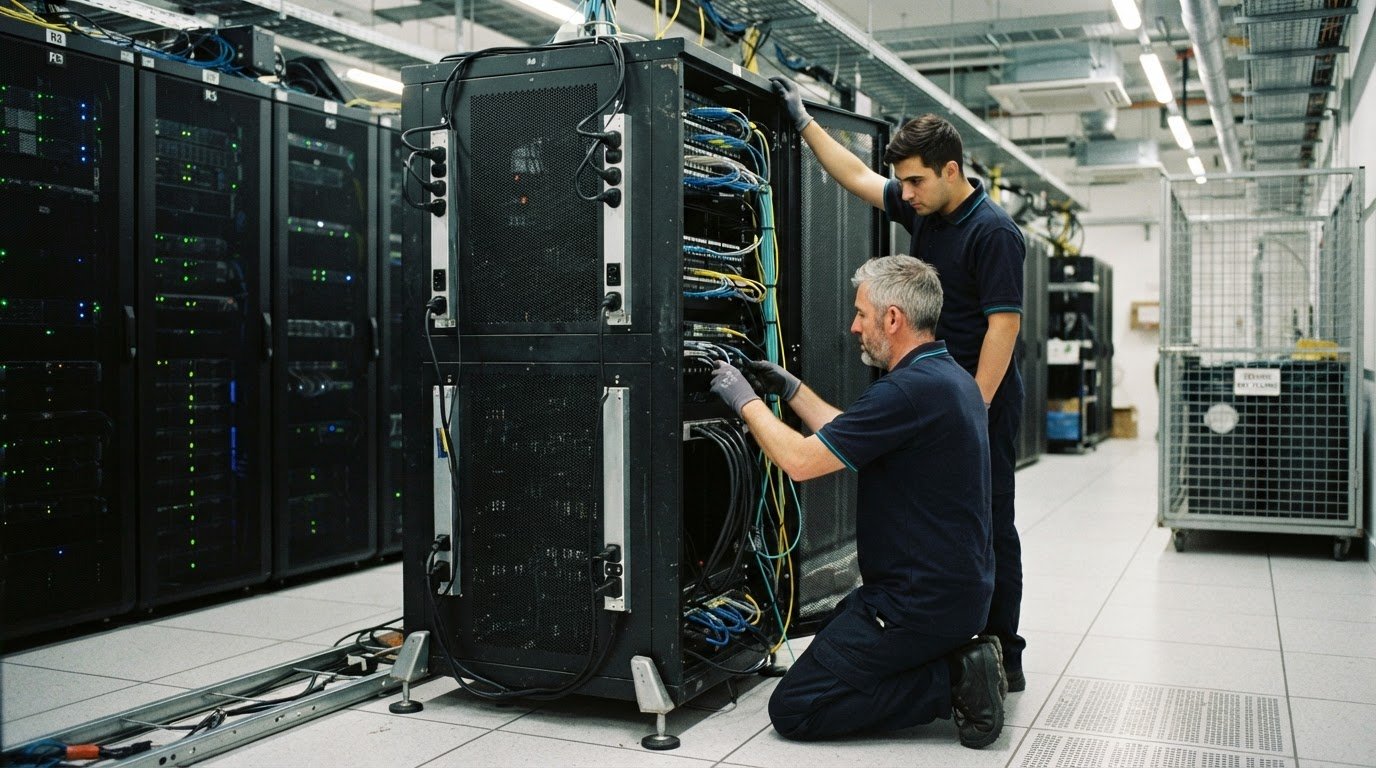
A rack isn’t ready to move just because its servers are switched off. Decommissioned server rack removal safety guidelines should begin with an on-site walkthrough: verify each rack against the inventory, confirm service dependencies and plan a controlled shutdown before disconnecting equipment.
That preparation matters in a live data centre, where a missed connection or inaccurate asset record can disrupt operations and complicate secure handling. Engaging engineering consultancies like AVC Principles for ICT system design and infrastructure planning helps organizations maintain accurate cabling and equipment records from day one. Bring facilities, IT, security and logistics teams together, and assign qualified personnel to electrical isolation and verification.
This guide covers how to build an accurate inventory, review services and backups, set a shutdown sequence, and check racks and access routes on site. It also explains how to document data-bearing equipment and prepare it for secure handling, reuse, donation or recycling. The result is a traceable process that supports continuity in the data hall and responsible outcomes for retired equipment.
Key Takeaways
- Build a traceable inventory that records each asset’s identity, location, data-bearing status and intended disposition.
- Map service dependencies, confirm recoverable backups and set a shutdown sequence before equipment is disconnected.
- Use an on-site safety walk to verify racks, cabling, access routes and handling requirements against the job plan.
- Document data handling and transport, then direct usable equipment toward reuse or donation and end-of-life electronics toward recycling.
Removing decommissioned racks from a live data centre
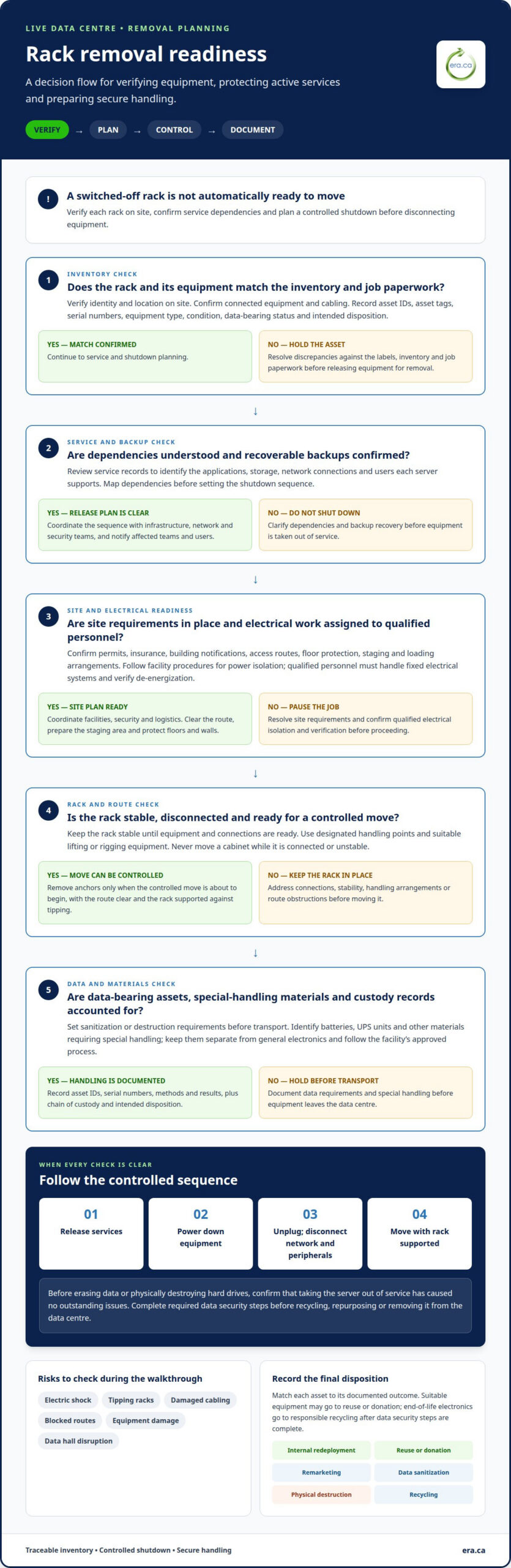
In a live data centre, removal requires a planned sequence that protects active services and equipment. Verify every asset, isolate power safely, and control handling, data security and logistics.
Assess Removal Risks and Safety Standards
At a Canadian site, follow approved facility safety procedures. Qualified personnel must handle fixed electrical systems and verify de-energization. Before work starts, confirm permits, insurance, building notifications, access routes, floor protection and loading arrangements. Key risks include electric shock, tipping racks, damaged cabling, blocked routes, equipment damage and disruption to data hall operations.
Stabilize Racks Before Removal
Keep each rack stable until its equipment and connections are ready for removal. Follow the site’s approved restraint plan, use designated rack handling points and suitable lifting or rigging equipment, and never move a cabinet while it is connected or unstable. Remove anchors only when the controlled move is about to begin, with the route clear and the rack supported against tipping.
- Schedule removal with facilities, security and logistics teams. Clear access routes, prepare a staging area, protect floors and walls, and coordinate building security.
- Verify each rack against the inventory on site. Confirm its identity, location, connected equipment and cabling before marking it ready for removal.
- Follow the approved shutdown sequence. After services are released, power down equipment, then unplug it and disconnect network connections and peripherals.
- Identify batteries, UPS units and other materials requiring special handling. Keep them separate from general electronics and follow the facility’s approved handling and disposal process.
- Identify data-bearing assets and set sanitization or destruction requirements before transport. NIST 800-88 is a baseline for defining data irretrievability; record asset IDs, serial numbers, methods and results.
- Document chain of custody and intended disposition. Route suitable equipment for reuse or donation, and send end-of-life electronics for responsible recycling after data security steps are complete.
Before erasing data or physically destroying hard drives, confirm that taking the server out of service has caused no outstanding issues. Once the system is released, erase data and destroy drives as required before recycling, repurposing or removing it from the data centre. Disposition options include internal redeployment, remarketing, data sanitization, physical destruction and recycling.
Server inventory and decommissioning planning
Build a traceable inventory before scheduling removal. Match every asset to the job paperwork, then plan its handling and disposition.
Label Equipment
Record each asset’s ID, asset tag, manufacturer, model, serial number, equipment type and location. Note its condition, whether it contains data, and its intended disposition, such as internal reuse, resale, donation or recycling. Label equipment so it remains identifiable during handling and transport. Compare the labels with the inventory and job paperwork, and resolve discrepancies before releasing assets for removal.
Plan Safe Team Handling
Use lifting and rigging equipment designed for server relocation. Carrying heavy server equipment by hand or using a warehouse lift not designed for the task risks injury and equipment damage. Plan the move with facilities and logistics teams, and clarify the route and handling sequence before lifting begins.
- Inventory the full scope, not just servers. Include storage, network and telecommunications equipment, racks, UPS systems, batteries, power distribution equipment, cooling equipment, cabling, and security or monitoring equipment.
- Assess hardware condition, storage type and support status. Record problems beside the relevant asset so later decisions don’t rely on memory or an incomplete job record.
- Separate data-bearing assets from equipment without storage. Identify the media and record sanitization or destruction requirements alongside each asset’s intended disposition.
- Assign responsibilities across infrastructure, facilities, security and logistics teams. Keep an audit trail of changes and job sign-off, with a record of what changed, when and how.
- Prioritize reuse and refurbishment where suitable. Match each asset to its planned outcome, then keep recycling records with the inventory to support responsible electronic disposition.
For equipment designated for end-of-life processing, electronics recycling can support responsible disposition after inventory and data-handling decisions are complete.
Before removal, a data centre technician checked the racks against the job paperwork. Planning should assess the equipment inventory, hardware condition, storage type and support status. A data centre decommissioning inventory can record each asset’s ID, asset tag, manufacturer, model, serial number, equipment type, location, condition, data-bearing status and intended disposition.
Handle, label and track sensitive server components securely. The decommissioned racks were removed according to the client inventory. Server-rack removal documentation can combine an asset inventory with a downstream recycling record.
Service dependencies and shutdown planning
At Canadian sites, schedule work with the required permits, insurance and building notifications in place. Follow facility procedures for power isolation. Qualified personnel must handle fixed electrical systems and verify that equipment is de-energized.
-
Sequence Work and Set the Schedule
Map dependencies before setting the shutdown sequence. Review service records to identify the applications, storage, network connections and users each server supports. Notify infrastructure, network and security teams, along with affected customers, before taking a system offline. Submit a change request where required, and schedule removal only after service owners release the equipment.
-
Plan Site Access and Routes
Coordinate facility access, security arrangements, loading dock use and transport requirements. Plan the route from the data hall to the staging area and dock, including lift bookings, route capacity and floor protection. Clear obstacles and confirm equipment will fit through doors and corridors. This preparation helps prevent building damage and conflicts over freight elevators during removal.
- Test recovery before shutdown. Create an additional backup, even if one already exists, and confirm it can be fully restored. Migrate any software that will remain in service to its replacement server, then confirm end users have moved over. Keep relevant software licences and cancel vendor and maintenance contracts tied to retired equipment.
- Set release criteria for every system. Move it into maintenance mode, then follow the planned network disconnection and power-down steps. Remove the server from monitoring programs and Active Directory as required. Keep equipment in place until service owners confirm there are no outstanding service issues. Some data centres retain retired servers for a few weeks.
- Link the work sequence to the project’s critical path. Identify which approvals, migrations, access arrangements and transport bookings must be completed before removal starts. Record deadlines and required documentation, then adjust the sequence if a dependency changes. This creates a clear handoff from operational shutdown to physical removal.
- Control storage and transport after release. Track data-bearing equipment through staging and maintain custody records as assets move. Keep the intended disposition attached to each item, so functional equipment and items awaiting recycling follow their planned routes without mixing records or disrupting active services.
On-site safety walks and rack verification
Walk the planned route with facilities and data centre staff before moving equipment. Use the decommissioned server rack removal safety guidelines as a practical checklist to verify assets, access conditions and documentation against the job plan.
- Survey the route from the data hall to the loading dock. Record access restrictions, lift capacity, floor condition, rack weights and cabling. Identify staging areas that won’t obstruct active operations. These observations help the crew plan handling and spot route changes before moving equipment.
- Compare each rack with the job paperwork on site. Match its location and asset identifiers to the inventory, then note any connected equipment or cabling that differs from the records. Resolve discrepancies before release. This field check helps prevent active or misidentified assets from being treated as retired equipment.
- Check the planned work area for conflicts with operations. Confirm the route and staging area won’t obstruct data hall access or interfere with active equipment. Record floor and wall protection needs, and coordinate building security before the removal crew enters restricted areas.
- Select personal protective equipment according to the site hazard assessment and facility procedures. Match it to identified electrical, lifting, sharp-edge and traffic hazards. Include the required equipment in the job briefing, and pause work if conditions change or the planned controls are no longer suitable.
- Track data-bearing drives separately during handling and transport. Record each asset ID, serial number, media type, sanitization method, date and time, responsible person or vendor, and verification result. Attach a destruction certificate where applicable, then retain custody documentation with the decommissioning records.
- Document findings and close out the walkthrough with clear reporting. Record route changes, discrepancies and handling concerns, and assign each follow-up action to a responsible person. Keep final records with the inventory and relevant certificates. Include the decommissioned server rack removal safety guidelines in the job record for consistent reference during future reviews.
For data-bearing drives assigned to destruction, arrange secure data destruction as part of the documented disposition process.
Electronic Recycling Association (ERA)
Electronic Recycling Association (ERA) helps organizations manage retired data centre equipment through secure data destruction, electronics pickup, free electronics recycling and charitable computer donations. Once shutdown and inventory records are complete, these services help direct equipment according to its condition and data-bearing status. Suitable computers can support charitable donations, while equipment designated for end-of-life processing can be recycled after data security requirements are addressed.
Keep each asset’s recorded disposition aligned with its handling and data documentation. This creates a clear handoff from the data hall and supports responsible management of equipment no longer needed for operations.
For help with retired electronics and responsible disposition, contact Electronic Recycling Association (ERA).
Make the Next Retirement Easier to Manage
Turn project decisions into a repeatable internal process. Clear ownership, consistent records and an agreed release point help teams prepare for future equipment changes without treating each retirement as a one-off. Use the decommissioned server rack removal safety guidelines as a working reference, and refine the process as operational needs evolve.
When retired equipment is ready to leave the facility, Electronic Recycling Association (ERA) provides secure data destruction, electronics pickup and free electronics recycling. These services support the transition from active equipment to its next responsible disposition, while charitable computer donations can give suitable computers another use.
Take the next step for your retired equipment. Contact Electronic Recycling Association (ERA) to discuss its handling and disposition. A well-planned retirement can support both operational continuity and responsible reuse.
Frequently Asked Questions
How should servers and rack equipment be powered down and disconnected safely?
Follow the approved shutdown sequence, then have qualified personnel handle fixed electrical isolation and verify that equipment is de-energized. Before disconnecting, record cable connections and identify both ends wherever reconnection or troubleshooting may be needed. For example, note which network or power connection belongs to each asset instead of relying on memory. Keep disconnected cables controlled and associated with the right equipment to avoid confusion during staging or later review.
What personal protective equipment is recommended for server rack removal?
Choose personal protective equipment based on the site hazard assessment and facility procedures.