

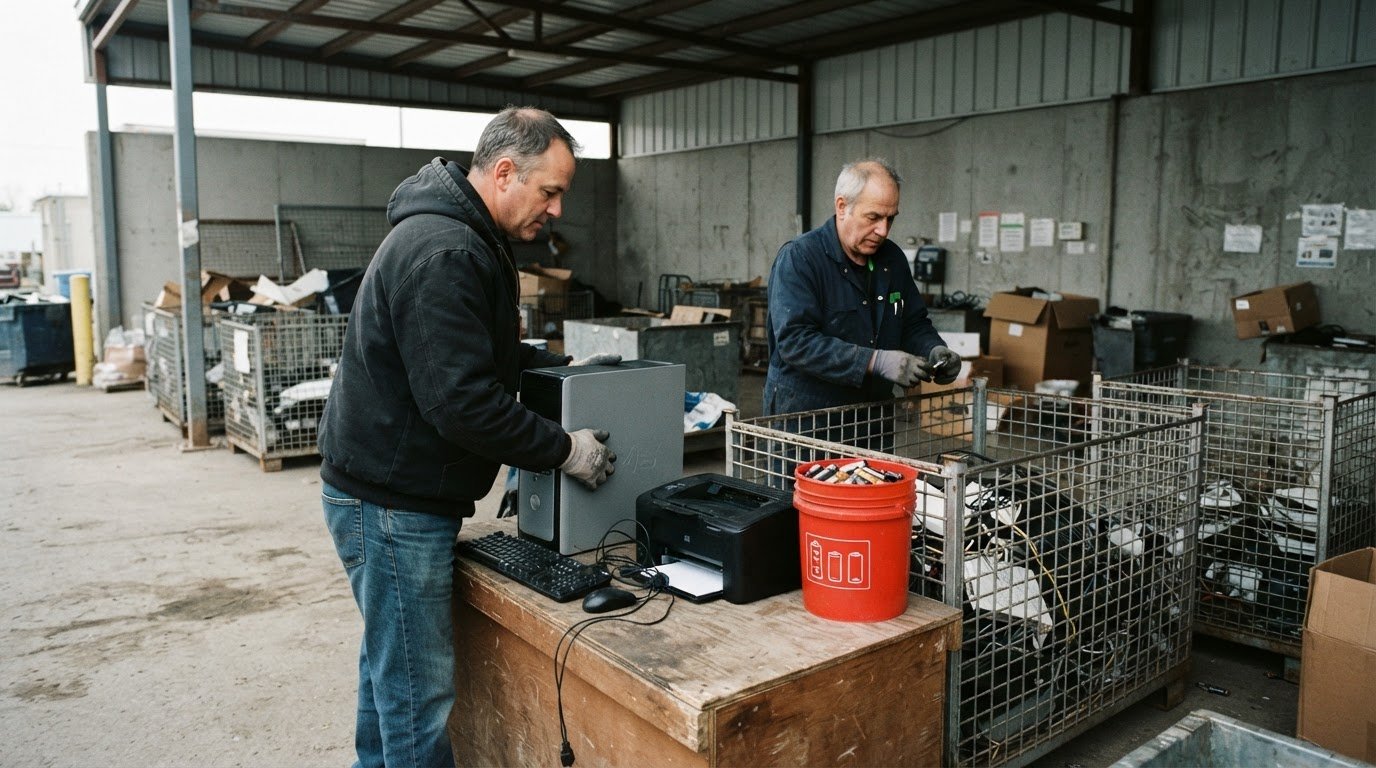
An e-waste depot in Canada may accept computers and other unwanted electronics, but accepted items and drop-off rules vary by program. Batteries and fluorescent lights may also need disposal through separate collection streams rather than with ordinary garbage.
It’s reasonable to want a clear answer before loading up old equipment: a depot’s rules can differ from one community to another. This guide explains which computers, peripherals and other items may count as e-waste, why some materials are collected separately, and what to know about possible drop-off fees.
You’ll also learn how to find a collection point and what to confirm before making the trip. If transporting equipment is difficult, the Electronic Recycling Association (ERA) offers free standard pickups and electronics recycling across Canada.
Key Takeaways
- Identify whether your computer, phone or related equipment belongs in an electronics collection stream, and prepare personal data before drop-off.
- Learn why fees can vary by depot and which details affect the cost of bringing in unwanted electronics.
- Find a nearby collection option by starting with your municipality and narrowing the search by city or postal code.
- Consider donation or pickup options for usable equipment, and choose secure data handling when privacy matters.
Computers and peripherals
Computers and their accessories are common electronic items for recycling. Examples include desktop computers, laptops, monitors, keyboards, mice and printers.
Computer and Peripheral Recycling
Computer and peripheral recycling involves collecting and processing unwanted equipment. Desktops, laptops and monitors are computers or display devices; keyboards, mice and printers are related peripherals.
Keep electronics together while sorting, and separate items that aren’t electronics. This makes it easier to identify what you’re bringing. Check the collection point’s accepted-item list, since not every site takes every type of equipment.
Electronics contain materials such as plastic, glass, gold, silver, copper and palladium. Responsible recycling can recover materials for use in new products instead of sending unwanted equipment into regular garbage.
Sorting Equipment for Drop-Off
Sort similar electronics together before drop-off. For example, group a laptop with other computers, and keep its mouse or keyboard identifiable as a separate peripheral.
List the items you plan to bring, such as a monitor, printer or desktop tower. Compare that list with the collection point’s accepted materials, since nearby sites may take different items.
Working electronics may have another useful purpose. Consider donation or reuse for a working laptop or monitor before choosing recycling.
Personal Data Before Recycling
Personal data removal means wiping information stored on an electronic device before it leaves your possession. Yes, remove personal data from computers and cell phones before recycling them, and remove a phone’s SIM card.
First, save any files you want to keep. Then erase personal information, such as documents and account details on a computer or contacts and messages on a phone. Include other electronics that may store personal information.
Treat data security as a separate step from sorting, so you don’t overlook the contents of a computer or phone before donation or recycling.
Batteries and Portable Devices
Battery separation means keeping batteries out of electronics waste and using an appropriate battery collection stream. Improper disposal can create fire and chemical-leak risks.
Before drop-off, separate loose batteries from computers, phones and other electronics. Don’t put batteries in curbside trash, recycling bins or electronics waste. Use the local battery collection stream, since procedures vary by community.
Cell phones are electronic items, but their SIM cards and personal data need attention before recycling. Remove the SIM card and wipe the phone, while keeping its battery separate for appropriate collection.
Drop-off deposits and fees
A drop-off fee is a charge a collection program may apply when accepting an item; a deposit is an amount collected under that program’s rules. There is no single fee schedule for every e-waste depot in Canada. Local programs set their own policies, so check the collection point’s terms for the items you plan to bring.
For example, a computer’s fee policy may differ from one for a television or another electronic item. The local program determines which categories it accepts and whether a charge applies. Don’t assume one depot follows the same rules as another, even if both serve the same community.
Before planning a drop-off, make a short item list:
- Name each item, such as a laptop, monitor or printer.
- Separate batteries from electronic equipment.
- Note whether the equipment is working or unwanted.
This list helps you match your load to a depot’s accepted categories and procedures. Contact the collection point about accepted items, fees, location and operating hours. This is especially useful when a load includes different equipment types, since one site’s collection rules may not apply elsewhere.
Depot hours and drop-off requirements are set by each site and vary by location. Accepted materials, intake procedures and fee policies also depend on the local collection program. Plan around the specific depot’s operating schedule and rules, rather than assuming every collection point handles a computer or peripheral in the same way.
A no-cost route is also available for electronics recycling through the free electronics recycling option. If a depot trip doesn’t fit your plans, explore this alternative for unwanted equipment. Choosing an appropriate collection route helps keep computers and other electronics out of regular garbage, while directing them to responsible handling.
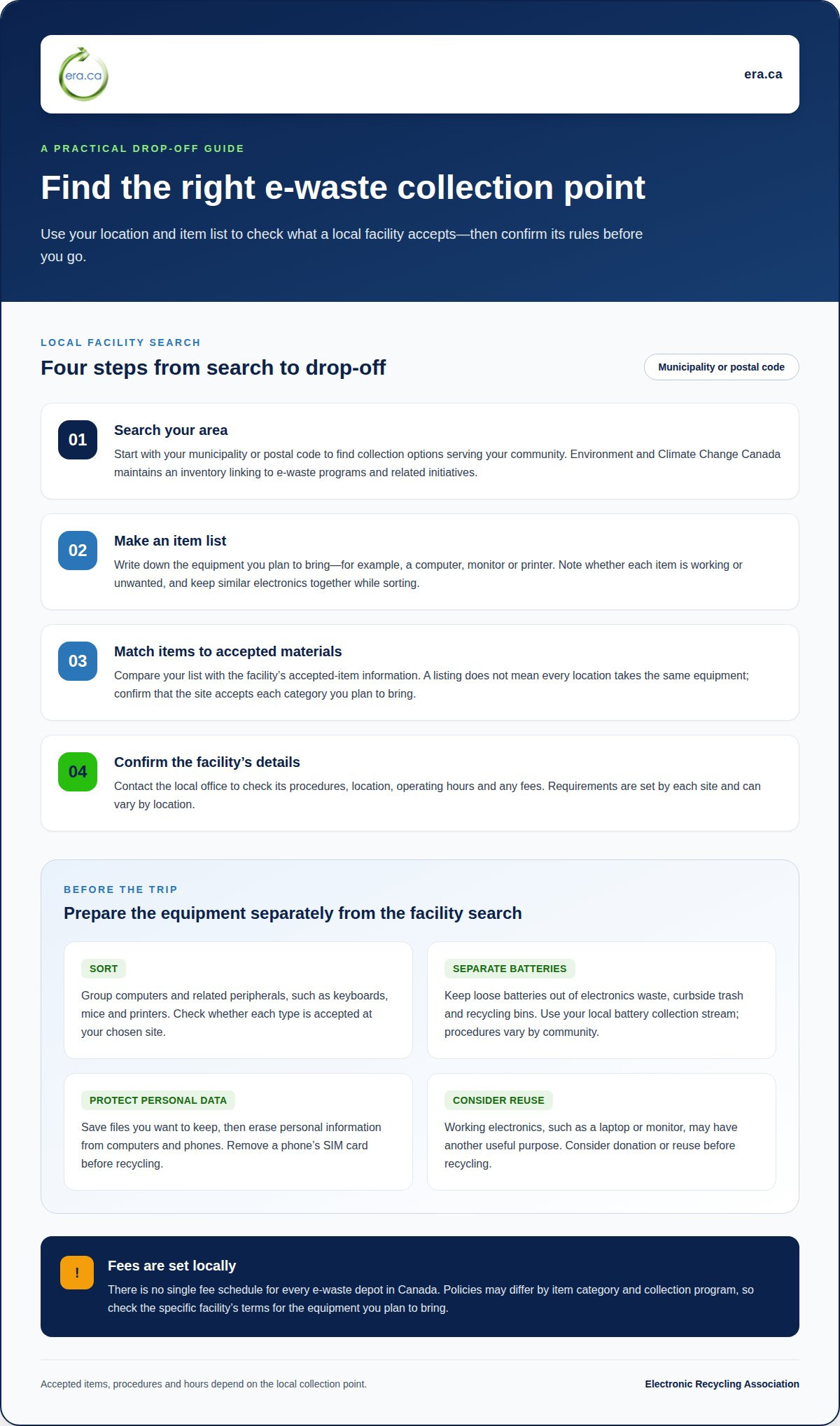
Local facility search by city or postal code
A local facility search helps identify electronics collection points serving your community. Start with your municipality and postal code, because available programs and accepted materials depend on where you live.
Search by city or postal code, then identify the program behind each listing. Environment and Climate Change Canada maintains an inventory linking to e-waste programs and related initiatives. Use it to find possible options, then check which items each local site accepts.
Follow these steps to make the search practical:
- Search by municipality or postal code to identify nearby collection options.
- Make a list of your equipment, such as a computer, monitor or printer.
- Compare the listed accepted materials with the items you plan to bring.
- Contact the local office for details about its program and procedures.
That last step matters because a listing doesn’t mean every location accepts the same equipment. If you have a laptop and printer, for example, confirm that the collection point takes both categories. Local procedures can also vary, so use information specific to the facility instead of assuming nearby sites follow identical rules.
Search results can include municipal, non-profit, retail and other collection points, as well as special collection events. These options have different operators and may serve different needs. A municipal site, retail return location and one-time event may each have distinct accepted-item lists and drop-off arrangements.
For working electronics, consider whether donation is a suitable alternative to recycling. A usable computer or other device may be valuable to a family member, community group or charity. Match the route to the equipment’s condition, then use your location search to identify a nearby collection or donation option.
Municipal and other e-waste depots
Canadian e-waste collection includes municipal, non-profit, retail and other depots, as well as special collection events. Choose a route based on your location, equipment and the program’s accepted materials.
Programs and disposal procedures vary by province and territory. Check your municipality’s information for local options and the items its recycling centres accept.
Businesses can use a public depot if its program accepts business drop-offs. Public access and accepted loads vary, so commercial equipment may need another collection route. ERA offers electronics pickup for offices and businesses across Canada.
Items Not Accepted at Depots
Items not accepted at depots are materials outside a particular site’s collection rules. Canada has no single acceptance list for every depot, so an item rejected at one location may have another local collection route.
Batteries and fluorescent lights may need separate handling rather than being placed with electronics. Don’t put batteries in curbside trash, recycling bins or electronics waste. Fluorescent lights contain mercury and shouldn’t go in regular garbage. Ask your municipality which local collection stream to use.
Take care with mixed loads. Separate batteries and fluorescent lights from electronics, then sort devices by type, such as computers or televisions. This helps match each item to an appropriate collection stream.
Safe Disposal of Electronics and Batteries
Direct electronics and batteries to the appropriate collection streams. Take computers and TVs to a local e-waste program that accepts them, and keep batteries separate for appropriate handling.
Before recycling a computer or cell phone, remove personal information and take out the phone’s SIM card. Keep batteries separate to reduce fire and chemical-leak risks. These steps support safer collection and help protect workers, waste facilities and the environment.
After drop-off, recyclable electronics can yield materials for new products, including plastic, glass, gold, silver, copper and palladium. Recovery depends on the materials in the accepted equipment and the recycling process.
For an alternative to depot drop-off, arrange electronics pickup for unwanted computers and other equipment.
Electronic Recycling Association (ERA)
If a local depot doesn’t suit your needs, the Electronic Recycling Association (ERA) offers free standard electronics recycling and pickup, secure data destruction, and charitable computer donations across Canada.
Choose a route that fits the equipment and its condition. Working computers may be suitable for charitable donation, while unwanted electronics can be recycled. If a device contains personal information, ERA provides secure data destruction. Pickup is an alternative when transporting equipment to a depot is difficult.
These options can complement local collection programs, but batteries and fluorescent lights still need separate disposal routes. Match the service to your electronics and keep materials requiring separate handling apart.
Contact Electronic Recycling Association (ERA) to discuss a suitable route for your computers and other electronics.
Make responsible electronics handling a routine
Make a plan for when computers or other devices need to leave your home or workplace. An e-waste depot in Canada can be one option, alongside donation or pickup. Protect personal information before devices leave your possession, and consider whether working equipment can be reused.
For unwanted electronics, the Electronic Recycling Association (ERA) offers free standard recycling and pickup, secure data destruction and charitable computer donations. These services can help you protect information or arrange collection instead of transporting equipment yourself.
Choose a next step that suits your equipment and circumstances. Contact Electronic Recycling Association (ERA) to discuss a practical recycling route. Each thoughtful choice supports responsible handling and a more resource-conscious community.
Frequently Asked Questions
What Items Are Considered E-Waste?
E-waste includes unwanted electronic equipment, and some collection programs also handle batteries and fluorescent lights. Computer-related examples include desktops, laptops, printers, scanners, servers, peripherals, phone systems, software, parts and accessories. Lab equipment can also belong in an electronics recycling stream. If a computer still works, its condition may make donation or reuse a suitable alternative to recycling.
Where can I find an e-waste depot near me in Canada?
Start with your municipality’s waste or recycling information and search by city or postal code. Environment and Climate Change Canada maintains an inventory linking to e-waste programs and related initiatives. Use it to identify possible collection routes, then check accepted equipment. A program serving household computers may not accept a business load or every peripheral.
What electronics can I drop off at Canadian e-waste depots?
Accepted items depend on the collection point. ERA’s electronics program includes computers, servers and server racks, scanners, phone systems, lab equipment, software, cables, docking stations, parts and accessories. These examples can help organizations sort office or technical equipment before arranging recycling or pickup. They don’t mean every municipal or retail collection point accepts the same devices.
Are there fees for recycling electronics at e-waste depots in Canada?
No single fee applies at every Canadian depot; each collection program sets its own terms. ERA provides standard electronics donations and pickups free of charge. Larger or specialized operations, such as detailed reporting, physical destruction or unusual logistics, may incur fees, which are disclosed beforehand. For municipal or retail drop-offs, follow that program’s fee policy.