


What if surplus electronics could be handled responsibly and help put useful technology within reach of Canadian charities? Free electronics recycling gives organizations a practical route for retiring equipment, while reuse can help suitable computers support community organizations.
Recycling, collection, and data handling are related but distinct parts of an equipment retirement plan. A clear inventory and a plan for information-bearing devices help your organization choose a pathway that fits its equipment, security needs, and sustainability goals.
This guide explains what free electronics recycling can include, how recycling differs from secure data destruction and pickup, and how to prepare surplus equipment for recovery. As a Canadian non-profit, ERA provides electronics recycling, pickup and depot drop-off, secure data destruction, and charitable computer donations. Use the steps below to plan a responsible handoff and consider whether suitable equipment could be reused.
Key Takeaways
- Separate equipment recovery from collection logistics and data services when planning a recycling project.
- Inventory computers, displays, and related equipment, noting condition and which devices may hold organizational information.
- Choose a pathway based on equipment condition, quantity, data sensitivity, and whether reuse or recycling is the priority.
- Align asset management, information security, and sustainability teams before equipment leaves your organization.
- ERA’s national non-profit services connect responsible electronics handling with charitable computer donations and community benefit.
What does free electronics recycling mean for Canadian organizations?
For an organization, free electronics recycling is a way to move surplus equipment into responsible recovery. Recycling describes the equipment’s recovery route, while collection and data handling describe how it is transported and how information-bearing devices are managed. Electronics recycling routes equipment towards reuse or responsible material recovery. Collection, data destruction, and other handling needs are separate parts of the plan.
Organizations need to consider more than where to drop off an item. Equipment type, quantity, condition, stored information, and transport logistics all affect how to plan a retirement project. The management of electronic waste in Canada also reflects provincial approaches to collection and extended producer responsibility, so organizations operating nationally may need to account for different local requirements.
What can organizations expect from electronics recycling?
The goal is to direct suitable equipment towards reuse where appropriate and recover materials responsibly when reuse isn’t suitable. ERA handles computers and TVs through its electronics services. Equipment condition and your organization’s needs help determine which recovery route makes sense.
Recycling isn’t repair, and it isn’t consumer electronics resale. An organization retiring a computer shouldn’t assume it will be repaired or returned to the consumer market. Suitable equipment may be reused; other devices may instead be processed for material recovery. Knowing the difference helps set practical expectations and keeps useful technology in circulation where appropriate.
Why free recycling is not the same as every service being free
Free electronics recycling doesn’t mean every collection arrangement or additional service is automatically included. Pickup is a collection option, while data-related needs may call for services beyond recycling. ERA provides electronics pickup and secure data destruction, so include those requirements in your project plan rather than assuming they are part of every recycling arrangement.
Start by describing the equipment and the outcome you need. A small group of retired computers has different collection needs from a larger equipment refresh. Devices containing organizational information may also need a separate data-handling plan. Identifying the project’s scope helps your organization plan the right pathway.
Make a simple inventory before arranging recovery. Record equipment categories, approximate quantities, working condition, and which devices contain storage media. Then separate the core recycling need from any pickup or data destruction requirements. This gives internal teams a clearer basis for planning and supports responsible handling from equipment retirement through its next destination.
Which electronics and service needs fit an organizational recycling pathway?
Build the inventory around what your organization is retiring and what each item may require. ERA handles computers and TVs through its electronics services. Record other related equipment by category instead of assuming every item follows the same route. A clear inventory helps distinguish equipment that may be suitable for reuse from items intended for material recovery, and highlights where data handling or collection logistics need attention.
Start with the equipment and its current condition
Group items by type, then note whether each works, is damaged, or is missing components. Record accessories separately, and avoid combining unlike items into a single count. Condition helps determine whether reuse is practical, while quantity and handling needs help shape the collection plan. An inventory is a planning tool that makes the project easier to describe and coordinate.
A compact decision view can help your team identify what to consider:
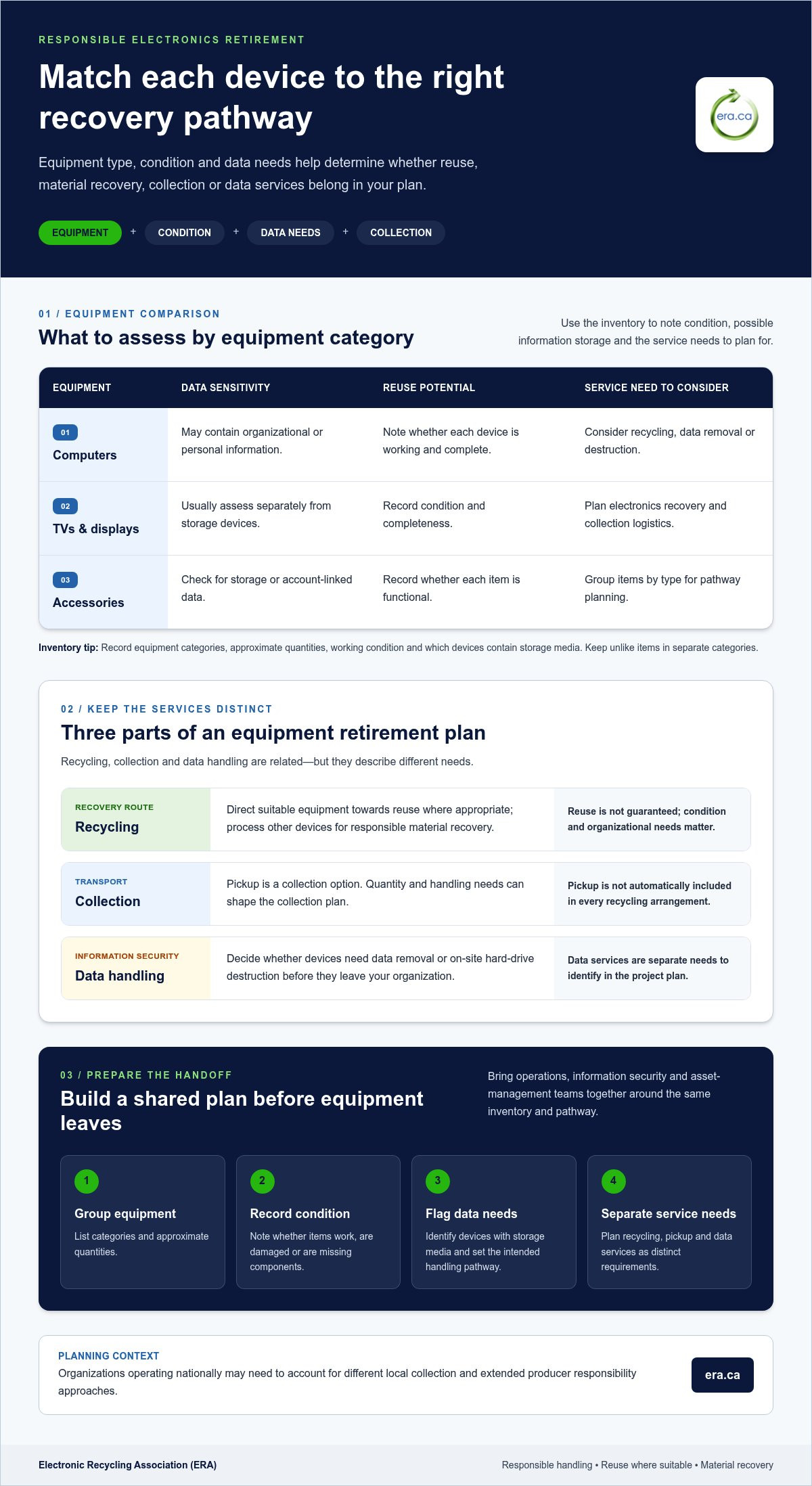
| Equipment | Data sensitivity | Reuse potential | Service need to consider |
|---|---|---|---|
| Computers | May contain organizational or personal information | Note whether working and complete | Recycling, data removal, or destruction |
| TVs and displays | Usually assess separately from storage devices | Record condition and completeness | Electronics recovery and collection logistics |
| Related accessories | Check for storage or account-linked data | Record whether functional | Group by type for pathway planning |
Identify data handling and documentation requirements
Flag computers and any other equipment that may hold sensitive information before it leaves your organization. Secure data removal before refurbishment supports a potential reuse route. On-site hard-drive destruction is a separate option for drives that need physical destruction. The Canadian Centre for Cyber Security sanitization guidance can help inform your internal approach to preparing devices for decommissioning or donation.
Separate data requirements from the recycling request. Decide whether your organization needs data removal or on-site destruction, and identify which equipment those services apply to. Keep an internal record of asset identifiers and the intended handling pathway so relevant teams can coordinate.
Before arranging free electronics recycling, bring together the inventory, condition notes, data flags, and collection needs. This gives operations, information security, and asset-management teams a shared view of the project. To see how equipment categories and service needs can be matched to an organizational pathway, explore ERA’s electronics recycling options.
How should organizations compare recycling, pickup, and reuse pathways?
Choose a pathway by considering four factors together: equipment condition, the information it may hold, the quantity being retired, and the outcome your organization wants. A working computer with no further business use raises different questions from a damaged display or a group of devices containing sensitive information. Use these factors to guide the decision, rather than assuming every item will follow the same route.
Reuse gives suitable equipment another possible purpose, recycling recovers materials when continued use isn’t appropriate, and data services address information risks that neither route resolves on its own. Recycling alone doesn’t cover collection or secure data handling, so plan for each need separately.
Match reuse and recycling to the equipment’s next possible use
Consider reuse for computers in working condition that may be suitable for another user. ERA connects charitable computer donations with charities and philanthropic organizations across Canada, creating a potential community benefit from equipment that can continue to serve. Condition and data handling matter when considering donation or refurbishment. Equipment that isn’t suitable for continued use can still have a responsible recovery route through recycling.
Use this comparison to guide the conversation internally:
| Pathway | Best suited to | What to consider |
|---|---|---|
| Reuse or donation | Equipment that may remain useful | Condition, completeness, and data handling before any potential refurbishment |
| Recycling | Equipment being retired for material recovery | Item type, condition, quantity, and collection needs |
| Pickup | Organizations that need equipment collected | Volume and logistics; arrangements may differ by project |
| Depot drop-off | Organizations able to bring equipment to a depot | Whether drop-off suits the items and the organization’s capacity |
Keep data services distinct from the recycling route
For devices that may be reused, ERA provides secure data removal before refurbishment. On-site hard-drive destruction is a separate service for organizations that need physical destruction of drives. These options address different information-handling requirements. Decide what your organization needs instead of treating data services as an automatic part of every recycling or pickup arrangement.
Quantity can influence whether depot drop-off or pickup is the more practical collection route, while device condition and data sensitivity shape what should happen to the equipment itself. For example, a working computer may be considered for donation after data removal, while a damaged device may be better suited to recycling.
Before choosing, agree on the intended outcome and separate collection needs from data requirements. This keeps the decision clear for operations, information security, and sustainability teams. Free electronics recycling supports responsible recovery, while a considered reuse pathway may also help suitable computers reach organizations that can put them to work.
How can an organization prepare for responsible electronics recycling?
A clear handoff starts before equipment leaves your organization. Bring asset management, information security, and sustainability stakeholders together to agree on what is being retired, what information it may contain, and the outcome the organization expects. A shared plan helps keep collection practical while respecting internal controls and environmental goals.
Create an equipment inventory and define responsibilities
Record the equipment category, approximate quantity, condition, and internal asset identifier for each item or group of similar items. Note whether devices are working, damaged, or incomplete. These details help describe the project and support decisions about potential reuse, recycling, and collection needs.
Assign responsibility as well. Identify who can approve release of organizational assets, who oversees devices that may contain sensitive information, and who coordinates sustainability or recycling requirements. Set aside equipment that needs separate handling under your organization’s policies. An inventory is a planning record, not a data-security measure, so make sure the appropriate team determines how information-bearing devices are handled.
Set data and recordkeeping expectations before handoff
Flag devices that may hold organizational or personal information, then determine whether they need secure data removal before refurbishment or on-site hard-drive destruction. These are distinct services. Specify the handling required for each device instead of relying on a general recycling request to communicate a separate data need.
Keep a record of the requested pathway, asset identifiers, and any internal reporting or documentation requirements. This gives teams a shared reference and helps clarify what information they need to retain after equipment leaves their control.
Use a straightforward planning sequence:
- Inventory equipment by category, approximate quantity, condition, and asset identifier.
- Flag devices that may contain organizational or personal information.
- Define whether the project requires recycling, potential reuse, data removal, destruction, pickup, or depot drop-off.
- Organize approvals and records, and assign a lead for coordination.
Keep collection planning proportional to the project. Establish whether depot drop-off or pickup is the relevant route, and summarize the equipment and handling needs. Detailed scheduling and preparation belong in the separate pickup guidance, while device-specific preparation instructions should be addressed in a dedicated secure-recycling guide. This keeps the organization’s readiness plan focused on the decisions it needs to make before handoff.
Thoughtful preparation makes free electronics recycling easier to coordinate and helps align the equipment’s next pathway with your organization’s data and reporting needs. To review how recycling and data services can fit into that plan, review ERA’s recycling and data services.
Why choose ERA for free electronics recycling across Canada?
For organizations retiring equipment, the right recovery pathway should account for more than the devices themselves. ERA is a Canadian non-profit serving organizations across Canada, connecting electronics handling with opportunities for reuse and community benefit. Its services include recycling, pickup, depot drop-off, secure data handling, and charitable computer donations, helping teams consider operational needs and the potential next use of suitable equipment.
ERA states that it is certified to ISO/IEC 27001, ISO 9001, ISO 14001, and ISO 45001 standards. These certifications provide information about its management systems. Your equipment’s condition and the handling required still matter when choosing a pathway.
Connect responsible equipment handling with community benefit
Working computers that may be suitable for continued use can have a purpose beyond an organization’s own asset cycle. ERA connects charitable computer donations with charities and philanthropic organizations across Canada, creating an opportunity for suitable equipment to support community needs. Considering reuse as part of equipment planning helps organizations look beyond disposal alone.
Equipment that isn’t suitable for continued use can still be directed towards responsible recycling. These are complementary outcomes: keeping usable technology in circulation where appropriate and recovering materials from equipment that has reached the end of its useful life. This connects routine asset retirement with community-minded resource management.
Take the next step with ERA
Organizations can consider the service pathway that fits their equipment and needs, including:
- Electronics recycling for equipment being retired
- Pickup or depot drop-off as collection options
- Secure data removal before refurbishment
- On-site hard-drive destruction for separate data-handling needs
- Charitable computer donations for suitable equipment
These options address different parts of an equipment retirement plan. Free electronics recycling supports responsible recovery, while pickup and additional data services address collection and information-handling needs. ERA’s non-profit purpose connects this practical work with potential community benefit, and its national reach supports organizations across Canada.
Use your equipment inventory and service requirements to identify a suitable next step. Explore free electronics recycling with ERA and consider how recycling, collection, data services, or charitable computer donations can fit your organization’s needs.
Make responsible recovery part of your next equipment refresh
Retiring technology doesn’t have to be an afterthought at the end of an asset’s useful life. Make it part of your organization’s equipment cycle, and each refresh becomes an opportunity to handle surplus responsibly while supporting a broader community purpose. Planning ahead also helps teams make decisions before storage areas fill with equipment and priorities compete for attention.
Choose one practical next step: bring the people responsible for assets, information security, and sustainability together to set a shared direction for your next retirement project. Then consider how free electronics recycling fits the plan, using the equipment inventory and service requirements you’ve identified.
ERA is a Canadian non-profit, and its stated certifications include ISO/IEC 27001, ISO 9001, ISO 14001, and ISO 45001. These offer context about its management systems, while your organization’s needs guide the appropriate pathway. Explore free electronics recycling with ERA and take a considered step towards responsible equipment recovery and community benefit.
Frequently Asked Questions
Can electronics with damaged or missing parts still be recycled?
Damaged or incomplete electronics may still have a recovery route, but their condition can affect whether reuse or material recovery is appropriate. A laptop with a cracked case presents different considerations from one missing its drive or power supply. Note visible damage, missing components, and whether each device powers on in your inventory. This supports accurate categorization and responsible handling.
Should old electronics go in regular curbside recycling?
Don’t assume an electronics item belongs in a curbside recycling bin. Municipal instructions vary by location and collection programme, so follow the guidance for your local service. Those residential disposal instructions are different from ERA’s national organizational recycling services, which support equipment recovery through organizational pathways. A rule for one municipality shouldn’t be treated as a Canada-wide requirement. Check your local programme’s current directions before setting items out.
Is deleting files enough before donating or recycling a computer?
Ordinary file deletion may not provide the same assurance as a dedicated data-removal process. Before a computer leaves your organization, identify whether it contains work files, personal information, or stored account details, then choose handling that fits your security requirements. ERA provides secure data removal before refurbishment and on-site hard-drive destruction as a separate service. Include data-bearing devices in your free electronics recycling plan instead of treating deletion as the only step.
What should an organization do with electronics that will not power on?
Include non-working equipment in your inventory and treat its storage components as potentially data-bearing. A device that won’t start may still contain a hard drive or other storage media, so record its condition and flag it for the organization’s data-handling plan. Its inability to power on affects the possibility of reuse, but doesn’t mean there is no recovery pathway. Avoid assuming it should be handled like working equipment.
Can an organization include different electronics in the same recycling request?
Prepare one inventory for the project, but separate it into categories such as computers, TVs, and related equipment. For each category, record approximate quantities, condition, and any data-handling needs. This gives a clearer picture of the project’s scope and helps identify where requirements differ. Keep category-level details available when planning the request, since items may have different handling or collection needs.
What records should a business keep after recycling electronics?
Keep the equipment inventory, internal release approvals, transfer records, and any service documentation your organization receives. Together, these records help asset managers account for retired equipment and show how the handoff was handled internally. Identify any additional reporting needs as part of the service plan, and retain the records your organization requires.
Does a device need to be usable to support a charitable computer donation?
Donation supports continued use, so a computer’s condition matters when considering it for that route. Record whether it works, is complete, or has visible damage, then distinguish potentially reusable devices from equipment better suited to recycling. ERA connects charitable computer donations with charities and philanthropic organizations. If a computer can’t support continued use, responsible recycling remains a relevant recovery pathway.