

Why Retired Business Devices Carry More Risk Than Most Companies Expect
A single decommissioned laptop can hold years of client records, payroll files, login credentials, and email archives, and most of that information stays recoverable long after an employee hits delete. That gap between what people assume is gone and what actually remains on a drive is where most corporate data breaches involving old hardware begin. When a business retires a batch of computers, phones, or servers during a refresh cycle, the question is not whether the equipment still works. The question is whether the information on it can be pulled back by anyone who gets their hands on the drive.
Three methods dominate the conversation around erasing that information, and each one suits a different kind of device and a different level of sensitivity. Software wiping overwrites the data while keeping the hardware intact. Degaussing uses a magnetic field to scramble older magnetic drives. Shredding physically reduces a drive to fragments. Picking the wrong one wastes money on perfectly reusable equipment or, worse, leaves sensitive files sitting on a drive you thought was clean.
At ERA, secure data destruction sits at the center of how retired electronics move safely from one organization into refurbishment and reuse. The Electronic Recycling Association is a Canadian non-profit that has spent more than fifteen years helping businesses retire equipment responsibly. Understanding how wiping, degaussing, and shredding differ is the first step toward a disposal plan that protects your data and keeps usable machines out of the landfill.
What Secure Disposal Actually Means at the End of a Device Life
Secure disposal means rendering the information on a device permanently unrecoverable before that device leaves your control or moves on to its next owner. It is a separate step from recycling, and the two often get confused. Recycling deals with the physical materials, the metals and plastics that can re-enter manufacturing. Secure disposal deals with the bits stored on the drive, and only one of those steps protects you from a breach.
The reason this matters for retired business devices is that deletion and formatting do not erase anything in a meaningful sense. They simply tell the operating system that the space is free to reuse. Until that space is actually overwritten, the original files sit there waiting for recovery software to find them. Plenty of cases involving exposed medical records and banking details have traced back to drives that were formatted but never properly sanitized.
A real plan accounts for the full chain of custody, from the moment a device is pulled from service to the certificate that confirms its data is gone. ERA’s certified wiping and shredding services were built around that chain, with documentation at each stage so an organization can prove the work was done.
Software Wiping and When It Is the Right Call
Software wiping is the best choice when you want to reuse or donate a device rather than destroy it. The process overwrites every sector of a drive with new data, usually random patterns, so the original files cannot be reconstructed. Because the hardware survives untouched, a wiped laptop can be refurbished and handed to a school, a charity, or a new employee with a clean slate. Done correctly, a wipe is invisible to the next user, who receives a working device that behaves as if it came fresh from the factory. For a business clearing out dozens of machines at once, that reusability is what makes wiping the default starting point.
This method works on the bulk of everyday business equipment. Office desktops, staff laptops, and standard storage drives that never held classified or heavily regulated information are good candidates. The cost stays low compared with physical destruction, and the environmental payoff is real, since a wiped machine keeps doing useful work instead of becoming scrap. For most refresh cycles, wiping handles the majority of the fleet.
How Data Wiping Works on Hard Drives and SSDs
A proper wipe overwrites the entire drive, not just the visible files, and the better tools confirm the work afterward. ERA uses industry-leading software that applies a multiple-pass, random-array approach, writing over the storage repeatedly so no readable trace of the original data remains. That multiple-pass standard is what separates a genuine wipe from a quick format that leaves files recoverable.
Traditional spinning hard drives respond well to this approach because their magnetic platters can be overwritten sector by sector. Solid state drives behave differently. They spread data across memory cells and use wear-leveling that moves information around behind the scenes, so a single overwrite pass may miss cells holding old data. Reputable wiping tools account for this with SSD-aware routines and built-in verification, and free options such as DBAN exist for organizations that want to handle simpler do-it-yourself jobs before donating equipment.
Where Software Wiping Reaches Its Limits
Wiping stops being the right answer the moment the data is too sensitive to trust to an overwrite, or the drive is too damaged to write to at all. A drive with failed sectors cannot be fully overwritten, which means a wipe might leave pockets of readable data in the parts the software could not reach. If the machine will not power on, software erasure is off the table entirely.
Certain categories of information also call for a higher bar. Patient health records, financial account data, and government files often come with regulations that favor physical destruction over any software method, regardless of how thorough the overwrite is. Some specialized wiping software is also expensive enough that for a one-time job involving a stack of old drives, paying per license makes little sense. In those situations the math points toward shredding, where a single pass through the machine handles the whole pile with no question about what survived.
Degaussing and the Drives It Was Built For
Degaussing erases a magnetic drive by exposing it to a magnetic field strong enough to scramble the way data is stored on the platters. For traditional hard drives and magnetic tape, it is fast and effective, wiping the entire drive in seconds by destroying the magnetic patterns that represent your files. The technique dates back to the era when nearly all storage was magnetic, and it remains an accepted option for organizations that still run tape backups or older spinning drives.
There is a catch worth understanding before anyone reaches for a degausser. A strong enough magnetic field usually destroys the drive’s servo tracks, the guides the read head uses to find data, which leaves the drive permanently inoperable. That makes degaussing a destruction method, not a sanitization step for reuse. You cannot degauss a drive and then hand it to a charity, because there is nothing left to refurbish. For a business focused on keeping usable equipment in circulation, that tradeoff matters, and a weak or aging degausser can still leave fragments of recoverable data behind.
Why Degaussing Does Nothing to a Solid State Drive
Degaussing has no effect on solid state drives, and relying on it for modern equipment is one of the more dangerous mistakes a business can make. SSDs and flash storage hold data in electronic cells, not magnetic fields, so running them through a degausser leaves every file perfectly intact. An IT team that assumes a degausser handles the whole fleet could send out drives still loaded with sensitive information, fully confident they are clean.
This is a real and growing problem because most business laptops and many servers shipped in recent years use solid state storage, and phones, tablets, and USB drives are flash-based too. As magnetic drives keep disappearing from the office, the situations where degaussing applies keep shrinking. For a mixed fleet of old and new equipment, a method that only works on part of the pile creates a false sense of security. Checking what kind of storage each device actually uses is not optional before degaussing enters the plan.
Physical Shredding When Certainty Matters Most
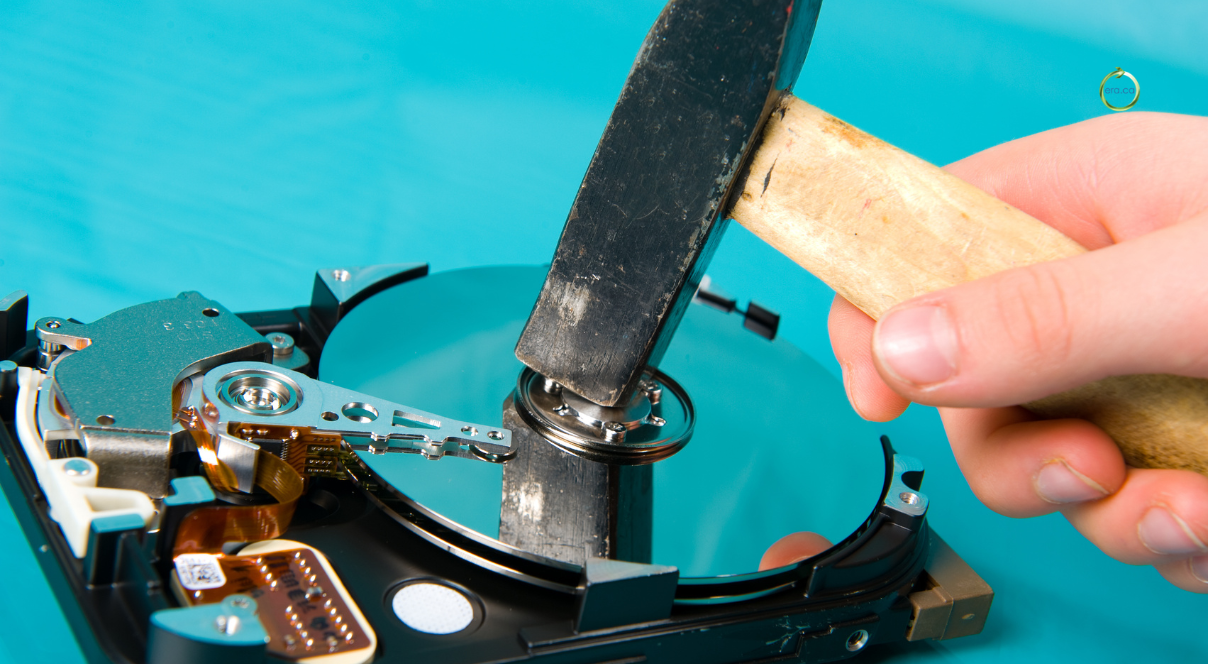
Shredding gives you the highest level of certainty by physically reducing a drive to small fragments, and it works on every kind of storage media. ERA operates AmeriShred mobile shredders capable of destroying hard drives, solid state drives, data tapes, servers, and other storage hardware, turning them into pieces too small to reassemble or read. When the question is whether data could ever come back, shredding answers it with finality.
This is the method regulated industries reach for when the stakes are high. Healthcare providers, financial firms, law offices, and government bodies frequently require physical destruction for drives that held protected information, because a pile of metal fragments removes any argument about recoverability. It also handles the awkward cases that defeat other methods, such as dead drives that cannot be wiped and solid state media that degaussing ignores.
The tradeoff is that shredding ends the life of the hardware. A shredded drive cannot be reused or donated, so it makes sense to reserve this method for the equipment that truly needs it rather than running an entire fleet through the machine out of habit. Reserving destruction for the drives that genuinely warrant it controls cost and keeps more working equipment available for a second owner. The goal is certainty where it counts, not certainty everywhere at any price.
On-Site Versus Off-Site Shredding for Sensitive Drives
The difference between on-site and off-site shredding comes down to where your drives are when they get destroyed and how much you need to witness it. With on-site shredding, ERA brings a mobile shredder directly to your facility and destroys the drives before they ever leave your property, which appeals to compliance officers who want sensitive media gone without it traveling anywhere first. Your team can watch the destruction happen in real time.
Off-site shredding works the other way. ERA collects the drives and destroys them at one of its own facilities, which suits organizations with larger volumes or fewer in-house security requirements. Representatives from your company are welcome to observe the destruction in person, and when sending someone is not practical, a live or recorded video can be provided instead. Both routes end the same way, with a Certificate of Destruction listing the individual serial numbers of every unit destroyed.
For organizations whose protocols demand that nothing sensitive ever leaves the building, ERA also rents AmeriShred units so a cleared internal staff member can run the shredder personally. The right choice depends on your volume, your regulations, and how much custody you need to keep.
How to Match the Method to the Device and the Data
The simplest way to choose is to weigh two things together, the sensitivity of the data and whether you want to reuse the device. Standard equipment holding ordinary business information that you plan to donate or redeploy is a clean fit for software wiping, which protects the data while keeping the machine alive. The moment either factor escalates, the answer shifts.
Highly sensitive or regulated information usually points toward physical destruction regardless of the drive’s condition, and choosing a data destruction method for that material is less about cost than about defensibility. Damaged drives that cannot be reliably overwritten belong in the shredder as well, since a partial wipe is worse than no wipe because it creates false confidence. Older magnetic drives and tape can be degaussed if reuse is not a goal, though shredding often covers the same need with broader compatibility.
A realistic plan rarely settles on one method for everything. A typical refresh might wipe the bulk of the laptops for donation, shred the handful of drives from the finance and HR machines, and route any dead or unwritable drives straight to destruction. Sorting devices by data sensitivity before anything else makes the rest of the decision fall into place.
The Documentation Auditors Will Ask You to Produce
The proof that data was destroyed matters as much as the destruction itself, because without documentation you cannot demonstrate due diligence if a regulator or client ever asks. A Certificate of Destruction is the core record, listing the serial numbers and quantities of the devices that were physically destroyed so there is a defensible paper trail tying specific hardware to a specific outcome.
ERA issues several types of documentation depending on what an organization needs to close out a project. Beyond the Certificate of Destruction, the options include a Collection Certificate, a Collection Inventory Spreadsheet capturing the make, model, and serial number of each unit, a Data Wipe Certificate for equipment that was sanitized rather than shredded, and a Donation in Kind Certificate for devices passed along to charity. Each one answers a different question an auditor or finance team might raise.
For regulated industries, this reporting is the part of data destruction that actually satisfies compliance frameworks, since the destruction is invisible after the fact and the certificate is what remains. Matching the right certificates to your obligations before the job starts saves a scramble later when someone requests evidence the work was done correctly.
Reuse First, Then Destroy Only What You Must
The most sustainable approach destroys as little as possible while still protecting every byte of sensitive information. Most retired business equipment still works, and a securely wiped machine can serve a school, a non-profit, or a family that could not otherwise afford a computer. Shredding a working laptop to be safe throws away both a usable device and the environmental value locked inside it.
This reuse-first thinking sits at the heart of how ERA operates. Rather than breaking down everything that arrives, the organization wipes and refurbishes functional devices and donates them to charities, community groups, schools, and care facilities across Canada. You can see the full reuse and refurbishment process and how secure erasure feeds directly into giving equipment a second life.
The fear of leftover data is the single biggest reason businesses hesitate to donate old hardware, and that fear is exactly what proper sanitization removes. Once a drive is genuinely clean and certified, donating the machine carries no more risk than shredding it, and it does considerably more good. Destruction has its place for the drives that demand it, but it should be the exception, not the default. A disposal plan that leans on reuse keeps more devices in service, lowers what a business spends on destruction, and puts working technology in the hands of people who need it. That is the outcome a non-profit like ERA is built to deliver.
How Certifications Separate a Real Provider From a Risky One
Certifications tell you whether a disposal provider follows established standards or simply claims to, and they are the most reliable signal a business has when choosing who handles its retired equipment. A vendor that processes sensitive drives without independent accreditation is asking you to take their word for it, and that is a poor foundation for protecting client data.
ERA holds four major ISO certifications that together cover the areas that matter for secure disposal. ISO/IEC 27001 governs information security management, ISO 9001 covers quality management, ISO 14001 addresses environmental practices, and ISO 45001 deals with occupational health and safety. The information security standard is the one to weigh most heavily for data work, since it speaks directly to how an organization handles confidential material throughout its process. You can review ERA’s partnerships and accreditations to see how those standards are maintained.
Track record counts too. ERA has worked with Canadian law enforcement, including the North Vancouver RCMP, to raise public awareness about the data risks hiding in discarded devices. A provider willing to partner on education and stand behind documented standards is a safer bet than one competing on price alone.
Building Secure Disposal Into Every Hardware Refresh
The businesses that handle this well treat disposal as a planned stage of the hardware lifecycle rather than a scramble at the end. Before a refresh begins, they decide which devices will be wiped for reuse and which hold data sensitive enough to require shredding, and they line up the certificates each category will need. That planning turns a stressful, last-minute problem into a routine step.
Folding data destruction into the refresh process also keeps costs predictable, because you are not paying to physically destroy a fleet that could have been wiped, nor risking a breach by under-protecting the drives that mattered. A short inventory at the start, sorting devices by data sensitivity and storage type, drives nearly every downstream decision about method and documentation.
Volume and timing shape the logistics. A company retiring a few machines might drop them at a depot, while one clearing out an entire office benefits from a scheduled pickup or on-site shredding. Building the relationship with a disposal partner before the next big refresh means the process is already mapped when the equipment piles up, rather than figured out under pressure with deadlines looming.
Retiring Business Devices the Right Way With ERA
Choosing between wiping, degaussing, and shredding comes down to how sensitive your data is and whether the device deserves a second life. ERA helps Canadian businesses make that call, wiping and refurbishing what can be reused and securely destroying what cannot, with certificates to back it up. When your next refresh cycle arrives, schedule a secure pickup and let ERA retire your equipment responsibly.