

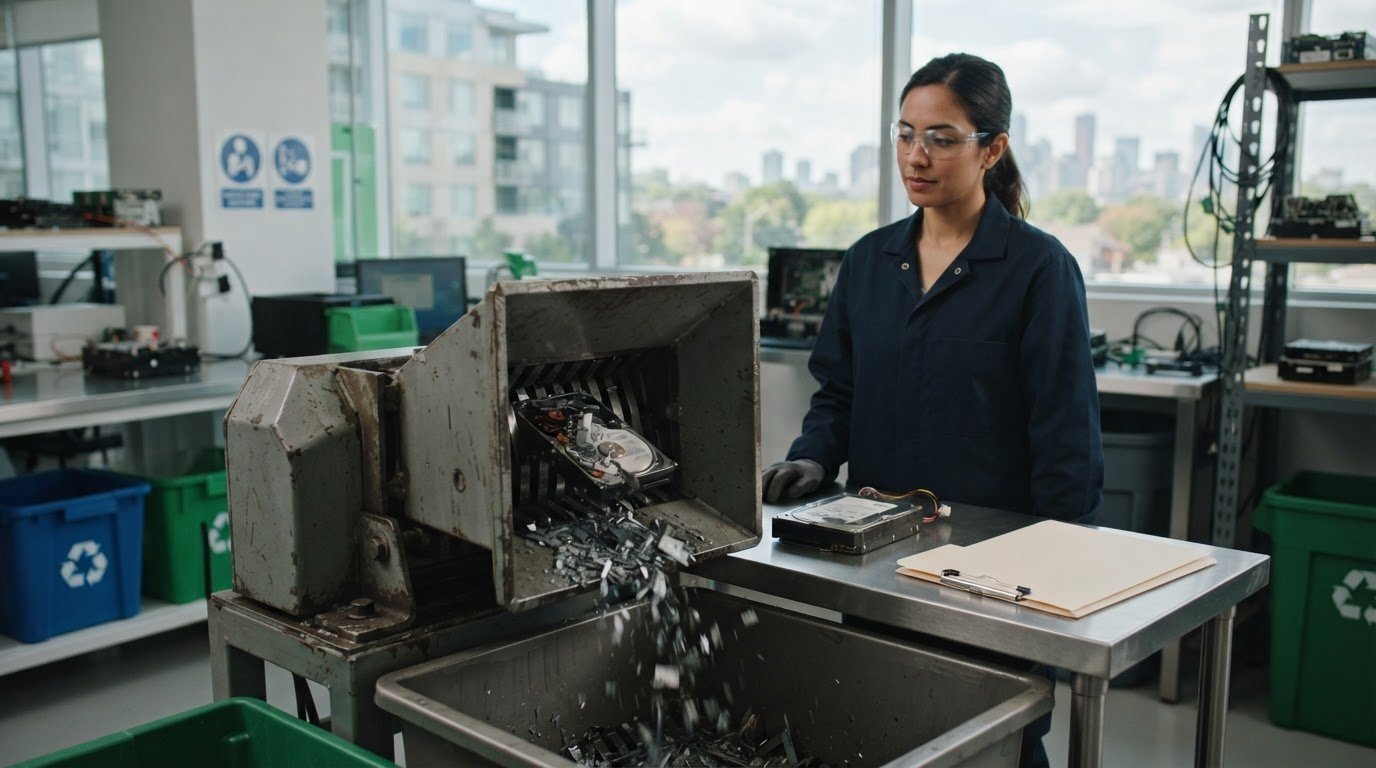
A hard drive may be destroyed, but your records should show what happened to it. A hard drive destruction certificate documents who destroyed the media, what was destroyed, when it happened, and how. It can link each drive to its serial number or asset tag, creating a clear record of the disposal process.
Wiping and shredding serve different purposes: wiping can prepare a drive for reuse, while shredding physically breaks it apart. The right method depends on whether the drive is suitable for reuse and on your organization’s data-handling requirements. A certificate supports accountability, but it is important to know what it records and what it does not replace.
This guide explains what to look for in a certificate, when shredding may be appropriate after wiping, and how PIPEDA and PHIPA relate to Canadian organizations handling personal information. It also covers practical considerations for arranging secure destruction and keeping useful records, so your next step supports responsible data management and electronics recycling.
Key Takeaways
- Decide whether a wiped drive is suitable for reuse or whether physical destruction better fits your data-handling process.
- Understand how degaussing, shredding and crushing differ, including which drive types magnetic erasure can affect.
- Consider how PIPEDA and PHIPA relate to your organization’s handling of personal information when retiring storage devices.
- Use a destruction record to support asset tracking, and explore how ERA’s secure data destruction and electronics recycling can help with retired equipment.
Is hard drive shredding necessary if I’ve wiped the data?
Not always. Wiping can prepare a working drive for reuse, while shredding physically destroys it. Choose the method based on whether the drive can be reused and the level of data destruction your organization requires.
Privacy Risks of Improper Disposal
A retired drive may still contain personal, employee, customer, or financial information if wiping was incomplete or unverified. Leaving it intact without a documented disposal process can expose information to recovery if the device is lost, resold, or discarded improperly.
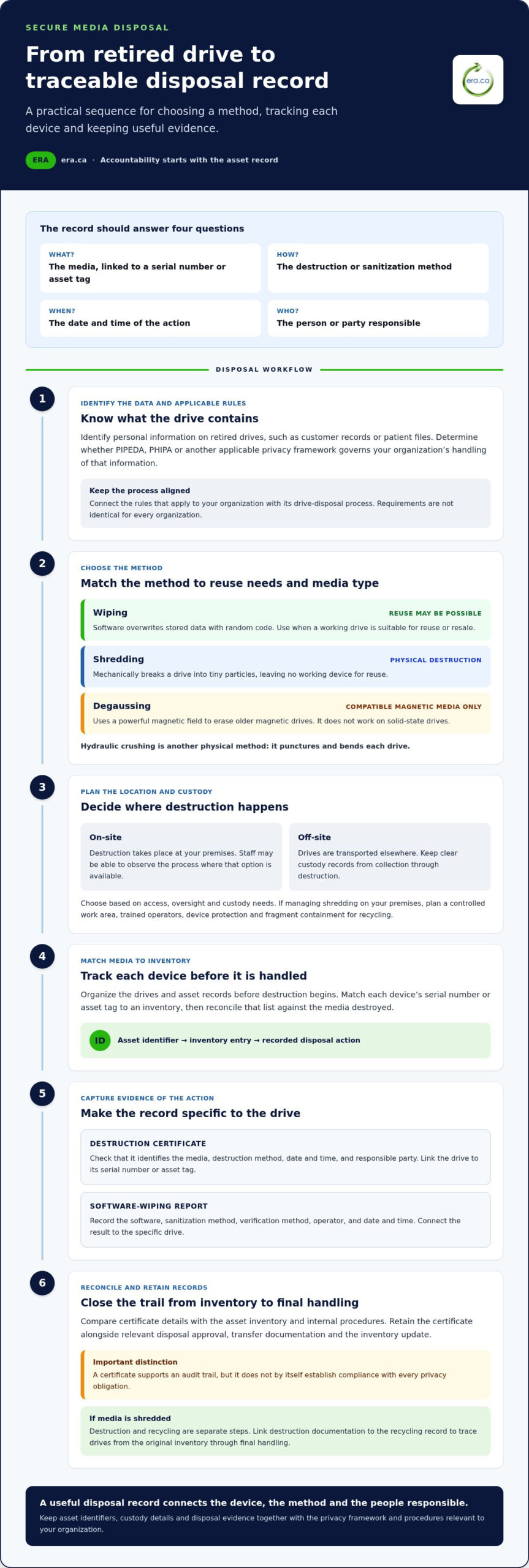
Keep evidence of the action taken. A hard drive destruction certificate can identify the drive by serial number or asset tag, record the date and time, and describe the method used. For software wiping, a report can document the software, sanitization method, verification method, and person responsible.
Industry-Specific Destruction Requirements
Start with the privacy rules and data-handling standards that apply to your organization, then align the disposal method and records with those requirements. GDPR requires businesses to securely erase personal data once it is no longer needed, including information stored on old hard drives.
NIST 800-88 Guidelines for Media Sanitization are described as de facto guidelines for privacy legislation for other private organizations. CCPA, DORA and GLBA are also references for secure data handling, with DORA associated with banking and financial organizations, and GLBA with banking, financial and consumer credit organizations. These are not interchangeable Canadian rules; identify the framework relevant to your operations.
Shredding, Wiping, and Degaussing
Wiping uses software to overwrite stored data with random code, allowing a drive to be reused or resold. A software-generated record should connect the result to the specific drive and identify the sanitization and verification methods, software, operator, and date and time.
Shredding mechanically breaks a drive into tiny particles, preventing data recovery and leaving no working device for reuse. Degaussing uses a powerful magnetic field to erase older magnetic drives, but it does not work on solid-state drives. Choose shredding when physical destruction is required, wiping when reuse is suitable, and degaussing only for compatible magnetic media.
Do you offer hard drive destruction services in my area?
On-site destruction takes place at your premises; off-site destruction involves transporting drives elsewhere. On-site access may let staff observe the process, while off-site handling calls for clear custody records from collection through destruction.
The method matters as much as the location. Shredding physically damages hard drives and can make data recovery more difficult. Hydraulic crushing punctures and bends each drive, while degaussing uses a powerful magnetic field to erase older magnetic media. Since degaussing does not work on solid-state drives, identify the device type before choosing this method.
For on-site shredding, organize the drives and asset records before destruction begins. Match each device’s serial number or asset tag to an inventory, then reconcile the list against the destroyed media. A representative can observe the process where that option is available. Keep the resulting documentation with the destruction date, method, and asset identifiers to support internal tracking.
A hard drive shredder rental may suit an organization that wants to manage destruction on its own premises. This approach still requires a controlled work area, trained operators, and a documented process for handling each drive. Plan how staff will reconcile the asset list, protect devices before destruction, and contain the fragments for recycling.
Shredded media can enter an electronics recycling stream, but destruction and recycling are separate steps. Shredding physically breaks media apart, while handling afterward affects how components are sorted and processed. Link the destruction documentation to the recycling record so the organization can trace drives from the original inventory through final handling.
Choose on-site or off-site destruction based on access, oversight, and custody needs. For example, a team handling drives on its premises may prioritize observation, while off-site processing may suit a planned collection with a documented transfer.
PIPEDA and PHIPA compliance
PIPEDA and PHIPA are Canadian privacy frameworks relevant to organizations handling sensitive data. Your records should connect the rules that apply to your organization with its drive-disposal process.
PIPEDA and PHIPA Requirements
Start by identifying the personal information stored on retired drives, such as customer records or patient files. Then determine whether PIPEDA, PHIPA, or another applicable privacy framework governs your organization’s handling of that information.
For example, a healthcare organization disposing of drives with patient files should document the chosen destruction method and link each device to its asset record. A business handling customer records should likewise connect its disposal procedure to the privacy requirements that apply to its activities. These steps support a consistent compliance process without assuming every organization has identical obligations.
Compliance Assurance
A certificate supports an audit trail, but it does not by itself establish compliance with every privacy obligation. Check whether it identifies the media, destruction method, date, and responsible party, then compare those details with your asset inventory and internal procedures.
For an audit, retain the certificate alongside the relevant disposal approval, transfer documentation, and inventory update. If a listed serial number differs from the asset register, resolve the discrepancy and record the correction. This reconciliation helps show how sensitive data moved from active use to documented destruction, rather than relying on a general statement that destruction occurred.
Retention of Certificates and Records
Canadian organizations should retain certificates for the period set by their records-retention schedule and applicable legal, contractual, audit, or investigation needs. There is no single retention period that applies to every organization and record type.
Set the schedule by considering the information involved, the relevant privacy framework, and any sector-specific requirements. Keep certificates, asset records, and disposal approvals together in an access-controlled repository, linking each certificate to the corresponding inventory entry. Review the schedule when organizational obligations or recordkeeping procedures change, and ensure authorized staff can retrieve the documentation for an audit.
Definition of a hard drive destruction certificate
A hard drive destruction certificate is an electronic or paper record that identifies who destroyed the media, what was destroyed, when it happened, and how. Use it to link a specific drive to its documented destruction method and disposal record.
Look for a unique certificate or report number, or a digital identifier, that distinguishes the record. Identify each drive by its serial number or asset tag so your team can match the certificate against its inventory. A batch description alone may not show which individual devices were processed.
The method details should specify whether the drive was wiped, shredded, or treated using another data-destruction method. For software wiping, useful documentation identifies the software, sanitization method, verification method, person responsible, and date and time. For physical destruction, record the method and link it to the listed drives.
Before filing the certificate, compare its serial numbers with the asset register and confirm the destruction date. Resolve any discrepancies by updating the relevant record and preserving the correction alongside the certificate. This makes the documentation more useful during an audit than a generic statement that equipment was destroyed.
Apply the same review to electronic records: confirm the identifier opens the correct certificate and that authorized staff can retrieve it. Standards and internal procedures can guide which fields your organization tracks, but the record should clearly show the media and destruction process. A certificate documents the event; it does not replace your organization’s privacy controls or records-retention schedule.
Need a documented disposal step for retired drives? Arrange secure data destruction and keep the resulting record with your asset documentation.
Electronic Recycling Association (ERA): Free electronics recycling
Electronic Recycling Association (ERA) helps organizations manage retired equipment through secure data destruction, free electronics recycling, and electronics pickup. Turn to ERA when drives or other electronics are ready to leave active use and your team needs a practical approach to data security and responsible recycling.
For drives requiring destruction, ERA’s certificate records the serial numbers of the units destroyed, helping link the process to your asset records. Equipment suitable for reuse may also support charitable computer donations, extending its value in the community. Separate devices that need secure data destruction from equipment prepared for reuse, then organize your inventory for clear tracking.
Contact Electronic Recycling Association (ERA) to arrange secure data destruction or electronics recycling for your organization’s retired equipment.
Make equipment retirement part of your process
Give retired drives a defined place in your organization’s equipment lifecycle. Assign responsibility for deciding whether each device is ready for reuse or requires destruction, and make that decision before it leaves your control. A consistent process helps staff manage routine equipment changes with the same care as other information-management tasks.
Use the hard drive destruction certificate as one part of the workflow, not as a substitute for clear internal ownership. Set a practical handoff between the team tracking assets and the people arranging disposal. When a drive’s status and records are handled together, the organization can close out equipment confidently and keep its attention on ongoing work.
For a next step with retired business electronics, connect with Electronic Recycling Association (ERA). Each well-managed equipment transition can support a more responsible approach to data and resources. Start with the process that fits your organization, and move forward with care.
Frequently Asked Questions
What Is a Certificate of Destruction?
A certificate is a record showing that specified media went through a documented destruction process. For a business disposing of drives from several departments, it helps link each drive to the organization’s equipment records. Use it to support internal reviews, investigate a missing asset, or show that retired media followed an identified process rather than simply being removed from service.
What happens to the destroyed media after shredding?
Shredding breaks media into small fragments, after which the material can enter an electronics recycling stream. Destruction and recycling serve different purposes: shredding addresses data recovery, while recycling handles the resulting electronic material. Keep the destruction record with the equipment’s disposal documentation so your organization can track the transition from a data-bearing device to material prepared for recycling.
What types of digital media can you destroy?
Destruction can apply to hard drives, data tapes, servers, and other data-storage hardware. The right method depends on the media: magnetic degaussing, for example, does not work on solid-state drives. Before arranging disposal, identify the equipment in your inventory and distinguish storage devices from surrounding hardware, such as server racks or peripherals, which may follow a different recycling route.
Why does it matter?
Retired storage devices can contain sensitive business, customer, employee, or financial information. A documented disposal process reduces the chance that an overlooked drive remains in storage, enters resale, or leaves with unrelated equipment. For example, matching retired assets to disposal records helps a team notice a drive removed from inventory but not accounted for during destruction.
Do Canadian privacy laws require a certificate of hard drive destruction?
PIPEDA and PHIPA concern the handling and protection of personal information, but a certificate alone does not establish compliance. Treat destruction documentation as evidence supporting your organization’s process, not as a substitute for applicable privacy obligations. For a practical approach, link each retired drive to an asset record and retain the disposal documentation according to your organization’s records schedule and relevant requirements.
Which Canadian standards or guidelines apply to hard drive destruction and data sanitization?
NIST 800-88 Guidelines for Media Sanitization are a recognized reference for selecting and documenting media-sanitization methods. They are guidelines, not a Canadian privacy law. Organizations should consider the media type, whether reuse is intended, and their applicable privacy and industry requirements. For example, software wiping for reuse calls for different documentation than physical destruction of a drive.