


Deleting files is not the same as wiping a computer. To recycle computers with sensitive data, back up what you need, disconnect the device from online accounts, and sanitize its storage before handover. A factory reset won’t erase data on external media such as memory cards or SIM cards, so handle those separately.
It’s reasonable to want an old computer out of your home or workplace without leaving personal or business information behind. Make the data unreadable before donating or recycling the device. Don’t rely on the delete key or a quick reformat.
This guide explains how to prepare a computer, choose a wiping method, and decide when physical destruction may be appropriate for highly sensitive information. You’ll also learn how to manage attached storage and unwanted electronics responsibly, so data protection goes hand in hand with keeping reusable equipment and materials in circulation.
Key Takeaways
- Back up needed files and disconnect the computer from online accounts before preparing it for reuse or recycling.
- Handle memory cards, SIM cards, and other external media separately; a factory reset does not erase them.
- Deleting files or reformatting a drive may leave recoverable traces, so choose a suitable sanitization method for the storage type.
- For highly sensitive information, consider whether secure erasure and physical destruction are appropriate before arranging responsible e-waste recycling or donation.
What about physical destruction of the device?
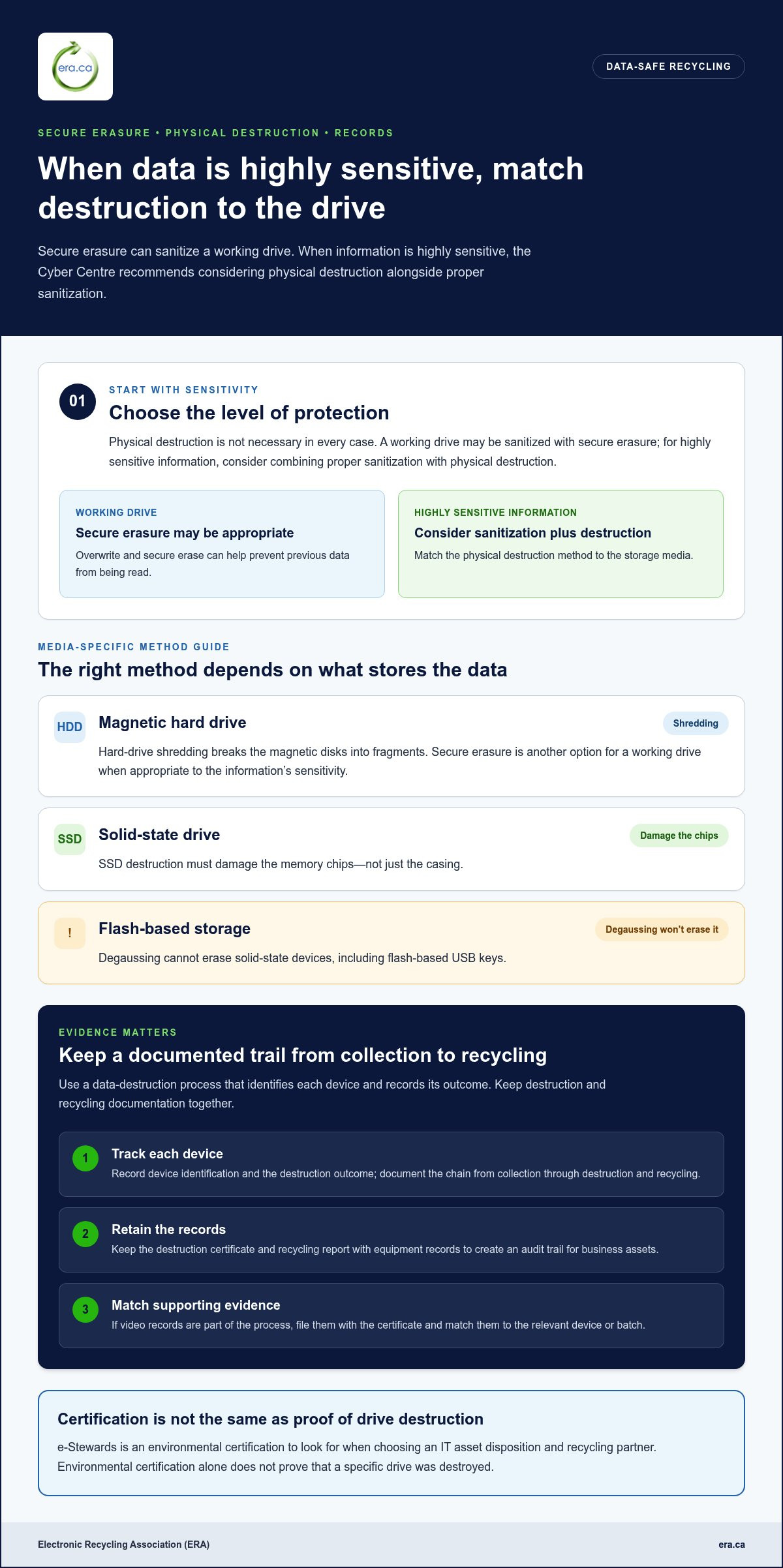
Choose physical destruction when secure erasure alone is not appropriate for the sensitivity of the information. Match the method to the storage media, then keep records linking data destruction to responsible recycling.
Is removing or destroying a hard drive necessary before recycling a computer? No, not in every case: secure erasure can sanitize a working drive. For highly sensitive information, the Cyber Centre recommends considering physical destruction alongside proper sanitization.
Which Canadian computer recycling programs accept computers with hard drives removed or destroyed? Environment and Climate Change Canada’s inventory lists extended producer responsibility and product stewardship programs. Acceptance depends on each program’s intake instructions, including whether it takes computers without storage drives.
-
Choose secure erasure or drive destruction
Match the method to the drive. Overwrite and secure erase can help prevent previous data from being read. For highly sensitive information, combine proper sanitization with physical destruction. Hard-drive shredding breaks magnetic disks into fragments; SSD destruction must damage the memory chips, not just the casing. Degaussing cannot erase solid-state devices, including flash-based USB keys.
-
Arrange certified data destruction
Use a data destruction process that identifies each device and records its outcome. Ask for a documented chain from collection through destruction and recycling, rather than relying on a general statement that equipment was handled securely. For an environmental certification, look for e-Stewards when choosing an IT asset disposition and recycling partner. Do not treat environmental certification alone as proof that a specific drive was destroyed.
-
Collect destruction certificates and records
Keep the destruction certificate and recycling report with your equipment records. For business assets, these documents create an audit trail of what was destroyed and what entered recycling. If video records form part of the process, file them with the certificate and match them to the relevant device or batch. Keep data destruction and recycling documentation together so you can follow up if an asset’s disposition is later reviewed.
How can I dispose of unwanted electronic devices and media (e-waste)?
Prepare each device for handover, then choose a disposal route that accounts for both the equipment and its information. For business electronics, record who releases each item and where it goes.
Are electronics recyclers in Canada required to protect personal data on devices? Don’t assume that accepting equipment means a recycler has sanitized its data. The Cyber Centre advises sanitizing devices and associated media before disposal, donation, recycling or resale.
Can a computer manufacturer or retailer take back a device and securely handle its data? A take-back option may accept a device, but acceptance alone doesn’t show that stored information was securely handled. Sanitize the device before handover.
-
Arrange secure pickup or drop-off
Choose a pickup or drop-off route, then prepare an itemized handover record. Include each computer, monitor, external drive and loose storage device, so nothing is overlooked. Keep a copy for your records and note who released the equipment. For a recycling route, use responsible electronics recycling to keep usable equipment and materials in circulation.
-
Track devices to a secure facility
Record the destination and receipt for each batch of electronics. Match device labels or inventory numbers to the handover record, then keep any receipt identifying the facility. This creates a practical trail from collection to processing, without assuming that a vehicle transfer proves secure handling. Environment and Climate Change Canada’s inventory lists e-waste programs, including extended producer responsibility and product stewardship programs.
-
Maintain chain of custody
Assign a staff member to record each transfer, including equipment collected from a remote or home-based employee. The Cyber Centre advises people using personal devices for work to follow their organization’s information management policies and handle business information appropriately, such as saving it to a corporate repository. Keep the handover record with relevant disposal and data destruction documents.
-
Check device take-back handling
Before using a manufacturer or retailer take-back route, read its intake instructions for computers, storage media and accessories. Separate acceptance for recycling from secure data destruction: a return channel alone doesn’t establish that information has been sanitized. Remove external media and keep it with the correct device record. The Cyber Centre advises disconnecting unwanted devices from online accounts before disposal.
Is deleting the same as sanitization?
No. Deleting files or moving them to the trash doesn’t sanitize a hard drive, because traces may remain recoverable. The Cyber Centre advises sanitizing devices and associated media before donation, recycling, resale or disposal.
- Distinguish deletion from sanitization. Treat the delete key, emptying the recycle bin and reformatting as file-management actions, not proof of data destruction. These actions can leave traces that data-recovery tools may retrieve. Before releasing a computer, use a sanitization method suited to its storage type, then record which device you prepared.
- Consider what information remains. A hard drive may hold more than visible documents: saved account details, email attachments and work files can remain in storage areas that ordinary browsing doesn’t show. If someone recovers those traces, personal or business information could be exposed. A discarded hard drive can compromise intellectual property, so assess the drive itself, not just the files shown on screen.
- Sanitize each device and drive. The Cyber Centre advises disconnecting unwanted devices from online accounts and sanitizing them before they leave your control. Include internal drives and associated media, such as external storage, rather than treating the computer as the only device to prepare. A factory reset doesn’t erase data on memory cards or SIM cards, so handle those separately.
- Keep data protection connected to material recovery. Once sensitive information is unreadable, send unwanted electronics through an appropriate recycling route. Recycling helps reduce e-waste in landfills and recover resources, including recyclable plastics and gold. WEEE, or waste electrical and electronic equipment, contains materials that can be recovered through recycling. Keep data sanitization and material processing distinct: one protects information, while the other supports resource recovery.
Wiping personal data before recycling a computer
Follow these steps before donating or recycling a computer. The right method depends on the storage type and whether encryption protected it from the beginning.
- Back up what you need. Before erasing anything, copy important files to a company server, encrypted cloud storage or replacement device. The Cyber Centre advises backing up before sanitizing, so an accidental deletion doesn’t remove the only copy. For a work computer, keep business files in your organization’s corporate repository.
- Disconnect accounts and peripherals. Sign out of online accounts and unlink the computer from associated services. The Cyber Centre advises disconnecting unwanted devices from online accounts before disposal. List attached storage, such as external drives, and remove memory cards or SIM cards for separate handling.
- Choose a method for the storage type. For a hard drive, use overwrite or secure erase to make previous data unreadable. The Cyber Centre describes these methods as using 3 or more series of random binary code. For encrypted drives, crypto erase suits hard drives, SSDs and other flash storage only when encryption has been used from the media’s beginning of life.
- Consider the effect on reuse. Overwriting and secure erasure can shorten the life of solid-state flash media and may interfere with reuse. Degaussing cannot erase SSDs or flash-based USB keys. Identify the drive type first, then choose a suitable approach rather than applying the same method to every device.
- Complete a final media check. Confirm that internal and external storage have been addressed before handover. A factory reset doesn’t erase data on memory cards or SIM cards. If you need to recycle computers with sensitive data, arrange free electronics recycling after preparing the computer and its associated media.
Electronic Recycling Association (ERA): Free electronics recycling
Electronic Recycling Association (ERA) offers free electronics recycling, secure data destruction and electronics pickup. These options can help when a computer is ready to leave your home or workplace after you’ve backed up needed files and considered the appropriate data-wiping method.
If a computer may be suitable for reuse, charitable computer donations offer another route. Choose recycling for equipment you no longer plan to use, or consider donation when the computer could support someone else. For devices containing sensitive information, ERA’s secure data destruction service can be part of your disposal plan.
Prepare an inventory of the computers and related electronics you’re handing over, and decide whether recycling, data destruction or donation suits each item. Visit era.ca to learn more or contact Electronic Recycling Association (ERA).
Build secure disposal into your next equipment refresh
Make computer retirement a planned part of your organization’s equipment cycle, not a last-minute task. Assign responsibility for preparing devices, recording handovers and keeping disposal records with the relevant asset information. A consistent process helps staff know what to do when a computer is replaced, including for remote and home-based employees.
If you need to recycle computers with sensitive data, choose a responsible next step that accounts for both information security and the equipment’s end use. Electronic Recycling Association (ERA) offers free electronics recycling, secure data destruction and electronics pickup, connecting practical disposal with resource recovery.
For your next handover, gather the devices and decide which need recycling or secure data destruction. Arrange electronics recycling with ERA and take a constructive step towards keeping equipment and materials in circulation.
Frequently Asked Questions
What is IT asset disposition (ITAD)?
IT asset disposition (ITAD) is the process of managing retired workplace technology, from collection through its next use or end-of-life handling. It can include inventory records, data destruction, refurbishment, donation and electronics recycling. For example, an organization replacing laptops can track each device, identify whether it can be reused, and document how its storage media and remaining materials are handled.
Why is e-waste recycling important?
E-waste recycling helps keep unwanted electronics out of landfills and recover useful materials. Computers contain components and materials that can be sorted for recovery, including recyclable plastics and gold. Reuse can also extend the useful life of working equipment. Before choosing either route, separate data security from the environmental decision: prepare stored information, then direct the equipment towards reuse or recycling.
Where can I recycle old computers near me?
In Canada, Environment and Climate Change Canada’s inventory can help you find e-waste programs, including extended producer responsibility and product stewardship programs. Electronic Recycling Association (ERA) offers electronics pickup and depot drop-off across Canada. Consider which option suits your equipment, and prepare an itemized list so computers and related devices are accounted for.
Does computer recycling protect my data?
Recycling a computer doesn’t automatically protect its data; the device needs appropriate data sanitization or destruction. Keep the outcomes distinct: recycling handles the equipment, while sanitization addresses stored information. Electronic Recycling Association (ERA) offers secure data destruction, including data wiping during laptop recycling and on-site hard-drive destruction. For business equipment, keep records linking each device to its handling outcome.
What is device sanitization?
Device sanitization makes stored information unreadable before a device or storage medium leaves your control. It differs from deleting files, which can leave recoverable traces. The appropriate approach depends on the storage type and encryption history. For example, crypto erase applies to encrypted storage only when encryption was used from the media’s beginning of life.
How do I securely erase sensitive data from a computer before recycling it in Canada?
Back up needed files, disconnect online accounts, identify every storage device, then sanitize the computer using a method suited to its drive. The Cyber Centre describes overwrite and secure erase as using 3 or more series of random binary code. Crypto erase is suitable only when encryption protected the media from its beginning of life. Remove memory cards and SIM cards for separate handling.