


Deleting files isn’t the same as preparing a laptop for secure recycling. Secure laptop recycling starts with backing up the files you need, then sanitizing the storage media, because deleted files or a factory reset may leave data recoverable. For highly sensitive information, physical destruction may also be appropriate.
A clear process can protect business information while keeping usable equipment and materials in circulation. This guide explains how data wiping works, when destruction may be needed, and how to prepare laptops and related media for recycling. It also covers what to consider before hand-off, so information security and responsible disposal are part of one practical plan.
Key Takeaways
- Build a clear hand-off record for device destruction, and understand what certificates or video documentation can show about the process.
- Separate removable media, such as memory cards and SIM cards, from the laptop’s storage when preparing devices for recycling.
- Keep laptops out of landfill pathways: components can contain hazardous substances, while responsible recycling can recover useful materials.
- Match your preparation steps to your organization’s information management policies and the recycling program’s requirements.
Is deleting the same as sanitization?
No. Deleting files or emptying the recycle bin doesn’t sanitize a laptop, and data may still be recoverable. In Canada, use an electronics recycling program suited to the device, and prepare its data-bearing media before hand-off. Provincial and territorial programs offer recycling routes, but accepted items and preparation instructions can vary.
Data Wiping and Physical Destruction
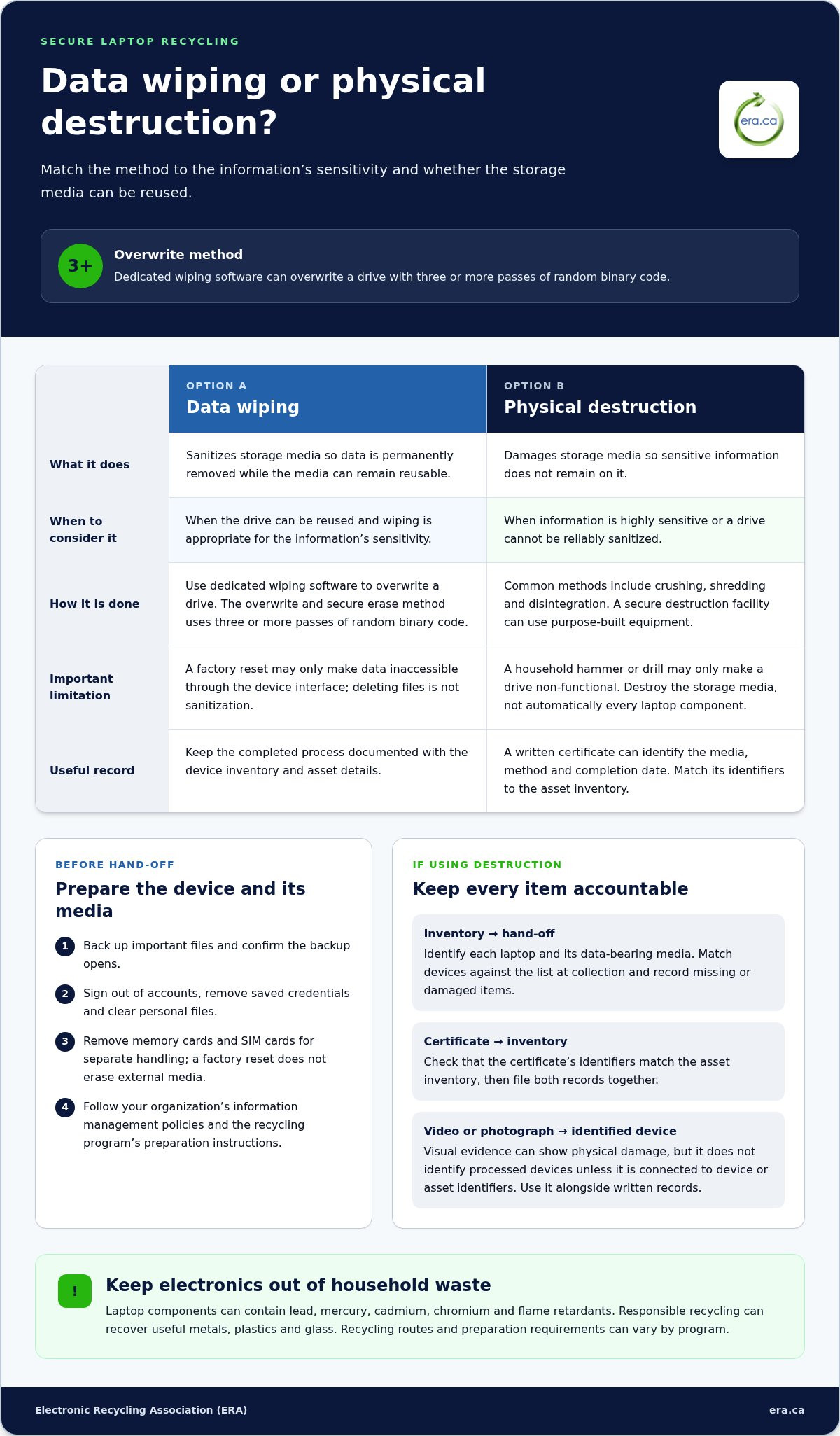
Sanitization permanently removes data while allowing storage media to be reused. Dedicated wiping software overwrites a drive; the overwrite and secure erase method uses three or more passes of random binary code. A factory reset may only make data inaccessible through the device interface. For highly sensitive information, physical destruction may also be appropriate.
Choose an approach based on the information’s sensitivity and whether the drive can be reused. A written data-destruction certificate can support business records; keep it with the device inventory and asset details. Document the completed process separately from evidence of the destruction method.
Protecting Personal Data
Before recycling, back up important files, then sanitize the laptop and related media. Sign out of accounts, remove saved credentials, and clear personal files after confirming the backup opens. For work devices, follow your organization’s information management policies before disposal.
Provincial and territorial electronics recycling programs may include extended producer responsibility and product stewardship programs. Environment and Climate Change Canada provides an inventory of these programs. Remove personal information from computers and other electronics before drop-off, including data on drives and SIM cards.
Remove memory cards and SIM cards for separate handling, since a factory reset doesn’t erase external media. AMA says laptop batteries don’t need to be removed before recycling. Follow the recycling program’s preparation instructions for batteries and chargers.
Visual Destruction Confirmation
Visual evidence, such as a photograph or video, can show that a drive was physically damaged. It doesn’t identify which devices were processed unless the record connects the footage to device or asset identifiers. Match visual records to the inventory and keep them with any written destruction certificate.
A laptop’s storage drive doesn’t always need to be removed or destroyed before recycling; sanitization can allow it to be reused. Choose wiping for reusable media, and consider destruction when data is highly sensitive. This helps protect business information while supporting responsible electronics recycling.
What about physical destruction of the device?
Physical destruction is an option when sensitive information must not remain on storage media. Plan collection, destruction and documentation together so every device can be accounted for.
Secure Collection and Destruction
Start with an inventory identifying each laptop and its data-bearing media. At collection, match the devices against the list and record any missing or damaged items. A documented hand-off helps maintain a clear record between the workplace and the destruction facility.
Agree on the destination and destruction method before devices leave your custody. For example, keep a batch record with asset identifiers and note when devices arrive for processing. This gives your organization a practical way to reconcile collected equipment with destruction records.
Physical Destruction of Sensitive Media
Crushing, shredding and disintegration are common ways to destroy storage media. Consider physical destruction when a drive holds highly sensitive business information or cannot be reliably sanitized. A facility equipped for secure destruction can use purpose-built equipment; a household hammer or drill may only make a drive non-functional.
Destroy the storage media, not automatically every component in the laptop. Separating data-bearing parts can make the rest of the electronics easier to assess for recycling or reuse. Keep phones and other devices with sensitive media in the same controlled process, while recording each item separately.
Destruction Certificates and Video Records
A written certificate can document which media was destroyed, the method used and the completion date. Compare its identifiers with your asset inventory, then file both records together. For a batch containing several drives, clear identifiers help show which items the certificate covers.
Video documentation can provide a visual record of a destruction stage, but it should complement, not replace, the written inventory. Define what the footage needs to show, such as identified media entering the destruction process. Keep records according to your organization’s information management policies.
For a professional route for sensitive storage media, explore secure data destruction as part of responsible electronics recycling, rather than sending data-bearing devices to landfills.
Environmental risks of improper laptop disposal
A laptop sent to landfill can expose the environment to substances in its components, including lead, mercury, cadmium, chromium and flame retardants, which may contaminate soil and groundwater. A cracked screen, damaged circuit board or discarded battery doesn’t make a device harmless. Keep computers and other electronics out of household waste and use an appropriate recycling route.
Responsible electronics recycling also preserves materials that can be recovered from retired equipment. Laptops contain metals, plastics and glass; sorting and processing these materials supports reuse instead of treating every device as waste. Before arranging disposal, separate working computers from damaged equipment. Working devices may be suitable for donation, while unusable electronics still need responsible recycling.
Sanitize unwanted devices and related media before donating, recycling or reselling them. This applies to laptops, desktop computers, phones and tablets, including storage cards and other removable media. Remove business and personal information using an appropriate wiping or destruction method, then record which devices were prepared. A donation meant to benefit a community should not transfer confidential files with it.
For a business collection, begin with an inventory of devices, locations and assigned asset identifiers. Group laptops, tablets and related equipment for pickup, then reconcile the collected items against the list. This helps prevent a forgotten device from remaining in storage or being sent through an unsuitable route. Keep sanitized equipment clearly separate from devices awaiting data handling.
In Canada, recycling programs follow provincial and territorial approaches, including extended producer responsibility and product stewardship programs. Environment and Climate Change Canada provides an inventory of these programs. Use it to understand the options relevant to your location, then prepare equipment according to collection requirements. A planned hand-off helps direct electronics away from landfills and toward recovery or reuse.
Preparing devices and hard drives for recycling
For secure laptop recycling, prepare each computer before it leaves your workplace. Follow your organization’s information management policies, identify the storage type and keep the asset record with the equipment. Back up the files you need and confirm the backup opens before sanitizing the device. This helps prevent important records from being lost during preparation.
To erase a hard drive, use dedicated wiping software that overwrites stored data. A factory reset alone may not remove it securely. For an SSD, choose a method designed for solid-state storage; repeated overwriting can shorten flash media’s life and interfere with reuse. The right method depends on the drive and the sensitivity of its information.
Crypto erase is suitable for encrypted storage only when encryption was used from the beginning. Degaussing erases magnetic media, including traditional hard drives, but cannot erase SSDs or flash-based USB keys. For highly sensitive information, consider combining overwriting with physical destruction. Matching the method to the storage type helps protect data while supporting reuse where possible.
Use this preparation sequence before handing devices to a recycling program:
- Back up necessary files, then confirm the backup opens.
- Sanitize internal drives using a method suited to the media.
- Remove memory cards and SIM cards; a factory reset doesn’t erase external media.
- Keep each laptop’s asset identifier with its hand-off record.
Review the program’s instructions for batteries and chargers. AMA says laptop batteries don’t need to be removed before recycling, but collection instructions may specify what to include. Don’t dismantle a laptop casually. Keep damaged equipment identifiable so it can be handled appropriately.
A secure laptop recycling process pairs data preparation with a clear equipment hand-off. For business devices that need professional data handling, arrange secure data destruction before recycling. This supports information protection and responsible recovery of equipment and materials.
Electronic Recycling Association (ERA): Free electronics recycling
Electronic Recycling Association (ERA) helps Canadian businesses move retired laptops from storage into responsible reuse or recycling. Its free electronics recycling and pickup services support organizations managing equipment across their workplaces, while secure data destruction addresses information security before disposal.
Working computers may also be suitable for charitable computer donations, giving usable equipment another purpose in the community. Devices that aren’t suitable for donation can go for recycling after their data has been handled. Consider ERA when your business is preparing a group of laptops and needs a route for recycling, data destruction, pickup or donation.
Prepare an inventory of the equipment and identify any devices requiring data destruction before collection. To arrange business electronics recycling, contact Electronic Recycling Association or visit era.ca.
Make device retirement part of your IT plan
Make secure laptop recycling a routine part of your organization’s equipment lifecycle, not a task left until storage space runs short. Assign responsibility for identifying retiring devices, recording their status and coordinating the hand-off. A consistent process helps teams avoid forgotten equipment and gives staff a clear next step when a laptop is replaced.
Build this workflow into future technology planning. When a department schedules equipment replacements, include time to prepare devices and decide how each should be handled. Make the process accessible to the people responsible for IT assets, information management and facilities, so no laptop is left waiting without an owner. Small, repeatable steps make responsible retirement easier to sustain as equipment changes.
For your next business equipment hand-off, plan the next step with Electronic Recycling Association. Each well-managed retirement can support a more thoughtful approach to information and material recovery.
Frequently Asked Questions
How can I dispose of unwanted electronic devices and media (e-waste)?
Separate equipment that may be reusable from damaged electronics, then use a recycling or donation route that accepts those items. Before hand-off, remove personal files and external media, such as memory cards. For a business, record each device and its destination. This helps track laptops, phones, tablets and storage media as they leave the workplace.
What is device sanitization?
Device sanitization removes stored data from a device or storage medium so the medium can be reused. For example, a laptop prepared for donation needs its internal drive sanitized, not just its desktop files deleted. The key question is whether the information has been removed, rather than simply hidden from ordinary view.
Where can I securely recycle a laptop in Canada?
Businesses across Canada can arrange laptop recycling through the Electronic Recycling Association (ERA), which offers recycling through depots and collection from customer locations. ERA also provides secure data destruction for devices containing sensitive business information. Choose the route that suits your equipment and preparation process, then organize the hand-off with a clear device inventory.
Do Canadian laptop recycling programs charge fees or offer free drop-off?
For most standard donations and pickups, ERA does not charge a fee. Larger operations with detailed reporting requirements, physical destruction needs, or unusual logistics may have associated costs. The team will outline any fees up front. Don’t assume every recycling program or collection option has the same terms.
How can I find an authorized electronics recycler near me in Canada?
Environment and Climate Change Canada’s inventory of e-waste recycling programs includes extended producer responsibility and product stewardship programs. Use the relevant provincial or territorial information to find a suitable collection route. Before preparing a business shipment, review the program’s accepted equipment and hand-off instructions so devices and removable media are handled appropriately.
What happens to laptops after they are recycled?
Depending on their condition, laptops may be directed toward reuse or material recovery. Working computers can be refurbished for charitable donation, while equipment that cannot be reused can be processed to recover materials such as metals, plastics and glass. ERA’s donation program supports charities and philanthropic organizations across Canada with refurbished computer equipment.