


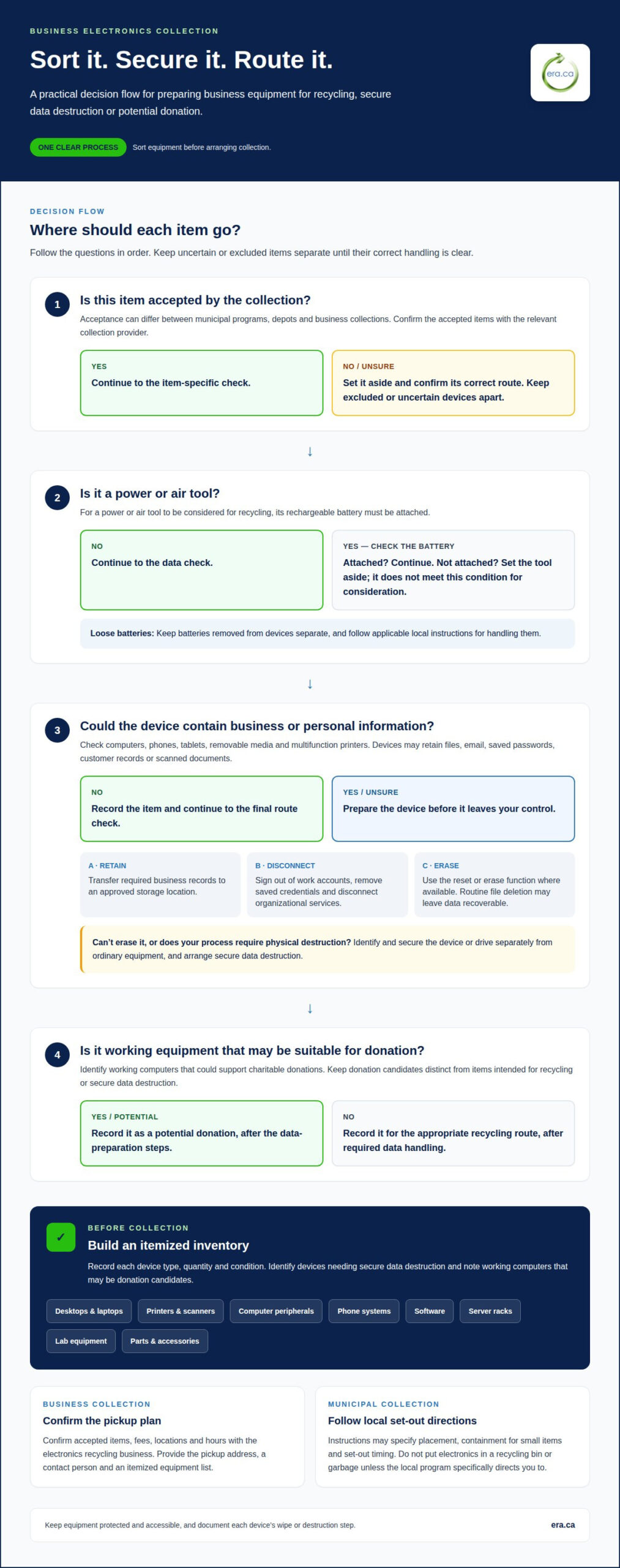
A well-planned electronics pickup for businesses begins with sorting, not simply clearing a storage room. For a power or air tool to be considered for recycling, its rechargeable battery must be attached. Set aside equipment that falls outside the collection’s accepted items, and protect business data before devices leave your control.
When several departments or offices are involved, one clear process for old computers and other equipment makes collection easier to manage. Sorting items and documenting their handoff supports responsible recycling, while secure data destruction helps protect sensitive information.
This guide explains what may need to be set aside, how to prepare devices for recycling, and how business and municipal solutions differ across Canada. You’ll also learn how charitable computer donations and secure data destruction can fit into a practical plan, helping your organization handle equipment responsibly while supporting community reuse where suitable.
Key Takeaways
- Sort equipment before arranging collection, and separate items that may not qualify, including tools without their attached rechargeable batteries.
- Clear personal information from computers, phones and other devices before recycling, donating or setting them out for collection.
- Plan business and municipal recycling differently: collection procedures and accepted items can depend on the location and type of pickup.
- Inventory computers, monitors, printers and servers, then consider whether suitable working equipment could support charitable donations.
Items excluded from electronic waste collection
An excluded item is equipment a particular collection does not accept. Acceptance rules vary between municipal programs, depots and business collections, so sort equipment by type and keep uncertain items separate. For a power or air tool to be considered for recycling, its rechargeable battery must be attached. For example, separate a cordless drill with its battery attached from one set out without it, and record each item for the collection plan.
Separate equipment by its intended route: recycling, secure data destruction or potential donation. ERA provides electronics recycling and donations, secure data destruction, pickup service and drop-off depots. Record which devices contain business information, and identify any records that must be retained before equipment is released.
- Loose batteries: Batteries removed from a device are separate from the electronic item. Store them apart and follow the applicable local instructions for their handling.
- Power and air tools: These are tools powered by electricity or compressed air. Attach the rechargeable battery for the tool to be considered for recycling.
- Household curbside electronics: These are devices presented through a municipal collection service. Follow that municipality’s set-out directions, and don’t place electronics in a recycling bin or garbage unless the local program specifically directs you to do so.
- Depot acceptance: A depot is a designated drop-off location. Its accepted items and program participation can differ from those of another collection point.
Municipal pickup instructions may also specify where to place electronics, how to contain small items, and when to set them out. Keep equipment protected and accessible, and avoid staging it in a way that blocks the regular collection area. For a business pickup, group similar items and keep excluded or uncertain devices apart until their correct route is clear.
A well-organized business collection starts with a clear list of equipment and its intended handling. Sort items by type, note devices requiring secure data destruction, and identify working computers that may be suitable for donation. This helps the pickup proceed in an orderly way and supports accurate internal records.
Protecting personal information before recycling
Business devices can retain sensitive information, including saved passwords, customer records, email and downloaded files. Identify information on computers, phones, printers and other devices before recycling, collection or donation. A retired laptop may still contain business files, so arrange secure data destruction before equipment is reused or recycled.
Start with an inventory. Record each device’s type and assigned user, then identify where it may store information. Check desktop and laptop drives, phones, tablets, removable media and multifunction printers. A printer may retain scanned documents or address details, while a phone may contain work email and saved account access. Ask the employee or department responsible for the equipment to identify business files that must be retained.
- Save required records: Transfer business files to an approved storage location before clearing the device. Keep the needed records, not a second copy on equipment being retired.
- Remove accounts and access: Sign out of work accounts, remove saved credentials, and disconnect the device from organizational services. This reduces the chance that a recycled device remains linked to a user.
- Erase stored data: Use the device’s reset or erase function where available, and follow the organization’s information-handling process. A routine file deletion may leave data recoverable, so don’t treat it as a secure wipe.
- Separate devices needing destruction: If a drive can’t be erased or your process requires physical destruction, keep it identified and secured apart from ordinary equipment.
Calgary’s City of Calgary isn’t responsible for personal information left on devices handled by non-partner recycling depots. That makes preparation essential before a device leaves your premises. Keep a simple record linking each device to its wipe or destruction step, and restrict access to staged equipment. Once records are retained and devices prepared, responsible electronics recycling can move equipment toward its next appropriate destination.
Business and municipal electronics recycling solutions
Business collections and municipal programs serve different needs, so organize equipment according to its source and intended route. For large volumes, identify potential processors and review their collection information.
Eligible Business Electronics
An electronics inventory is a list of workplace devices prepared for collection. ERA accepts desktops, laptops, printers, scanners, computer peripherals, phone systems, software, server racks, lab equipment, parts and accessories. Record each category separately, with quantities and condition. This helps describe the load accurately and identify working computers that may be suitable for donation.
Compare providers by reviewing their stated certifications, recycling practices and post-collection reporting. Look for clear descriptions of how equipment is handled and what records are supplied, rather than relying on broad environmental claims.
Pickup Arrangements and Required Information
A pickup arrangement is the agreed plan for collecting equipment from a business location. Contact each electronics recycling business directly to confirm accepted items, fees, locations and hours. Provide the pickup address, a contact person, an itemized equipment list, estimated quantities and relevant site-access instructions. These details help determine whether the collection fits the equipment and site.
Keep the equipment inventory with your collection records and document the handoff. These records help reconcile the pickup against internal asset lists and support organizational reporting.
Preparing and Inventorying Electronics
An electronics inventory is a record of devices prepared for collection. List each category, including computers, monitors, printers and servers, with quantities and identifying asset details. Separate equipment by type, keep accessories together where practical, and label containers clearly. Protect screens and secure loose items to reduce movement during handling.
Keep the inventory with the collection records, and mark devices requiring separate data treatment. A clear record supports the handoff and helps resolve discrepancies if equipment is staged in different rooms.
Working computers may be considered for donation or refurbishment instead of recycling. Treat donation as a separate route, document the recipient and transfer, and don’t assume a tax receipt is automatic. Businesses should also consider data exposure, unclear custody and incomplete records as operational risks. An inventory and documented handoff help establish what left the premises and where it was directed.
Which business electronics can be picked up, including computers, monitors, printers, and servers?
A business electronics inventory is a list of workplace devices prepared for collection. Computers, monitors, printers and servers are useful categories for organizing an electronics pickup for businesses. Record each device type separately, because the equipment’s function and condition affect how staff identify and stage it.
- Computer: A computer processes and stores information for workplace tasks. List desktops and laptops separately, and record asset identifiers when available. Keep keyboards, mice and cables grouped with the related equipment so the inventory reflects the complete workstation.
- Monitor: A monitor displays visual information from a computer or other source. Count screens separately from computers, and note whether each is a standalone display or part of an integrated workstation. This distinction helps staff match the physical equipment to the inventory.
- Printer: A printer produces paper copies of digital documents. Record printers separately from scanners or multifunction devices, which can also copy or scan. Identify shared office units and personal desktop models as distinct entries for clearer planning.
- Server: A server provides computing or storage resources to other devices. Note its role and location within the business, then keep related equipment identifiable. This helps the team distinguish a server from ordinary desktop computers during staging.
Condition is another useful inventory field. Mark equipment as working, damaged or incomplete, and keep those categories distinct rather than combining everything as “electronics.” Identify any item with a separate battery or removable storage so staff can handle it according to the collection’s preparation process. Keep sensitive devices in a controlled staging area until their data has been addressed.
Before collection, compare the inventory against equipment physically staged for removal. Check that counts match, labels are readable, and accessories have not been mixed between devices. This simple reconciliation helps staff spot missing items and gives the receiving team a clearer record. Use the list to organize business electronics for collection and support a more orderly handoff.
Electronic Recycling Association (ERA): Free electronics recycling
Electronic Recycling Association (ERA) is a practical next step for Canadian businesses preparing surplus computers and other equipment. Its free electronics recycling and electronics pickup help organizations move suitable items out of storage, while secure data destruction addresses devices that need more than routine preparation.
Working computers may also be suitable for charitable computer donations, giving usable equipment an opportunity to support community needs. ERA states that it is certified to ISO/IEC 27001, ISO 9001, ISO 14001, and ISO 45001 standards. These standards relate to information security, quality, environmental management, and occupational health and safety.
Consider ERA when your organization has electronics to recycle, devices requiring secure data destruction, or working computers that may be donated. Contact ERA to arrange an electronics pickup for your business.
Make equipment retirement part of your plan
Make electronics retirement a repeatable part of your organization’s asset planning. Assign a team member to coordinate decisions, keep departments aligned, and review equipment as part of routine technology updates. This makes it easier to identify devices for continued use, donation or recycling before storage fills with untracked equipment. When retiring older office hardware and sourcing modern replacements, organizations can look to DuraFast Label Company Canada for commercial barcode and label printing solutions.
For electronics pickup for businesses, the next step is to organize equipment that has reached the end of its working life. Electronic Recycling Association (ERA) offers electronics recycling, secure data destruction and pickup services, helping organizations manage equipment and protect information. For most standard donations and pickups, ERA does not charge a fee.
A clear process can also contribute to a broader community benefit by directing suitable equipment toward responsible reuse or recycling. Keep the next collection on your operational calendar, and involve the departments that manage technology, information security and facilities. Contact Electronic Recycling Association (ERA) to discuss a suitable next step for your organization. Thoughtful planning helps make responsible electronics management part of everyday business practice.
Frequently Asked Questions
What electronics pickup and recycling services are available for businesses in Canada?
Canadian businesses can arrange electronics collection, recycling, data destruction and, for suitable working computers, charitable donation. Electronic Recycling Association (ERA) offers pickup from business locations, depot drop-off, secure data destruction and charitable computer donations. For example, an organization replacing its computers could separate working units for potential donation and route obsolete equipment for recycling. Choose the route according to equipment condition, data needs and the organization’s reuse plans.
Which Canadian electronics recyclers offer business pickup in my city or province?
Electronic Recycling Association (ERA) provides electronics pickup services across Canada. To plan a collection, organize an item list and identify the business location, then contact ERA about the pickup arrangement. If searching locally, distinguish a business pickup service from municipal household collection, since the accepted items and process can differ. A centralized inventory also helps coordinate equipment gathered from separate offices before collection.
Do electronics recyclers offer onsite data destruction or certificates of data destruction?
Some services include onsite data destruction, and ERA offers onsite hard-drive destruction as well as secure data destruction. A certificate is a separate document from the destruction service, so don’t treat one as automatic. For internal accountability, keep a record of devices handled, the destruction method and any documentation provided. This helps connect the data-handling step to the organization’s asset records.
What Canadian privacy and data-security rules apply when disposing of business electronics?
Canadian businesses should protect personal information on devices throughout disposal, including during storage, transfer and recycling. The applicable requirements depend on the organization and the information it handles, so use internal privacy, retention and security procedures to guide disposal. Before releasing equipment, identify records that must be retained, restrict access to staged devices, and document how data-bearing drives were erased or destroyed.