


Commercial e-waste pickup is for electronics such as computers, computer equipment and televisions; furniture, packaging and general rubbish aren’t electronic waste. The accepted list can depend on the collection program, so sort electronics separately from other surplus before arranging a pickup.
It’s reasonable to want a clear answer before setting equipment aside. This guide explains which items may be accepted, what falls outside an electronics collection, and how IT asset recycling can include reuse, recycling and secure data handling. You’ll also learn how collection options can be tailored to the equipment and needs of a business, helping make the next steps practical and responsible.
Key Takeaways
- Separate business electronics from general waste, then group equipment by type to make collection planning clearer.
- Identify items that aren’t electronics before setting equipment aside, so excluded materials don’t get mixed into the collection.
- Prepare devices for reuse or recycling by addressing stored business information and choosing an appropriate data-destruction approach.
- Match collection arrangements to your equipment and goals; ERA offers electronics pickup, secure data destruction, free recycling and charitable computer donations.
Accepted electronic waste
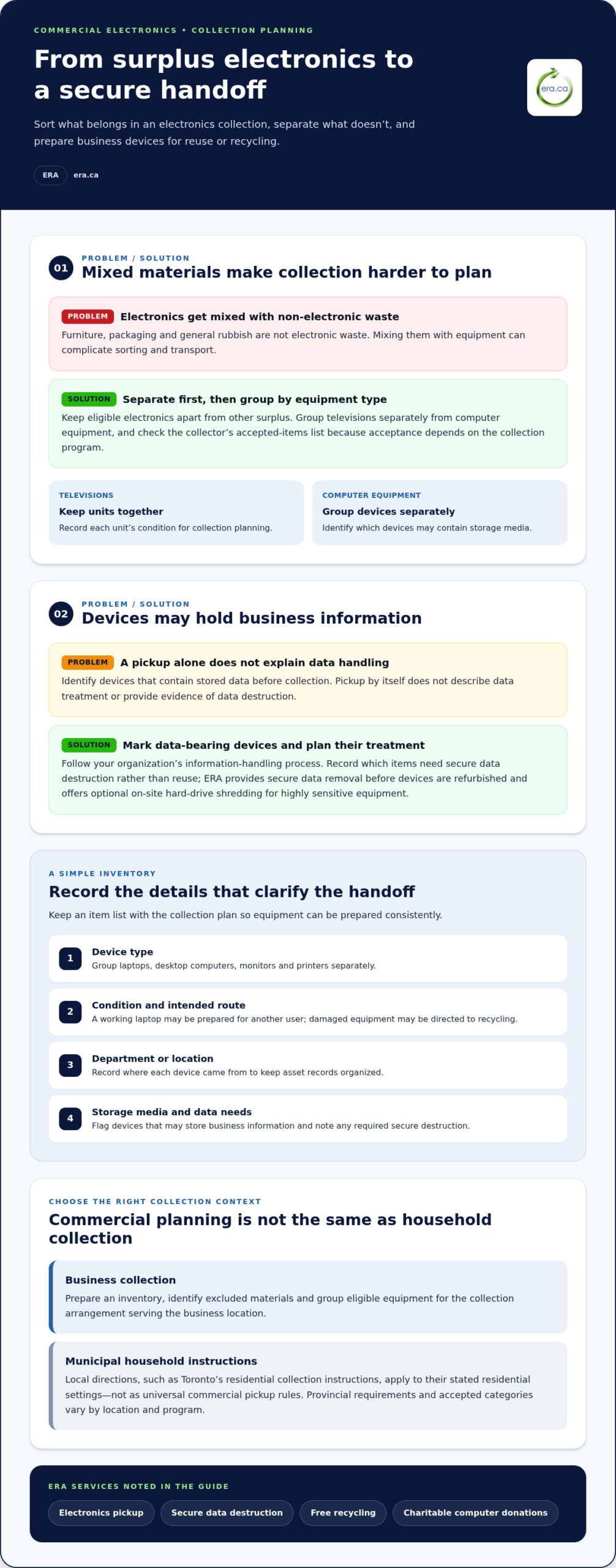
Accepted electronics are business devices collected for reuse or recycling. Televisions and computer equipment are examples of equipment identified for collection. Commercial acceptance depends on the collection program, so sort items by type before arranging transport. Keep televisions separate from computer equipment, and note the quantity and condition of each group. This inventory helps clarify what the collection includes and how much space equipment may need.
Televisions are electronic display devices used in offices, meeting rooms, and reception areas. Record each unit’s type and condition, then group televisions together. Computer equipment covers business computing devices collected as electronic waste. Group those items separately, and record whether they contain storage media. This simple sorting step helps identify equipment requiring data preparation before reuse or recycling.
- Televisions: Keep units together and record their condition for collection planning.
- Computer equipment: Group equipment by type, then identify devices that may store business information.
- Mixed equipment: Separate electronics from packaging and ordinary office materials before collection.
Provincial rules for commercial e-waste vary by location and collection program. Follow the applicable provincial program’s requirements and the collector’s accepted-items list; don’t assume household instructions cover business equipment. Separate identified electronics from general waste while arranging collection.
R2 and e-Stewards are certification names associated with electronics recycling. They aren’t item lists, so the accepted-material schedule still matters. Review the collection program’s equipment categories separately from any recycler credentials. A certification label does not, by itself, tell you whether a particular television or computer item is accepted.
Improper disposal can expose stored business information and divert reusable electronics from appropriate handling. Before collection, identify devices that may contain data and plan secure data destruction where needed. Keep those devices distinct from other materials to support a clear, secure handoff.
Start by making an inventory of each equipment group and marking items for reuse or recycling. Set aside materials that are not electronics, and keep the item list with the collection plan. Clear identification helps staff prepare equipment consistently for handoff.
Items excluded from electronic waste collection
Excluded items are materials outside the electronics accepted by a collection program. For commercial collections, separate non-electronic material from equipment so it doesn’t complicate sorting or transport. Check the program’s accepted-items list against the business inventory, and set aside anything outside its categories.
Free municipal electronics collection is a city-run option for eligible residents. Toronto’s residential collection instructions give useful examples, but they don’t establish commercial pickup rules. In Toronto, houses should place electronics 0.5 metres from the garbage bin. Small electronics at multi-residential buildings must be in a bag, box or bin weighing no more than 20 kilograms. These are municipal instructions for residential settings, not a universal business collection standard.
Multi-residential building collection is a shared arrangement for residents and building managers. In Toronto, managers should place electronics in a visible, accessible area at the regular collection point designated for oversized items. Residents should ask their superintendent or property manager where the building’s electronics collection area is. Toronto residents should remove batteries from devices before pickup or drop-off.
Pickup and collection logistics are the steps for preparing items and handing them over. Commercial e-waste pickup brings collection to a business, while drop-off requires the organization to transport equipment to a designated location. Bulk recycling describes handling a larger group of materials; the accepted categories and collection arrangements determine how that group is managed.
Canadian city and provincial options vary by local program. Toronto’s household directions differ from the planning needs of a business, so organize commercial equipment according to the collection arrangement serving its location. For a business collection, prepare an inventory, identify excluded materials, and group eligible equipment for handoff. That preparation supports an orderly pickup without treating municipal household instructions as commercial requirements.
IT asset recycling
IT asset recycling is the organized reuse or recycling of business technology. Begin by identifying each device, protecting stored information and deciding whether it is suitable for reuse. A working laptop may be prepared for another user, while damaged equipment may be directed to recycling. Separating these categories helps teams plan collection and maintain clear asset records.
An asset inventory records equipment prepared for collection. List each device type, its condition and its department or location. For example, group laptops, desktop computers, monitors and printers separately. Note which devices contain storage media so data preparation can be assigned and the handoff stays organized.
Data preparation means removing personal and business information before equipment changes hands. In Toronto, people should clear personal information from electronic devices before collection, drop-off, or donation. For workplace equipment, follow your organization’s information-handling process. Identify devices with stored data, remove access where appropriate, and record which items need secure destruction rather than reuse.
Secure data destruction makes stored information inaccessible. Pickup alone does not describe how data is handled or provide evidence of destruction. Identify devices containing data before collection and record the treatment needed for each item. ERA provides secure data removal before devices are refurbished and offers optional on-site hard-drive shredding for highly sensitive equipment.
Reuse means keeping a working device in service or preparing it for another user. Before reuse, check the device’s condition and complete your organization’s data-removal steps. Equipment that will not be reused can be recycled. Labels such as “reuse” and “recycling” help staff sort devices consistently and keep unprepared equipment out of the wrong stream.
Create a handoff record with each device’s type, condition, data status and intended route. Match laptops and desktops to their inventory entries, then keep the record with your asset documentation. This supports a clear process for equipment prepared for reuse, recycling or secure data destruction.
Tailored e-waste pickup solutions
A tailored pickup plan matches collection steps to a business’s equipment and site. Start with an inventory grouped by type, condition, and intended route. A downtown office with laptops and monitors may need different staging from a warehouse clearing computer equipment. Record where items are stored and who can provide access, so the handoff fits the workplace.
Site access covers the route and conditions for moving equipment from storage to collection. Identify loading areas, elevators, stairs, security desks and restricted rooms. Note practical details, such as whether boxed electronics can reach the loading area without crossing a busy reception space. Share access instructions with the staff coordinating pickup and choose an organized staging point.
A collection inventory helps prepare the load. Include equipment types, quantities, condition and any data-bearing devices requiring separate handling. Keep different materials apart and flag items intended for reuse. These details help organize collection and distinguish electronics from furniture or packaging.
- Small office: Group laptops and monitors in one accessible staging area.
- Multiple floors: List each storage location and the route to the building’s loading area.
- Equipment refresh: Separate working devices from obsolete equipment before the collection.
Staging means preparing equipment in a designated collection area. Choose a secure, accessible space that does not obstruct daily work. Label groups by intended route, such as “reuse” or “recycling,” and keep the inventory with the staff member coordinating the handoff. Clear labels reduce sorting confusion.
Coordinate pickup with building access, staff availability and equipment readiness. Complete data preparation before staging devices that contain stored information. A commercial e-waste pickup is easier to organize when the inventory, access route and handling instructions are ready together.
For a business collection, arrange an electronics pickup as the next step after organizing equipment and site details.
Electronic Recycling Association (ERA): Free electronics recycling
Electronic Recycling Association (ERA) helps businesses manage surplus electronics through free electronics recycling and electronics pickup. Turn to ERA when an office refresh leaves computers or other eligible equipment ready for collection, or when usable computers could support charitable donations. For devices holding business information, secure data destruction can address a separate part of the recycling plan.
Before arranging collection, group equipment by type and identify devices needing data destruction or potential donation. This creates a clear inventory and connects each item with its next step. Eligible electronics can be recycled, while suitable computers may be refurbished for charitable donation.
Visit era.ca to arrange electronics pickup for your business equipment.
Make responsible collection part of your next refresh
A planned electronics collection can become a repeatable part of your organization’s equipment lifecycle. Set a process for identifying surplus devices, assigning responsibility and preparing equipment before it leaves the workplace. Clear ownership of each step helps future technology refreshes proceed with less last-minute sorting.
Use your next commercial e-waste pickup to establish a practical handoff routine. Record what is leaving, keep internal asset records aligned, and give staff a straightforward way to flag equipment for collection. A consistent approach supports responsible handling while helping your organization make considered choices about surplus technology.
Electronic Recycling Association (ERA) can help businesses take the next step with electronics collection. Contact Electronic Recycling Association (ERA) to discuss your organization’s equipment and collection needs. Each well-planned handoff contributes to a more thoughtful approach to electronics reuse and recycling.
Frequently Asked Questions
What types of commercial electronics can be collected for recycling in Canada?
Accepted equipment includes desktops, notebooks, printers, scanners, computer peripherals, phone systems, servers, and lab equipment. ERA’s accepted categories also include components such as motherboards, docking stations, cables, and accessories. For example, an office can group retired laptops separately from printers and server equipment. Match each item to the collection program’s accepted categories before preparing the equipment for recycling.
Minimum quantities and pickup requirements for business e-waste collection
ERA’s depot drop-off and shipping-label options accept even a single laptop or printer. For a business pickup, prepare an inventory and note handling needs and site access. Record item types, storage locations and devices requiring separate data handling so the collection team can plan the handoff.
How to schedule an electronics collection in Canada
Contact ERA to book a pickup or arrange depot drop-off by phone, online form or in person. For commercial e-waste pickup, prepare an equipment inventory and identify the collection point at your site. Note access instructions and the staff member coordinating the handoff to help organize collection.
How to prepare electronics for commercial e-waste pickup
Identify devices containing stored information and decide what data handling they need before collection. ERA provides secure data removal before devices are refurbished and offers optional physical hard-drive shredding for highly sensitive equipment. Separate devices requiring data treatment from those without storage media, and keep asset records aligned with the equipment being collected.
Commercial e-waste pickup services by Canadian city or province
Collection arrangements can vary by province. ERA offers business pickups and depot drop-off for eligible electronics. Prepare an inventory and organize equipment by type before collection.