

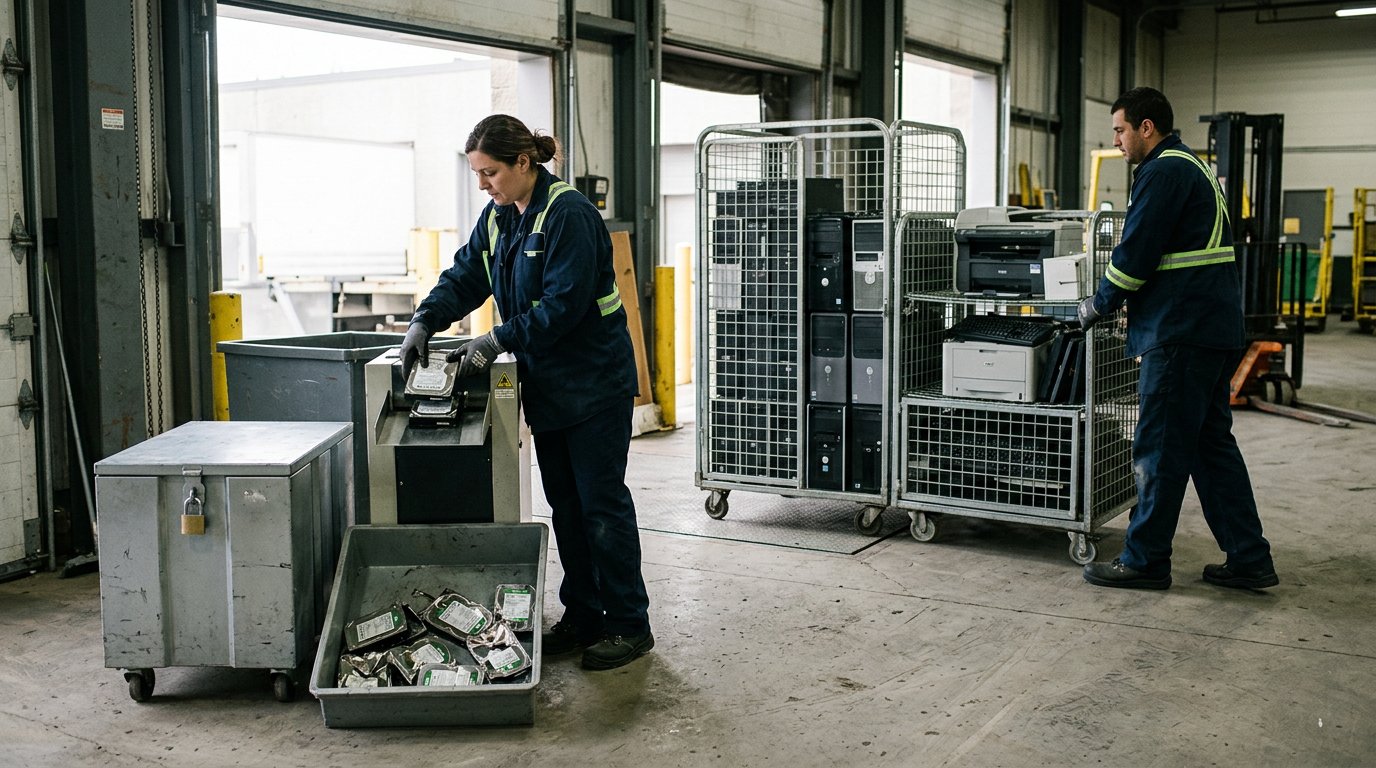
For Canadian organizations, business e-waste disposal can be arranged through pickup or drop-off, with the right option depending on the equipment, volume and local acceptance requirements. In Toronto, electronics should not go in the Blue Bin or garbage. Keep them separate from regular waste and plan for secure handling of devices that hold organizational data.
Clearing out computers, printers or other equipment takes more than finding somewhere to leave it. You need a practical way to move the items, protect information and keep reusable equipment in circulation where possible.
This guide explains which items are commonly treated as e-waste, how to prepare equipment, and how pickup and drop-off compare for organizations and municipalities. You’ll also learn what to consider when planning a collection, managing data destruction and choosing a responsible next step.
Key Takeaways
- Build an inventory of computers, printers, peripherals and other equipment so you can plan a suitable collection or drop-off.
- Group equipment by type, condition and volume to make recycling plans more practical for your organization or municipality.
- Protect organizational information by arranging secure data destruction for devices that store sensitive files.
- Consider the Electronic Recycling Association for free electronics recycling, pickup, secure data destruction or charitable computer donations.
What Items Are Considered E-Waste?
Working computers and other usable electronics may be reused or refurbished; equipment that cannot serve again can be recycled for material recovery. Batteries require separate handling: don’t place them in curbside trash, recycling bins or mixed with electronic waste, since improper disposal can cause fires during collection and processing.
Start with an inventory of equipment, including its type, condition and accessories. Common electronic items include computers, portable computers, keyboards, mice, cables, webcams, hard drives and USB flash drives. Printers, photocopiers, scanners, fax machines and multi-function printing, copying and scanning devices are also examples. Listing these items helps organizations sort equipment before arranging collection or drop-off.
Acceptance depends on the local program and facility. Before moving a load, separate electronics from regular waste and review the categories accepted at the intended collection point. Municipal programs may have different routes for household collections and larger business volumes, so identify whether the equipment is for a workplace, municipal department or community site.
Prepare devices for safe handling. Separate batteries from electronics where required, and keep loose batteries apart from collection containers. Remove organizational data before equipment leaves the workplace. For larger inventories, record device types and quantities, then group similar items together. This helps identify equipment for reuse, refurbishment or recycling.
For business e-waste disposal, consider how each item will be collected and processed. ERA accepts a range of computers, printers, peripherals, servers and related equipment through its pickup service and drop-off depots. Sort mixed or bulky equipment by type and note anything that needs secure data destruction. Processing can then direct suitable equipment toward reuse, refurbishment or recycling.
Keep electronic items protected from damage and weather while they await collection. Store them in a designated area, separate from regular waste and removed batteries. A clear inventory and careful sorting support safer electronics recycling and help ensure reusable equipment is not treated as scrap.
Custom recycling solutions for businesses and municipalities
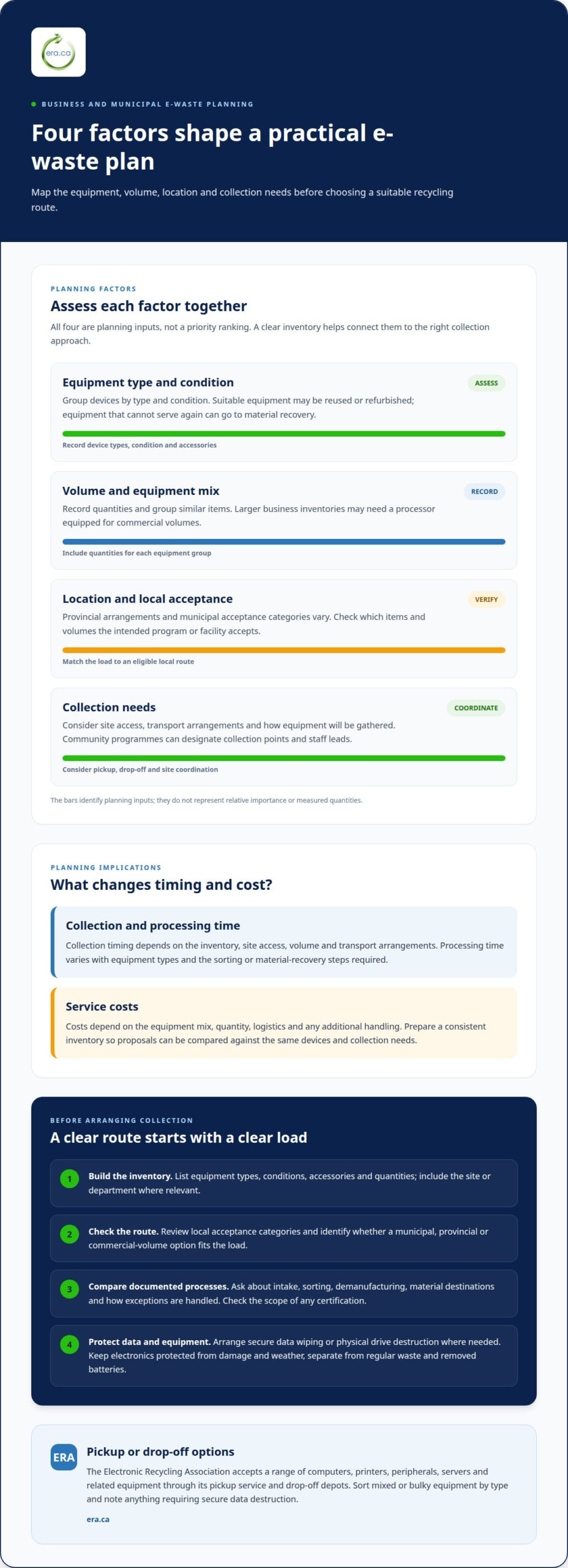
Plan around equipment type, volume, location and collection needs. These factors shape practical recycling services for workplaces and community facilities.
Industry-Specific Recycling Solutions
A computer refresh at an office creates a different load from cell phones collected across municipal departments. Group equipment by type, condition and site, then record quantities. This information helps establish collection needs and identify items for reuse, refurbishment or material recovery. For community programs, designate collection points and staff leads so participating sites can coordinate their equipment efficiently.
Certified Recycling Processes
Ask how a processor documents intake, sorting, demanufacturing and material destinations. A clear process describes how devices move into reuse or recycling streams and how exceptions are handled. Review the scope of each certification rather than assuming it covers every activity. This gives procurement teams a practical basis for assessing responsible waste recycling and comparing documented processes against organizational requirements.
Service Timelines and Costs
Collection timing depends on the inventory, site access, volume and transport arrangements. Processing time also varies with equipment types and the steps required for sorting or material recovery. Costs depend on the equipment mix, quantity, logistics and any additional handling. Prepare a consistent inventory before comparing proposals, so each recycling service is assessed against the same devices and collection needs.
Municipal and Provincial Program Options
Businesses may use municipal or provincial recycling programs when their items and volumes meet the program’s acceptance criteria. Commercial e-waste rules and stewardship arrangements vary by province, while local programs set their own collection options. Identify the applicable provincial program, review municipal acceptance categories, then match the load to an eligible route. Larger business inventories may need a processor equipped for commercial volumes.
For organizations considering a coordinated route, electronics recycling options can help frame the next step.
Secure data destruction
Before collection, remove organizational information from computers, phones and other data-bearing devices. Choose secure wiping or physical drive destruction based on the equipment, stored information and whether the device may be reused.
Hard-Drive Wiping and Destruction
Servers and computers can retain business records after staff delete visible files. ERA can securely wipe data before devices are refurbished, and offers on-site hard-drive shredding for drives that require physical destruction. Identify which drives hold sensitive information, then record whether each requires wiping or destruction. This helps direct equipment through appropriate processing.
Data Privacy Before Disposal
Clear personal and organizational information before devices are collected, dropped off or donated. Make an inventory, identify phones and computers that hold accounts or files, then assign someone to wipe or remove their storage. Treat phones separately from laptops, since each may retain different credentials and records. Include shared devices and equipment from meeting rooms, not just staff-assigned computers.
Environmental and Data-Security Considerations
Secure processing should account for both reuse and stored information. A reusable computer may be suitable for another user, while its data-bearing drive still needs controlled wiping or destruction. Separate drives requiring physical destruction from equipment intended for reuse. This helps protect organizational information while allowing devices and components to enter appropriate reuse or recycling streams.
Preparing Computers and Devices
Prepare each item before it enters a collection or recycling program. Back up business files that must be retained, sign out of accounts, remove organizational data, and label equipment needing drive destruction. Remove personal data from mobile devices before recycling. Keep the inventory with the devices so staff can match each computer, phone or server to its required handling.
Business e-waste pickup and drop-off options
Choose pickup when equipment is spread across sites or forms a large collection. Drop-off can suit a smaller, consolidated load when the facility accepts its items. In either case, match the route to the inventory, access arrangements and handling needs before moving electronics.
For pickup, prepare an item list and group equipment by type and location. Identify loading access, stairs, elevators and any site-specific entry procedures. In Mississauga, an on-site e-waste pickup is estimated to take 15-30 minutes. The actual work depends on the quantity and placement of materials, so keep items together in an accessible collection area.
Drop-off requires transport and careful loading by your staff. Before travelling, organize items so accepted electronics are easy to identify at arrival. Toronto offers Drop-Off Depots and Community Environment Days for unwanted electronics. Check local instructions for batteries before setting out devices for pickup or drop-off.
Use these steps to prepare either route:
- Separate electronics from batteries and unrelated waste.
- Group similar devices, such as computers, printers and screens.
- Keep an inventory of item types and quantities with the load.
- Secure loose materials for transport and protect equipment from damage.
Acceptance varies by location, and Calgary’s electronics listings may include sites outside the ARMA provincial stewardship program. Match the inventory to the collection route and keep materials organized during handling. Businesses with larger volumes can plan a consolidated pickup, while a smaller, transport-ready group may fit a drop-off option.
For electronics pickup or recycling, arrange business electronics collection as a practical next step for your organization.
Electronic Recycling Association (ERA): Free electronics recycling
Electronic Recycling Association (ERA) offers organizations free electronics recycling, electronics pickup and secure data destruction. These options can help when an office is clearing out computers, or a municipality is coordinating equipment collection across community sites.
Working computers may be suitable for charitable computer donations, giving usable equipment another purpose. ERA’s Computer Donation Program provides refurbished equipment to registered charities, non-profits, care facilities and educational institutions. Arrange secure data destruction for devices containing organizational information, and sort items by type and condition before collection.
Choose the service that fits your organization’s next step, whether you need to collect electronics, protect data or direct usable computers toward donation. Visit era.ca to learn more or get started.
Make your next equipment transition count
Set a simple process for the next time your organization replaces or clears out equipment. Assign responsibility for sorting devices, preparing data-bearing equipment and choosing a collection route. A consistent approach makes business e-waste disposal easier to plan across offices and municipal sites, while keeping usable computers in consideration for charitable donation.
When you’re ready to arrange the next step, Electronic Recycling Association (ERA) offers free electronics recycling, electronics pickup and secure data destruction. These services can help organizations move equipment out of storage and address information security as part of the same disposal plan.
Contact Electronic Recycling Association (ERA) to discuss electronics recycling for your organization. A considered decision today can support responsible handling and a more useful future for equipment that still has potential.
Frequently Asked Questions
Not sure how to dispose of your item?
Identify each item, its condition and whether it stores information, then match it to an accepted recycling route. A working computer may be suitable for reuse or donation, while equipment beyond reuse can enter recycling. Keep batteries separate where required. For business e-waste disposal, an inventory of device types and quantities helps determine whether pickup or drop-off suits the load.
What happens if e-waste is not disposed of properly?
Improper handling can create information-security and safety concerns. A discarded computer may still contain personal or organizational data, so arrange secure data destruction before disposal. Keep batteries separate from electronics and regular waste, and use an appropriate collection route. Sorting items in advance helps ensure they are handled as intended.
What counts as business e-waste in Canada?
Common examples include desktop and portable computers, keyboards, mice, cables, webcams, hard drives, USB drives, printers, scanners and photocopiers. Offices may also have fax machines and multi-function devices. Accepted categories differ by program and location, so identify each item before arranging recycling. Include less common equipment, such as servers or phone-system components, in the inventory because processors may handle these separately.
Where can Canadian businesses find certified e-waste recyclers near them?
For large loads, use electronics processor lists to find facilities that may accept business volumes, then compare their accepted categories and documented processes. The Electronic Recycling Association (ERA) serves organizations nationally and states that it holds ISO/IEC 27001, ISO 9001, ISO 14001 and ISO 45001 certifications. Review which management systems matter to your organization’s information-security, quality, environmental and workplace-safety needs.
What certifications should a business e-waste recycler have in Canada?
Consider certifications that address the concerns in your disposal plan, including information security, environmental management, quality and occupational health and safety. ERA states that it is certified to ISO/IEC 27001, ISO 9001, ISO 14001 and ISO 45001 standards. These standards relate to different management systems, so consider the scope relevant to your equipment, data-handling needs and procurement requirements.
How much does business e-waste disposal cost in Canada by device type and volume?
Costs depend on the device mix, total volume, pickup logistics and any additional handling, such as physical drive destruction or detailed reporting. The price depends on the case and is provided after a quote request. For ERA, most standard donations and pickups are free; larger operations involving detailed reporting requirements, physical destruction needs or unusual logistics may have associated costs, outlined up front.