

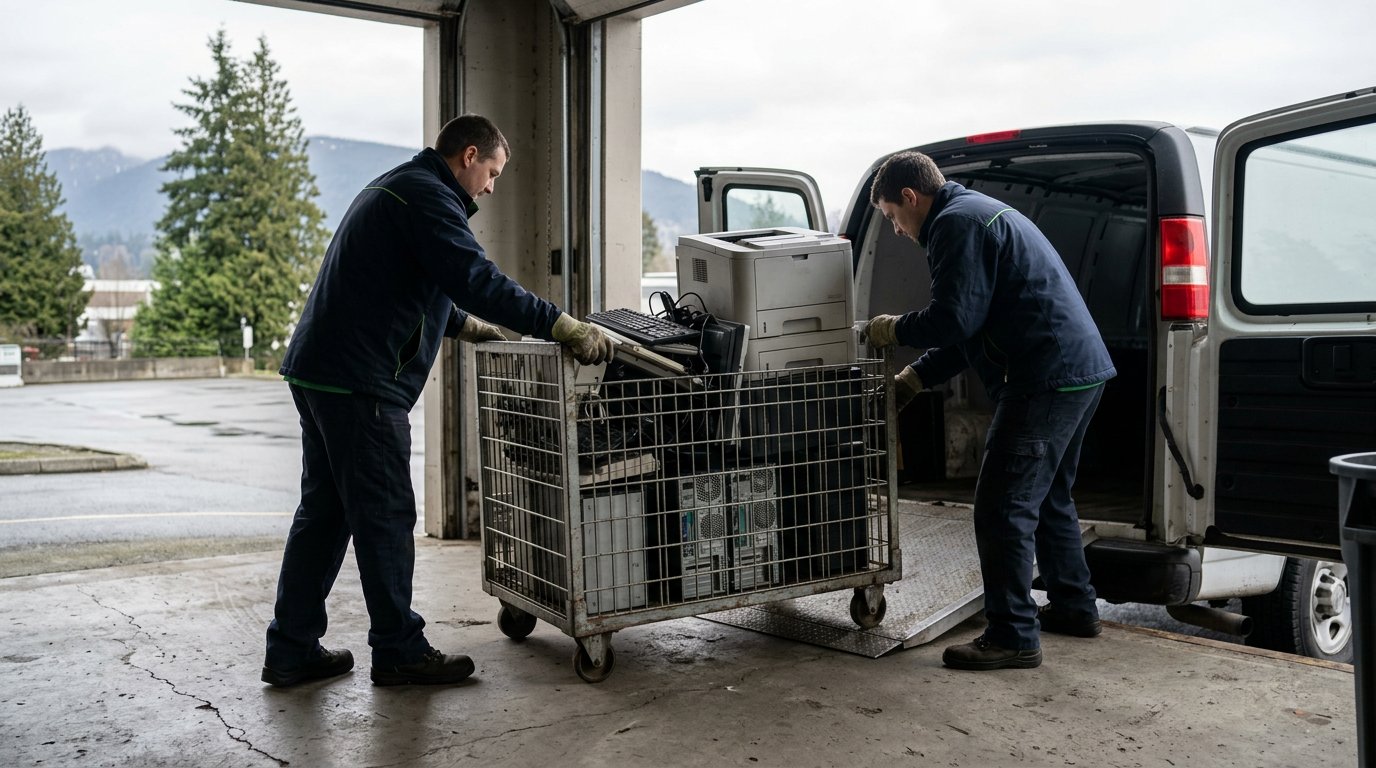
Recycling office electronics keeps reusable equipment and recoverable materials out of the waste stream. In Canada, electrical and electronic waste averages 20.4 kilograms per person per year, while an estimated 5 kg are recycled. An office equipment recycling pickup gives businesses a practical way to move computers and other equipment toward responsible reuse or recycling.
It’s understandable to want clear steps, especially when a collection is missed or old devices are taking up valuable space. This article explains why office equipment recycling pickup matters, what to do if a collection doesn’t happen as planned, and how pickup works across Canada.
You’ll also learn which equipment ERA accepts and how to prepare devices, including steps for handling stored data. With a clear process, your business can arrange a responsible next step instead of letting surplus electronics sit unused.
Key Takeaways
- Plan recurring collections around the equipment your business or building accumulates, so devices can be set aside for responsible recycling.
- If a collection is missed, note the pickup details and follow up with a clear inquiry to help resolve the issue.
- Prepare computers and office equipment for collection by organizing items and considering how stored data will be handled.
- Review pickup options available across Canada and consider whether usable computers could support charitable donations.
Why recycle your computer and office equipment?
Computers and office equipment contain materials that can be recovered instead of discarded. A recurring collection plan also gives businesses and building managers a clear way to handle equipment as it becomes surplus.
Canada generates an average of 20.4 kilograms of electrical and electronic waste per person per year, and an estimated 5 kg are recycled. Responsible collection helps direct retired computers and other electronics into recycling or reuse instead of leaving them in storage or putting them into unsuitable waste streams. For example, a building manager can establish a designated holding area for tenant equipment awaiting collection.
Business and Municipal Solutions
Business and municipal recycling arrangements should suit the volume, location and types of equipment being collected. A business can group retired computers, monitors and printers in one collection area, while a municipality may coordinate collection across several facilities. Before scheduling, identify who manages each site, how equipment will be gathered and whether collections need to recur as items accumulate.
Certification and Environmental Standards
Compare services by reviewing their documented environmental practices and relevant certifications, rather than relying on broad claims about responsible recycling. For example, look for named standards such as ISO 14001 for environmental management and ISO/IEC 27001 for information security. Ask how the service handles collected equipment and what information it provides about material recovery and data protection.
Collection routes vary across Canada. Identify the instructions that apply to your location, then confirm which devices are accepted and how businesses or residents can arrange collection. ERA offers electronics recycling through pickup and depot drop-off, with standard pickups and donations free of charge.
For recurring office equipment recycling pickup, building managers can set a regular review step: gather surplus devices, record the equipment types and arrange collection when the holding area is ready. Residents and businesses may use different collection routes, so organize household electronics separately from workplace loads. A written schedule helps staff and tenants know where to place items and who coordinates the handoff.
Missed collection and recycling inquiries
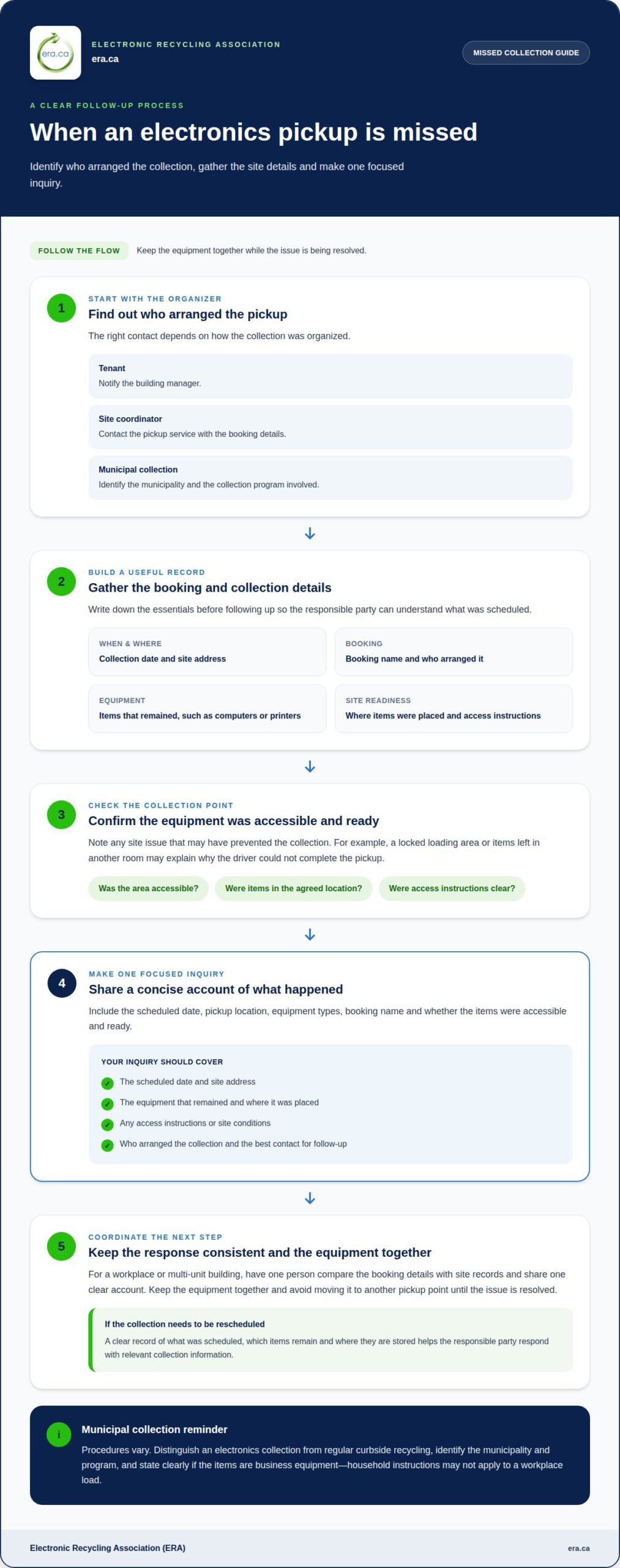
If a scheduled electronics collection doesn’t happen, first establish whether it was arranged through a municipal program, building management or a service provider. The right contact depends on who organized it. A tenant should notify the building manager, while a site coordinator should contact the pickup service with the booking details.
Gather clear information before making an inquiry. Include the collection date, pickup location, equipment types and booking name. Note whether the equipment was accessible and ready. For example, a locked loading area or items left in another room may explain why a driver couldn’t complete the collection.
Use this short checklist to make the inquiry specific:
- Confirm the scheduled date and site address.
- List the equipment that remained, such as computers or printers.
- Describe where the items were placed and any access instructions.
- Record who arranged the collection and the best contact for follow-up.
For a workplace or multi-unit building, have one person coordinate the response. They can compare the booking details with site records and share one consistent account. Keep the equipment together and avoid moving it to another pickup point until the issue is resolved. This reduces confusion if the collection needs to be rescheduled.
For municipal recycling inquiries, identify the municipality and collection program involved. Procedures vary, so distinguish an electronics collection from regular curbside recycling. If the items are business equipment, say so clearly, since household collection instructions may not apply to a workplace load.
If the missed appointment leaves electronics waiting for a responsible next step, consider free electronics recycling for eligible equipment. Keep the inquiry focused on the practical issue: what was scheduled, which items remain, and where they are stored. A concise record helps the responsible parties understand the situation and respond with relevant collection information.
North Shore computer and office equipment pickup
Across Canada, office electronics can be collected through municipal programs and non-profit recycling services. For businesses located on the North Shore and throughout the country, it is important to identify the service area, accepted equipment, and arrangements for your specific site. The Electronic Recycling Association (ERA) offers convenient pickup and depot drop-off services for all types of electronics, including obsolete office equipment.
A professional pickup service can collect computers and office equipment directly from your workplace, helping staff avoid the hassle of transporting heavy items separately. Start by grouping devices in an accessible area and making a detailed inventory. For example, list desktop computers, monitors, printers, and televisions separately. This gives the collection organizer a useful description of the load and helps distinguish electronics from unrelated materials.
Collection arrangements depend heavily on the total load size and site requirements. A pickup involving just a few items may be organised differently from a larger corporate office clearance. Be sure to describe the equipment and collection address accurately when arranging your office equipment recycling pickup so that logistics can be handled efficiently.
Prepare your site so that equipment can be gathered safely and securely. Choose one designated collection point, keep walkways clear, and assign a staff member or building manager to coordinate site access. Separate computers and office electronics from other waste materials. For larger facility cleanouts where non-electronic debris must also be cleared, commercial waste management providers such as Rapid Rolloff Dumpsters LLC offer roll-off containers to keep general refuse separated from electronics. If several departments or tenants are contributing to the load, give each group a strict deadline and ask them to label equipment by type.
Before the collection takes place, compare your inventory with the equipment actually gathered. Note any additions or removals, and always follow your organisation’s data-handling procedures for devices containing stored information. In a multi-floor office, coordinate the move to the agreed collection point instead of leaving sensitive equipment unattended in shared corridors.
Across Canada, municipal programs, non-profit recyclers, and specialised electronics collectors offer various collection options depending on location and load volume. When scheduling your office equipment recycling pickup, always consider whether the chosen service handles your specific equipment types and site logistics. Organisation and preparation give your team a clearer plan and support a smooth, secure handoff.
What office equipment can be recycled through pickup services in Canada?
Pickup programs can collect computers, related computer equipment and televisions, but accepted items depend on the collection service. Start an inventory by grouping equipment by type: desktops, laptops, monitors, printers and TVs. This gives the collection organizer a clear description of the load and helps separate workplace electronics from unrelated materials.
Include printers in your equipment inventory and keep them with the other electronics. ERA accepts inkjet and laserjet printers, plotters, copiers, scanners and fax machines. Identifying them clearly helps the collection team understand what the load contains.
Computers may contain stored business information, so prepare them before collection. Follow your organization’s data-handling process, identify devices that need secure data destruction and keep those items together. If some computers may be suitable for charitable donation, separate them from equipment intended for recycling. Clear labels can help staff distinguish the groups.
For a shared office or multi-tenant building, designate one collection area and assign a coordinator. Have departments list their equipment before moving it, then compare the list with the items gathered. For example, record whether the load includes printers or server equipment instead of describing everything simply as “electronics.” This supports an orderly handoff and gives the collection team a clearer picture of the load.
Keep batteries and other materials separate from the electronics inventory unless the collection instructions specifically include them. Don’t assume every item in an office belongs in the same recycling stream. A careful sort helps the collection team identify the equipment and avoid mixing in unrelated waste.
Ready to move computers, printers or televisions out of storage? Arrange electronics pickup and organize the equipment by type before collection.
Electronic Recycling Association (ERA): Free electronics recycling
The Electronic Recycling Association (ERA) helps businesses and organizations arrange electronics recycling, secure data destruction and charitable computer donations. Turn to ERA when computers and office equipment are ready for collection, or when stored data needs responsible handling before devices leave your site.
ERA’s free electronics recycling and pickup offer a practical route for equipment that is no longer needed. Computers suitable for reuse may support charitable donations, while secure data destruction addresses information stored on devices. Sort equipment by type and identify items requiring data handling before arranging collection.
To discuss your electronics, contact ERA about recycling and pickup.
Make responsible equipment planning part of your routine
Make equipment retirement a clear workplace process. Assign a staff member to track devices that are no longer needed, coordinate decisions about reuse and keep collection planning visible to the people who manage each site. A consistent approach can help prevent unused electronics from becoming an unplanned storage problem.
Before arranging an office equipment recycling pickup, decide who will gather the equipment, oversee information handling and tell staff how to flag devices for donation or recycling. Clear responsibilities make the next transition easier to coordinate, even when departments or tenants change.
When your organization is ready to discuss its equipment, contact Electronic Recycling Association (ERA). A considered next step helps keep surplus electronics moving toward responsible outcomes and supports a more organized workplace. Start with the equipment you’re ready to retire, then build a process your team can follow with confidence.
Frequently Asked Questions
Can you erase my data?
Yes. ERA provides secure data destruction, including data removal before devices are refurbished. For drives that require physical destruction, ERA also offers on-site hard-drive shredding. Before collection, identify computers or storage devices containing sensitive business information and communicate your requirements when arranging service. This helps your team align the request with internal policy rather than assume a standard wipe meets its needs.
Can you pick up my unwanted items?
Yes. ERA offers pickup from customer locations for electronics, including office computer equipment and TVs. When arranging service, describe the site, equipment categories and any access requirements, such as coordinating entry with a building contact. For a home or office with only a small number of devices, ask about the suitable collection option. Depot drop-off is another route for electronics.
How can I prepare my materials for recycling?
Group desktops, docking stations, cables and server-rack components by type. Note partial systems and loose motherboards separately, as these are also accepted electronics. Keep devices identified for data destruction distinct from equipment intended for donation. Share this inventory when arranging service, so the request reflects the actual mix rather than a broad label such as “office electronics.”
Where does the scrap go?
Collected equipment may be reused or recycled, depending on its condition and suitability. ERA refurbishes equipment for donation to registered charities, non-profits, care facilities and educational institutions across Canada. Separating equipment that may be reusable from items intended for recycling can help clarify your organization’s donation intentions during collection planning.
Is office equipment recycling pickup free for businesses in Canada?
Yes. ERA offers free electronics recycling across Canada, and most standard donations and pickups are free of charge. Larger operations with detailed reporting requirements, physical destruction needs or unusual logistics may have associated costs. Describe the equipment and work required when arranging service, so the team can understand the request and outline any fees up front.
How do I arrange an office equipment recycling pickup?
Contact ERA to request a workplace collection or arrange a depot drop-off. Provide the site address, equipment categories, a description of the load, access instructions and any data-handling requirements. For example, note whether the request includes server components or drives requiring physical destruction. A clear description helps ERA plan the next step for your organization.