


A 2026 University of Waterloo study found that 64% of Canadians replace electronics for reasons other than device failure or true obsolescence. For organizations, deciding how to recycle office electronics involves more than disposal: some equipment may still be useful, while drives and other data-bearing devices need careful handling.
It can be difficult to decide what to reuse, donate, or recycle while also managing information security and collection logistics. A clear, repeatable office-wide process helps protect business information, coordinate responsibilities, and keep unwanted electronics out of landfill.
This guide explains how to build that process, from taking inventory and sorting equipment to arranging secure data handling and responsible recycling. The Electronic Recycling Association (ERA) is a Canadian non-profit that connects suitable equipment with refurbishment and charitable computer donations, giving organizations a practical way to support community benefit alongside responsible electronics management.
Key Takeaways
- Learn how to recycle office electronics by creating an inventory that helps your team sort equipment and plan its next step.
- Use function and suitability, not appearance alone, to decide whether a device may be reused, needs assessment, or is ready for recycling.
- Identify computers, phones, storage media, and other devices that may hold business information before equipment leaves the office.
- Prepare an organized collection by consolidating items, protecting equipment, documenting the handoff, and following the collection program’s instructions.
- Explore how ERA’s recycling, data services, pickup, depot drop-off, and charitable computer donations can connect responsible handling with community benefit.
How to recycle office electronics: start with an organized inventory
Office electronics recycling is the responsible reuse or recovery of retired workplace devices. To understand how to recycle office electronics, first identify what the organization has, where it is, and whether it may still be useful. A shared inventory helps prevent misplaced equipment, repeated handling, and the premature disposal of devices that could be considered for another use.
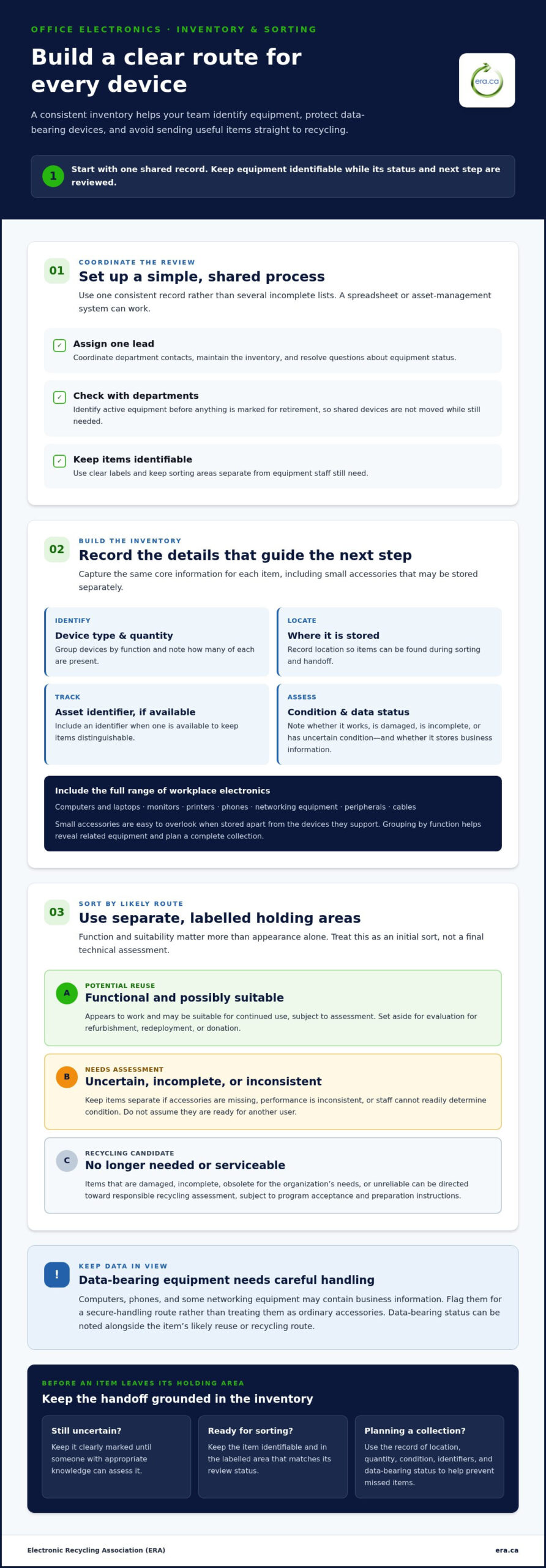
Keep the first pass practical. Assign a lead to coordinate the work, ask departments to identify equipment that is still active, and record the same core details for each item. A spreadsheet or asset-management system can work. The important thing is to maintain one consistent record rather than several incomplete lists.
- Assign a lead. Choose one person to coordinate department contacts, maintain the inventory, and resolve questions about equipment status.
- List devices. Record workplace equipment by function, including computing, communications, display, printing, networking, and accessories.
- Record condition. Note whether each item is working, damaged, incomplete, or of uncertain condition. Don’t decide its final route based on appearance alone.
- Separate storage areas. Set aside labelled spaces for potential reuse, data-bearing equipment, and recycling candidates. Keep items identifiable as the review continues.
What office electronics should go on the inventory?
Include computers and laptops, monitors, printers, phones, networking equipment, peripherals, and cables. Small accessories are easy to overlook, particularly when stored apart from the devices they support. Grouping items by function makes it easier to see what departments have, identify related equipment, and plan a complete collection.
For each item, record its device type, quantity, asset identifier if available, condition, and whether it stores business information. Computers, phones, and some networking equipment may contain data, so flag them for careful handling rather than treating them as ordinary accessories. A record of location, quantity, condition, identifiers, and data-bearing status helps prevent items from being missed during sorting and handoff.
How can a team sort devices without slowing down work?
Use clear labels and keep sorting areas separate from equipment staff still need. Ask each department to identify active devices before anything is marked for retirement. This can prevent a shared monitor, printer, or network component from being moved before its team has finished using it.
- Potential reuse: Equipment that appears functional and may be suitable for continued use, subject to assessment.
- Data-bearing equipment: Devices that may store business information and need a secure-handling route.
- Recycling candidates: Items that are no longer needed or appear unserviceable, subject to the collection program’s acceptance and preparation instructions.
Keep uncertain items in a clearly marked holding area until someone with the appropriate knowledge can assess them. This keeps them separate from equipment ready for reuse or recycling. For context on what can happen after collection, the overview of electronic waste recycling processes describes how electronics may be dismantled and materials recovered. A well-organized inventory gives your team a reliable starting point for deciding which route each item should follow.
How to decide whether office electronics can be reused or recycled
Once equipment has been identified, sort it by its likely next use instead of sending everything directly to recycling. A computer that powers on may be a reuse candidate, while a similar-looking device with a failed component may need further assessment. Appearance alone can’t show whether equipment is reliable, complete, or appropriate for another user.
Use this comparison as an initial triage, not a final technical assessment:
| Category | What to look for | Possible next step |
|---|---|---|
| Functional and potentially suitable for reuse | Powers on, performs its intended function, and is complete enough to assess. | Set aside for evaluation for refurbishment, redeployment, or donation. |
| Uncertain condition | Missing accessories, inconsistent performance, or condition that staff can’t readily determine. | Keep separate for assessment; don’t assume it is ready for another user. |
| No longer serviceable | Damaged, incomplete, obsolete for the organization’s needs, or unreliable. | Direct it toward responsible recycling assessment. |
Which workplace devices may be candidates for reuse?
Start with equipment that powers on, performs its intended function, and is complete enough to evaluate. A laptop that starts reliably or a monitor with a clear display may merit further review, but a quick check is only an initial screen. Keep devices that need evaluation separate from those already identified for retirement so staff don’t confuse a possible reuse candidate with an item ready for handoff.
Refurbishment can extend the useful life of appropriate equipment and give it another opportunity to serve. Charitable computer donation is one possible route for suitable devices, connecting organizational surplus with community needs. Suitability depends on assessment, so don’t promise a donation destination based only on a device powering on. For data-bearing equipment considered for refurbishment, include secure data handling in the decision. The Canadian Centre for Cyber Security guidance on media sanitization offers relevant federal guidance.
When should equipment move to the recycling stream?
Flag damaged, incomplete, obsolete, or unreliable devices for responsible recycling assessment when they’re unlikely to serve another user. Recycling candidates still need an appropriate collection route so materials can be handled responsibly. Keep batteries and accessories with their devices unless the collection program’s instructions say to separate them.
Accepted items and preparation requirements can vary by collection program and jurisdiction in Canada. Review the program’s current instructions before consolidating the recycling group. Keep items needing evaluation separate from confirmed recycling candidates so uncertain equipment isn’t treated as accepted by default.
A reuse-first review is a practical part of how to recycle office electronics responsibly: it gives suitable equipment a chance to serve again while ensuring end-of-use devices receive responsible handling. Organizations considering donation can explore the Electronic Recycling Association’s charitable computer donation program as a route for appropriate equipment.
How to protect business information before office electronics leave
Computers, phones, external drives, and removable storage can retain business information after staff stop using them. Some office equipment, including printers and networking devices, may also store information in internal memory or storage components. A device being retired, shared, spare, or damaged doesn’t mean its stored data has disappeared.
Physical recycling does not itself remove stored information.
Before equipment leaves organizational control, focus on oversight. Identify which items may contain data, establish who is accountable, and record how each device is handled. This makes information security part of the retirement process instead of leaving it to individual staff to assume the data is gone.
Which retired office devices may contain business data?
Flag desktop computers, laptops, phones, external drives, USB drives, memory cards, and other removable storage. Also consider shared or damaged devices: a broken computer or spare phone may still hold files, saved credentials, or other information. Compare asset records with the physical inventory before devices leave the office. Record items with uncertain storage status for follow-up.
How should organizations plan secure data handling?
Assign a specific person to authorize retirement and oversee the documented handoff. That owner can coordinate with IT or the appropriate internal team to identify data-bearing equipment, track its status, and ensure it follows the organization’s secure handling route. A concise record should connect each asset identifier with its assigned route and handoff, allowing the organization to account for devices without mixing data security decisions into general collection logistics.
- Identify. Mark devices that may contain information, including items with uncertain storage status.
- Assign. Name the person responsible for approving retirement and coordinating secure handling.
- Document. Record the device identifier, responsible owner, planned data route, and transfer of custody.
Keep secure data removal and physical destruction distinct. Data removal is used when a device is being prepared for refurbishment and another opportunity to serve. Physical hard-drive destruction is a separate route for drives designated for destruction. The appropriate approach depends on the device’s intended next step and the organization’s security process. ERA offers secure data removal before refurbishment and on-site hard-drive destruction for organizations.
This stage establishes who is responsible and which route a device should follow. For preparation, follow your organization’s approved procedures and keep the device’s data-handling record with its inventory entry. A consistent inventory, accountable owner, and recorded handoff make information protection a clear part of how to recycle office electronics responsibly.
How to prepare an office electronics collection for responsible recycling
A well-planned handoff helps prevent equipment from being misplaced, left behind, or moved before internal approvals are complete. Group devices by type and keep them accessible to the people coordinating collection, while maintaining organizational control until the handoff. Routes and preparation steps can differ, so don’t assume household collection rules or municipal drop-off arrangements apply to workplace equipment.
Use this sequence to prepare:
- Choose the route. Decide whether depot drop-off or pickup best fits the equipment and your team’s workflow.
- Review instructions. Check the collection program’s current accepted-item details and preparation requirements before packing or moving items.
- Consolidate and protect. Group equipment by type in an accessible, designated area. Protect devices from avoidable damage during internal movement and staging.
- Document the handoff. Record what is leaving, when it is transferred, and which staff member is responsible for the handoff.
What should an office confirm before moving equipment?
Match the collection route to the equipment, office access arrangements, and staff capacity. Before items are moved, complete internal approvals, designate a staff contact, and make sure the collection area is accessible to the people handling the transfer. Review instructions for accepted items and preparation so the team can separate anything that needs a different route.
Keep the staging area organized without leaving equipment unattended or outside the organization’s control. Label groups by category, such as computers, monitors, printers, phones, and accessories. Keep data-bearing devices identifiable for their planned secure handling. If the collection program specifies a preparation step, communicate it to the staff responsible before collection.
What records help close out the recycling process?
Create a straightforward handoff record that can be compared with the office inventory. Include device categories, quantities, the transfer date, and the name of the staff member responsible. Where relevant, connect the record to asset identifiers and existing data-handling documentation. Keep these records according to your organization’s normal retention practices so the team can account for retired equipment without creating a separate, inconsistent filing system.
- Collection summary: Categories and quantities transferred.
- Handoff details: Date, responsible staff member, and receiving route.
- Related records: Relevant asset and data-handling documentation maintained through normal organizational procedures.
This close-out step gives the organization a practical record of what left and who oversaw the transfer. It can also help improve future collection planning by showing where coordination worked well and where instructions or access arrangements could be clearer.
For Canadian organizations seeking a practical route for workplace electronics, ERA offers depot drop-off and equipment pickup alongside electronics recycling. Explore ERA’s electronics recycling options as you plan a responsible collection and handoff.
How ERA can help your organization recycle office electronics
For organizations deciding how to recycle office electronics, the next step is finding a practical route for equipment that has been assessed, sorted, and prepared. The Electronic Recycling Association (ERA) is a Canadian non-profit that connects electronics recycling with community benefit. Suitable computers may be considered for refurbishment and charitable donation, while equipment without reuse potential can move toward responsible recycling.
What support can ERA provide for retired office equipment?
ERA offers electronics recycling through depot drop-off and pickup from customer locations. Use your inventory to organize equipment by category and plan the collection. Keep reuse candidates, data-bearing devices, and recycling candidates clearly identified so each group can follow the appropriate next step.
Suitable computers can support organizations in the community through charitable donations. Refurbishment gives appropriate devices another opportunity to serve, while secure data removal before refurbishment helps address information stored on the equipment. ERA also offers secure data services, including on-site hard-drive destruction. These routes support different outcomes, so keep the intended disposition clear for each group of devices.
- Depot drop-off: A route for organizations planning to bring equipment to a depot.
- Equipment pickup: A collection option for retired workplace electronics.
- Charitable computer donations: A potential next step for computers suitable for refurbishment and donation.
- Secure data services: Options that include data removal before refurbishment and on-site hard-drive destruction.
ERA states that it is certified to ISO/IEC 27001, ISO 9001, ISO 14001, and ISO 45001 standards. These certifications relate to information security, quality management, environmental management, and occupational health and safety management, respectively. They provide context for ERA’s management systems as organizations consider responsible electronics handling.
How can an organization take its next step?
Bring your inventory and equipment categories into the planning process. A summary of device types, quantities, reuse candidates, recycling items, and data-bearing equipment helps organize the next steps. Keep secure data-handling information connected to the assets it applies to, and retain handoff records through your organization’s normal procedures.
ERA brings recycling, donation, and data-destruction options together for organizations. Use your inventory to plan a practical way forward, whether the priority is responsible recycling, another opportunity for suitable computers, or secure handling of data-bearing equipment.
Explore ERA’s electronics recycling services to plan a responsible next step for your organization’s retired equipment.
Make responsible equipment retirement part of your routine
Rather than treating an office cleanout as a one-time task, make equipment retirement a planned part of your organization’s asset lifecycle. Reviewing devices as teams replace or relocate technology gives staff time to consider what could serve another organization and prepare a responsible next step. Planning ahead can turn suitable surplus into a community resource and reduce last-minute decisions.
If your team is deciding how to recycle office electronics, use its inventory to shape the collection plan. The Electronic Recycling Association is a Canadian non-profit providing electronics recycling and donations across Canada. ERA states that it is certified to ISO/IEC 27001, ISO 9001, ISO 14001, and ISO 45001, covering management systems for information security, quality, environmental practices, and occupational health and safety.
Choose a practical next step that fits your equipment and internal process. Explore ERA’s electronics recycling services to plan for your organization’s retired devices. A repeatable approach helps each technology refresh contribute to responsible resource recovery and community benefit.
Frequently Asked Questions
Can office electronics go in regular recycling?
No. Don’t place office electronics in a regular recycling bin unless the instructions for that specific collection route allow it. Set retired devices aside in a designated area and tell staff not to add them to routine waste or recycling. Label the area with the responsible staff contact and keep items there until your organization has arranged an appropriate electronics recycling route.
What office electronics can be recycled?
Common items include computers, laptops, monitors, phones, printers, networking equipment, keyboards, mice, cables, and related accessories. Acceptance depends on the collection program and the item, so an example list doesn’t mean every device will be accepted. To plan how to recycle office electronics across several categories, make a working list and note unusual or incomplete items separately for review against the program’s current instructions.
Should an office donate or recycle working computers?
A working computer may be considered for donation if it’s complete, suitable for another user, and can be prepared responsibly. For example, a device that powers on but lacks a required accessory may need further assessment before donation. If it isn’t appropriate for reuse, arrange responsible recycling instead. Before either route, handle organizational information through the organization’s approved process.
How should an office handle electronics with missing parts or damage?
Keep damaged or incomplete equipment separate from devices being considered for donation, and record the visible issue, such as a missing power supply or cracked casing. Don’t assume an item can be refurbished or accepted through every collection route. Follow the collection program’s current instructions, and maintain the organization’s data-handling controls if the device could contain stored information, even if it no longer powers on.
Can an office recycle electronics from more than one department together?
Yes. Departments can combine equipment into one planned cleanout as long as the organization can account for each group. Ask departments to identify equipment they own or manage before it is moved, and keep internal transfer notes with the collection record. This is especially useful when devices are stored in different offices or shared work areas. A central staging point can help prevent items from being missed.
What should an office do with cables and accessories?
Include loose cables, keyboards, mice, chargers, and other accessories in collection planning rather than leaving them in desk drawers or storage cupboards. Group similar items together and label them by type. Keep an accessory with its device when that helps staff identify what belongs together. Before packing, compare each group with the collection program’s instructions, since accessory acceptance can differ from device acceptance.
Does recycling an office computer automatically erase its data?
No. Recycling a computer doesn’t by itself show that its stored data has been removed. A device may retain files, saved account details, or other locally stored work, so don’t assume a broken or reset computer is clear of information. Keep a record of who approved its retirement and the route it took. Follow your organization’s secure handling process before transfer, including for devices that can’t be accessed.
Is office electronics recycling the same across Canada?
No. The broad aim is responsible reuse and recovery, but accepted items and preparation instructions can vary by program and jurisdiction. For organizations with offices in multiple locations, use one national inventory and consistent internal data controls, then maintain route-specific instructions for each collection. This helps standardize staff responsibilities without assuming residential drop-off rules or collection arrangements apply to workplace equipment everywhere.