

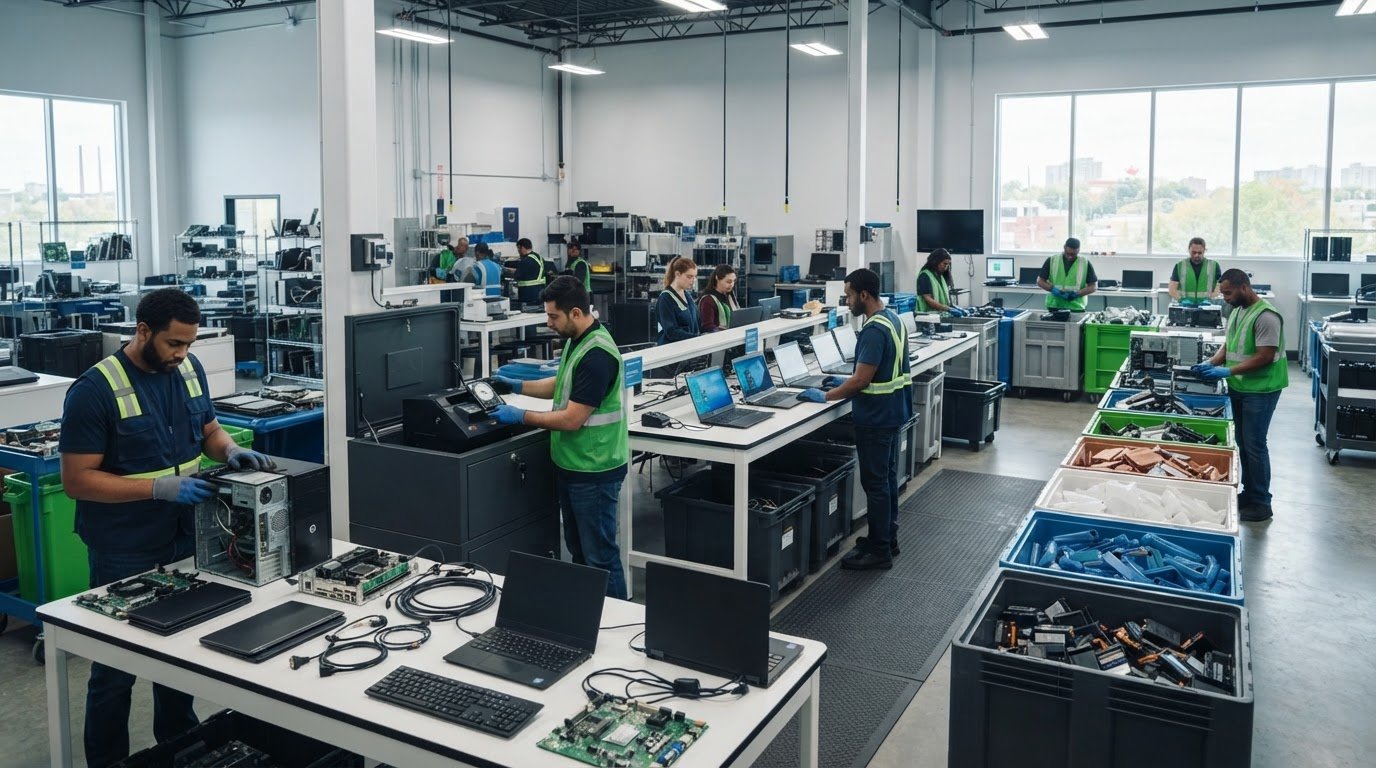
A computer’s recycling journey starts with sorting, not shredding. To understand what happens to recycled computers, follow the main steps: hazardous components are removed, devices are assessed for reuse, and remaining materials are separated for recovery. Before handing over a computer, back up files you want to keep and erase personal information.
It’s reasonable to want old equipment handled in a way that protects both private information and the environment. The route depends on the computer’s condition: working equipment may have parts or devices suitable for reuse, while equipment that can’t be reused is dismantled and processed for materials. This guide explains how recyclers sort computers, remove hazardous components, handle data, recover reusable parts, and separate metals and plastics. You’ll see how each stage helps keep valuable resources in circulation and supports responsible disposal across Canada.
Key Takeaways
- Back up files you want to keep and erase personal information before a computer is collected, dropped off or donated.
- Early sorting separates hazardous components, helping protect workers and prevent contamination of materials for recovery.
- Working devices and usable parts may be directed toward reuse, while equipment that cannot be reused moves through recycling.
- After dismantling, shredding and automated separation can help sort materials such as metals and plastics into recoverable streams.
- Choose a responsible next step for unwanted equipment, whether that means secure data destruction, electronics pickup or charitable computer donation.
Initial sorting and removal of hazardous components
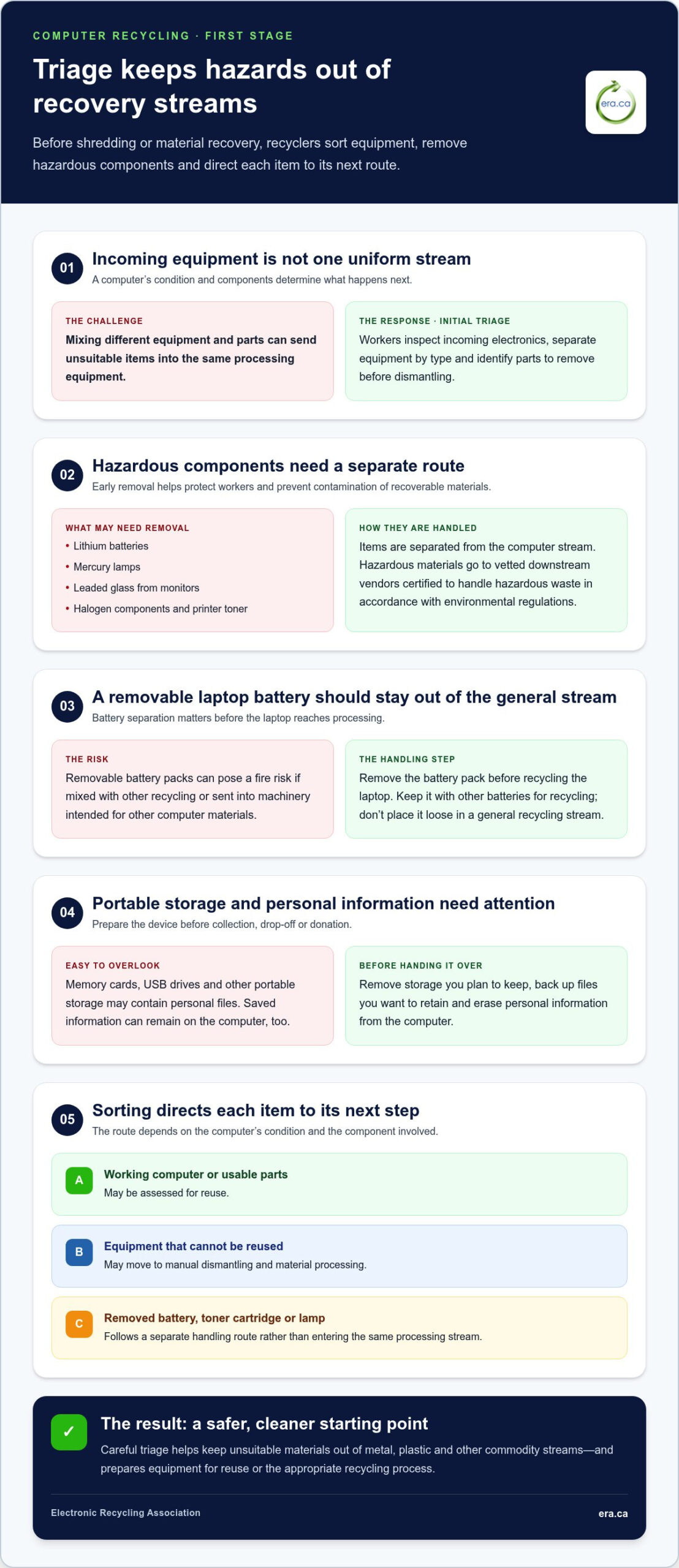
Initial triage is the first inspection and sorting stage for incoming electronics. Workers assess each computer, separate equipment by type, and identify parts that must be removed before dismantling. This step helps prevent hazardous materials from contaminating recyclable materials and supports worker safety.
Hazardous components need separate handling to reduce risks during recycling. They can include lithium batteries, mercury lamps, leaded glass from monitors, halogen components, and printer toner. During triage, recyclers identify and remove these items from the computer or equipment stream. A monitor, for example, may need different handling from a laptop without a mercury lamp or leaded glass.
A removable laptop battery pack is designed to detach from the computer. Remove it before recycling the laptop and keep it with other batteries for recycling. Removable battery packs can pose a fire risk if mixed with other recycling, so don’t place them loose in a general recycling stream. Separating the battery also keeps it out of processing intended for other computer materials.
A memory card is removable storage that may hold personal files. Remove memory cards, USB drives, and other portable storage before handing over a computer. Check slots and card readers, and keep any storage you plan to reuse. Back up files you want to retain and erase personal information before collection, drop-off, or donation.
Components that can’t be recycled are separated from recoverable materials and sent for appropriate handling. Hazardous materials removed during triage are transferred to vetted downstream vendors certified to handle hazardous waste in accordance with environmental regulations. This keeps unsuitable materials out of metal, plastic, and other commodity streams.
Sorting directs each item to its next processing step. A reusable computer can be assessed for reuse, while damaged equipment may go to manual dismantling. A removed battery, toner cartridge, or lamp follows a separate handling route. These distinctions help prevent incompatible items from entering the same processing equipment.
Early removal matters because batteries, lamps, and leaded monitor glass can contaminate material streams or create safety concerns. Separating a laptop battery before shredding, for instance, keeps it out of machinery designed for other computer materials. Careful triage creates a safer, cleaner starting point for the recovery stages that follow.
Keep electronics out of household recycling and garbage streams, and use an appropriate electronics recycling route. Sorting starts before processing, so separating a removable battery or memory card at home supports safe handling. It also helps direct each component to a suitable route instead of mixing it with unrelated materials.
Protecting personal information before disposal
Personal data includes documents, photos, saved passwords, and account details stored on a computer. Protect it before the device leaves your care. In Canada, back up files you want to keep and erase personal information before recycling a computer.
A backup is a separate copy of files you want to retain. Before erasing anything, copy important documents, family photos, and work files to storage you control. Open a few copied files to confirm they work. Check folders such as Documents, Downloads, and Desktop, as well as folders used by photo or accounting software.
Clear personal information from computers and other electronic devices before collection, drop-off, or donation. This matters whether a device is collected from home or handed over at a drop-off point. Wherever you are in Canada, follow the local electronics disposal route and prepare the device by removing personal information.
Use this sequence to reduce the chance of leaving files or accounts behind:
- Back up files you need, then open copies to confirm they are readable.
- Sign out of email, cloud storage, and other accounts on the computer.
- Remove external storage, such as USB drives, and keep it with you.
- Use the computer’s built-in reset or erase function, following its on-screen steps.
A factory reset returns a computer to its setup state. It can remove personal files and settings, but the steps differ between operating systems and devices. Read each prompt before confirming, because erasure can remove files you haven’t backed up. Afterward, restart the computer and check that it displays its initial setup screen rather than your personal account.
Remember other storage locations, too. A browser may retain saved passwords, browsing history, or autofill details. Email and cloud applications may remain signed in even after you move documents. Sign out, remove stored account access where the computer provides that option, and check for downloaded files or saved work attachments.
If the computer won’t start, you may not be able to erase its data through the usual menus. Don’t assume that a blank screen means the storage has been cleared. Keep track of the device and any storage you remove, and choose a recycling route that addresses data handling. For a practical next step, explore electronics recycling options that can help keep equipment in responsible channels.
Shredding and automated material separation
Shredding mechanically breaks prepared electronic components into smaller pieces. After depollution and disassembly, remaining components may be shredded before passing through automated separation systems. Circuit boards, cables, casing, and other computer materials can then enter processing designed to separate different material types. Shredding is not the first step: hazardous components must be removed beforehand.
Automated material separation sorts shredded material by its physical properties. A mixed stream may contain plastic fragments, metal pieces, and lighter materials. Separation systems direct these fractions into different streams for further processing. The aim is to recover usable commodities, not to turn every fragment into a finished product at this stage.
Infrared sorting uses infrared technology to identify and sort plastics. Some e-waste recyclers use it to distinguish plastic fractions in a mixed stream. Separating plastics can direct different material types towards suitable recovery routes. The result depends on what enters the system, including the mix of plastic pieces remaining after processing.
Air separation uses airflow to divide lightweight material from heavier pieces. For example, it can separate light fractions from denser shredded components, making it easier to process each stream according to its material properties. Some recyclers use air separation, but it isn’t part of every facility’s equipment.
Robotics refers to automated machines that assist with sorting or handling. Some e-waste recyclers use robotics alongside other separation technologies. A robotic system can support a sorting line as mixed pieces move through processing equipment. It is one part of a wider system, not a standalone way to recover every material.
Separation takes place in several stages, each narrowing the material mix. A shredded stream may be divided by weight, material type, or other physical properties. Infrared technology can help sort plastics, while airflow separates lighter pieces. These methods can work alongside equipment that directs metal-rich fractions for later recovery.
For example, plastic fragments separated from metal pieces can enter a plastics stream, while heavier fractions continue through material recovery. This matters because copper, aluminium, steel, and plastics need different handling. Sorting also prevents a mixed batch from being treated as one uniform material, which would limit the value of recovered commodities.
Automated separation comes after electronics are prepared, not during personal data handling or reuse assessment. Devices suitable for reuse can follow a different route before shredding. Material that is shredded and separated becomes sorted fractions for further processing. The next stage can refine those fractions into commodities that may be reused or sold.
Manual dismantling and recovery of reusable parts
Manual dismantling is the careful separation of computer components by trained technicians. Working computers may be refurbished and donated, while parts from other devices can be recovered for reuse, resale, or further processing.
Yes. Charities may refurbish donated computers for people who need them, or recycle or sell donated equipment to raise funds. The route depends on the condition of the computer and its components.
Manual Dismantling
Manual dismantling means taking a computer apart by hand to separate its components. After hazardous parts are removed, trained technicians disassemble devices and extract items such as circuit boards, processors, memory, display screens, and power supplies. Each component can then be directed towards reuse, resale, or further processing according to its condition and potential use.
Separating parts individually helps keep reusable components out of the material stream sent for shredding. For example, a display screen or power supply can be removed intact instead of processed with the computer’s casing. The technician’s assessment determines whether a part is suitable for another use or should continue through material recovery.
Reusable Parts Recovery
Reusable parts recovery means identifying and removing components that can serve a purpose in another device. Technicians may extract memory, processors, circuit boards, screens, and power supplies. Parts suitable for reuse or resale can be separated from components requiring further processing, so the whole machine doesn’t have to follow one route.
A computer’s accessories may also be assessed for continued use. A keyboard, mouse, or power supply in usable condition can remain useful rather than becoming part of a mixed recycling stream. Recovery gives working components another potential use, while parts that can’t be reused can proceed to recycling.
Refurbishment and Resale
Refurbishment prepares a working computer for another user. Charities can refurbish donated computers and accessories for someone who needs them. This can extend the equipment’s useful life and connect a working device with a person or community that can use it.
Resale is another possible route for donated electronics. Charities may sell equipment to raise funds or recycle it when reuse isn’t suitable. Across Canada, working computers and other electronics can be donated to local charities. A donation program can support reuse, fundraising, or recycling, depending on the device and the charity’s needs.
The computer’s condition matters at each decision point. A working computer may be more useful as a complete device; one that can’t be reused may still contain recoverable parts. Separating these routes helps preserve equipment and components that can serve another purpose.
Recovery of metals, plastics and other commodities
Commodity recovery separates recyclable materials into streams for reuse or sale. After reusable parts are removed, remaining computer materials can be sorted into metals, plastics, and other fractions. The goal is to keep recoverable resources in circulation rather than treating the device as one mixed waste item.
Computer recycling can conserve resources by recovering materials for use in new products. It also helps keep electronic waste out of ordinary disposal streams, while responsible processing separates materials that need different handling.
Magnetic separation uses magnets to draw ferrous metals, such as steel, away from other shredded materials. Steel from a computer frame or casing can then enter a ferrous-metal stream. This step relies on magnetic properties, leaving non-ferrous metals for a different separation process.
Eddy current separation uses changing magnetic fields to separate non-ferrous metals. Recyclers may use it to recover metals such as aluminium and copper from mixed material. These metals don’t respond to a magnet like steel does, so a separate technique helps sort them into their own streams.
Computer parts and drives can contribute different materials to recovery. A steel casing, copper-bearing components, and aluminium pieces don’t become one commodity. After sorting, recyclers aim to produce separate streams for reuse or sale. Examples include:
- Steel from ferrous components.
- Aluminium and copper from non-ferrous components.
- Plastics separated from metal-rich material.
- Metallic fines, small metal-rich particles recovered during processing.
Plastic separation keeps plastic pieces distinct from metals and other fractions. Some recyclers use infrared technology to sort plastics, while other automated methods separate materials by their physical properties. A separate plastic stream supports further processing instead of leaving the pieces mixed with recoverable metals.
Metallic fines are small particles containing metal, collected during material processing. They can join other sorted fractions for further recovery. The final streams depend on the materials present in the computer and how processing separates them. Sorting enables more targeted handling than sending a mixed load onward as one material.
For example, magnetic separation can direct steel away from a mixed stream, while eddy current separation can help recover aluminium and copper. Plastics and metallic fines can also be kept as distinct fractions. Together, these steps turn dismantled equipment into more clearly defined commodities for reuse and sale.
Choose a responsible route for unwanted computers so their materials can enter recovery rather than general waste. Arrange free electronics recycling for equipment ready to leave your home or workplace.
Electronic Recycling Association (ERA): Free electronics recycling
Electronic Recycling Association (ERA) offers free electronics recycling across Canada, providing households and organizations with a practical route for unwanted computers. Turn to ERA when equipment is ready for recycling, when you need secure data destruction, or when pickup collection would help move computer equipment out of your workplace.
Working computers may also be suitable for charitable computer donations, helping connect usable technology with people and communities that can benefit from it. ERA states that it is certified to ISO/IEC 27001, ISO 9001, ISO 14001, and ISO 45001 standards. These standards relate to information security, quality, environmental management, and occupational health and safety.
Prepare devices by backing up files you want to keep and removing personal information. For recycling, data destruction, pickup, or donation, visit ERA’s electronics recycling services.
Give your old computer a responsible next step
Understanding what happens to recycled computers makes the next decision clearer: choose a route that protects the device’s data and gives usable equipment or materials a chance to serve again. Before handing over a computer, consider whether it may be suitable for donation or needs recycling, and make sure files you want to keep are backed up.
For a practical next step, Electronic Recycling Association (ERA) offers free electronics recycling, secure data destruction, and electronics pickup. These services help households and organizations manage unwanted equipment while keeping information security and responsible handling in view.
Take the next step at a pace that works for you. Contact Electronic Recycling Association (ERA) today to discuss recycling your computer or arranging pickup. Each thoughtful decision helps keep useful equipment and materials in circulation, and supports a more responsible approach to electronics in Canadian communities.
Frequently Asked Questions
Where does obsolete hardware actually go?
Obsolete hardware usually follows a reuse, parts-recovery, or materials-recycling route, depending on its condition. Understanding what happens to recycled computers means recognizing that one device can follow several paths: a working machine may be refurbished or donated, while suitable components are recovered separately. Equipment beyond reuse is processed for materials. Items requiring special handling are kept out of ordinary commodity streams and sent for appropriate downstream processing.
What happens to a computer after it is dropped off for recycling?
After drop-off, a computer is assessed so its next route matches its condition and components. A working machine may be directed towards donation or refurbishment; equipment unsuitable for reuse can be dismantled for parts and materials. Clear personal data and remove portable storage before handing it over. This preparation matters even if the device will be assessed later, because it keeps your files and removable media under your control.
How are recycled computers sorted and dismantled?
Recyclers sort computers by equipment type, condition, and components needing separate handling. A laptop, desktop tower, and monitor don’t contain identical parts, so they may need different preparation. Once hazardous items are removed, trained technicians can dismantle equipment and separate reusable components. Remaining material may then be shredded and sorted. These steps direct parts and material fractions to suitable next stages.
What parts and materials can be recovered from old computers?
Old computers can yield reusable circuit boards, processors, memory, display screens, and power supplies. Parts that aren’t suitable for reuse may still enter further processing. Material recovery can produce separate streams of steel, aluminium, copper, plastics, and metallic fines. For example, metal casing and plastic components are sorted into different streams rather than treated as one material, allowing each fraction to continue through an appropriate recovery route.
How are hard drives and personal data securely erased or destroyed?
Personal data may be removed through data wiping, or storage media may be destroyed as part of secure data handling. The approach depends on the device and its intended next route, such as refurbishment or recycling. Before disposal, back up files you need, sign out of accounts, and remove USB drives or memory cards. If a computer won’t start, don’t assume its storage has been cleared.
What hazardous materials in computers require special handling?
Computer recycling may require separate handling for lithium batteries, mercury lamps, leaded glass from monitors, halogen components, and printer toner. These items are identified during initial sorting and removed from the regular material stream. For example, keep a removable laptop battery separate from other recycling because it poses a fire risk. Separate handling helps prevent contamination and supports safer processing for workers.
How can I prepare a computer for recycling safely?
Prepare a computer by backing up files you want to keep, signing out of accounts, and erasing personal information. Remove memory cards, USB drives, and other portable storage, then keep them with you. If the laptop has a removable battery, separate it from the computer and recycle it with other batteries rather than mixing it with general recycling. Keep accessories together so they can be sorted with the device.