

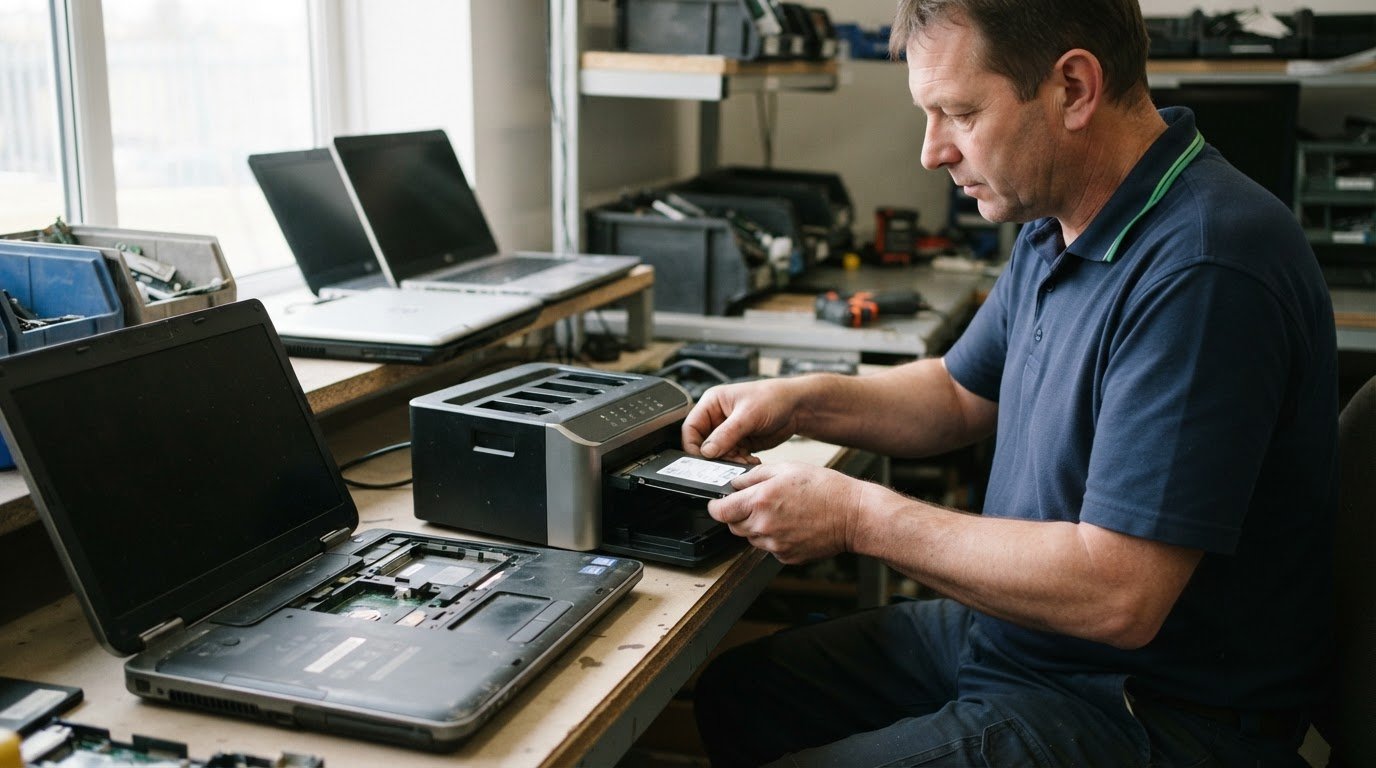
Deleting files isn’t the same as securely erasing a computer. For data security when recycling computers, back up needed files, disconnect the device from online accounts and erase its storage before disposal. Handle memory cards and other external media separately. The Canadian Centre for Cyber Security advises considering physical destruction when a device holds highly sensitive information.
It’s reasonable to expect a computer to be safe to pass on once personal files are gone, but old or non-functional devices may still retain information. The right approach depends on the device, its storage and the sensitivity of its data. A factory reset or secure wipe may suit some devices; physical destruction may be more appropriate for sensitive data or storage that can’t be reliably erased.
This guide explains how to dispose of unwanted computers and media, what to consider before wiping a device, and when destruction may be appropriate. You’ll also learn how responsible recycling can keep useful materials in circulation while reducing the risk of exposing personal or business information.
Key Takeaways
- Back up files you need, disconnect online accounts and remember that memory cards and other external media need separate attention.
- Deleting files may leave data recoverable; choose a secure wipe or factory reset suited to the device and its storage.
- For highly sensitive information, consider whether physical destruction is more appropriate than wiping the drive.
- Secure data destruction and responsible electronics recycling can help protect information while keeping useful materials in circulation.
What about physical destruction of the device?
A hard drive or solid-state drive can retain files after a computer leaves service. Choose overwriting or physical destruction based on the data’s sensitivity and whether the storage can be reused.
Overwriting or Destroying Storage Drives
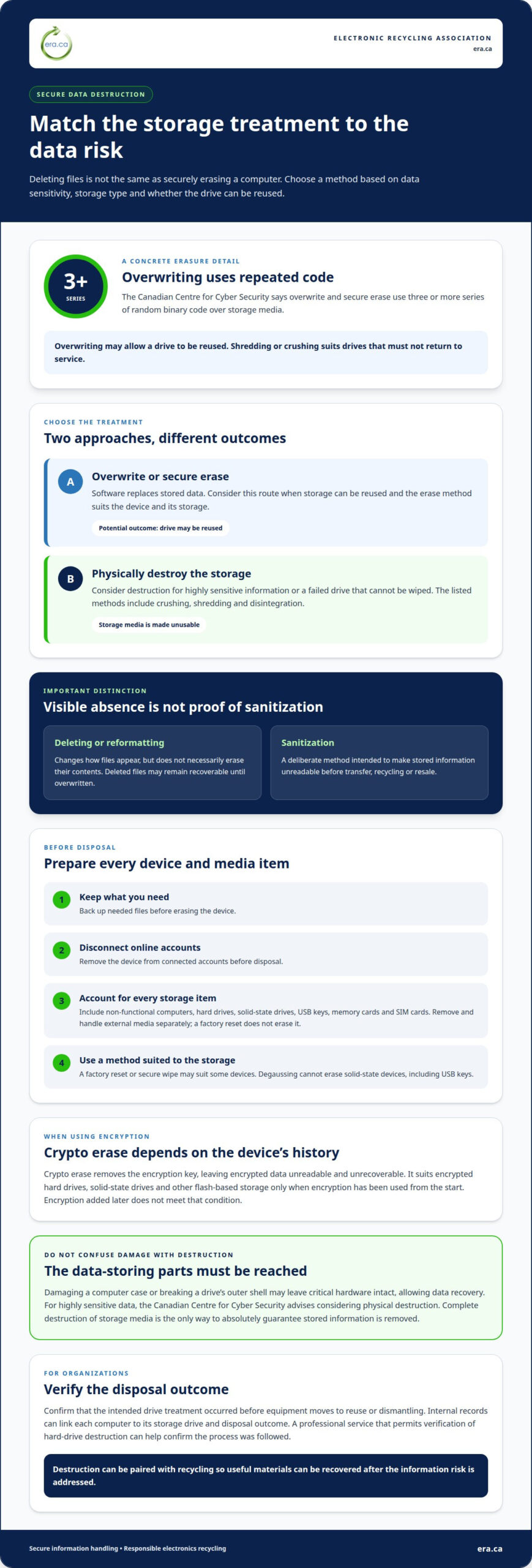
Overwriting uses software to replace stored data; physical destruction makes storage media unusable. According to the Canadian Centre for Cyber Security, overwrite and secure erase use three or more series of random binary code over storage media. Overwriting may allow reuse, while shredding or crushing suits drives that must not return to service. The choice matters when a hard drive contains sensitive information.
Checking Recycling and Destruction Procedures
Procedure verification means confirming that the intended drive treatment occurred before equipment moves to reuse or dismantling. Organizations should verify their equipment-disposal and data-destruction procedures were followed, rather than assuming a scheduled recycling process completed each step. For example, link each computer to its storage drive and disposal outcome in internal records. A professional service that permits verification of hard-drive destruction provides a practical way to confirm sensitive information did not bypass the process.
Using Professional Destruction Services
Professional destruction services use specialized equipment to make storage unreadable. The Canadian Centre for Cyber Security lists crushing, shredding and disintegration as common secure-destruction methods. Professional destruction may be relevant when computers hold highly sensitive records or a failed drive cannot be wiped. It can also be paired with recycling, so useful materials can be recovered after the information risk is addressed.
Data Recovery Risks After Destruction
Destruction reduces recovery risk only when it reaches the parts that store data. Damaging a computer case or breaking a drive’s outer shell may leave critical hardware intact, allowing data recovery. The Canadian Centre for Cyber Security advises considering physical destruction for highly sensitive data. Complete destruction of storage media is the only way to absolutely guarantee stored information is removed, so avoid improvised damage when confidentiality matters.
Is deleting the same as sanitization?
No. Deleting a file removes its visible entry, while sanitization aims to make stored information unreadable. That difference matters before a computer changes hands.
Limits of Deleting and Reformatting
Deleting or reformatting a drive changes how files appear, but doesn’t necessarily erase their contents. A file removed with a computer’s delete key may remain recoverable until new data overwrites it. Reformatting doesn’t confirm that every stored file has been securely erased. For a computer leaving an organization, old records could remain on its drives after routine cleanup. Use the device’s erase process or factory reset before recycling it.
Data Left Behind in Deleted Files
Deleted data may remain on a drive even when the file no longer appears in its folder. On Windows, macOS, Android and iOS, items moved to the recycling bin or trash can eventually be overwritten by new data. Until then, deletion alone doesn’t establish that the information is gone. For example, a business computer’s customer records or confidential reports might remain after staff clear the desktop. Treat visible absence as convenience, not proof of sanitization.
Sanitization Compared with Deletion
Sanitization is a deliberate method for making information on an electronic device unreadable, while deleting usually removes a file’s reference from view. The goal is different: routine deletion manages files during use; sanitization prepares storage for transfer, recycling or resale. Before disposal, choose an erase process or factory reset intended for the device, rather than relying on deleting individual documents. A sound handoff also includes the device’s next destination, such as responsible electronics recycling.
How can I dispose of unwanted electronic devices and media (e-waste)?
Before disposal, identify every device and storage item that may hold personal information. A practical plan for data security when recycling computers starts by disconnecting unwanted devices from online accounts, as advised by the Canadian Centre for Cyber Security.
Devices and Media to Sanitize
Include non-functional equipment in your disposal plan because it may still retain information. Hard drives and solid-state drives store much of a computer’s data, while USB keys, memory cards and SIM cards may hold separate files. A factory reset doesn’t erase external media, so remove and handle each item separately. The Canadian Centre for Cyber Security says degaussing cannot erase solid-state devices, including USB keys. Choose a method suited to each storage type.
Encrypting Devices and Storage Media
Encryption makes stored information unreadable without the key needed to access it. Encrypting a device or storage media helps protect personal information, including deleted files. Crypto erase removes the encryption key, leaving encrypted data on the media unreadable and unrecoverable. It suits encrypted hard drives, solid-state drives and other flash-based storage only when encryption has been used from the start. Encryption added later doesn’t meet that condition, so the media’s history matters.
External Drives and Cloud Storage
Include external drives and cloud storage in the disposal plan, rather than focusing only on the computer’s internal drive. Back up information you need, then account for connected external hard drives and removable media. Encrypt data stored on hard drives or in cloud storage. Disconnect the device from online accounts before disposal; deleting local files doesn’t remove copies stored online. For data security when recycling computers, handle each storage location separately.
If a device isn’t ready for disposal, keep it in secure storage until it can be sanitized. This protects its stored information while the equipment remains unused and awaits its next step.
Securely wiping a computer before recycling or resale
For an HDD, use a secure-erase or overwrite method; for an SSD, use its erase function or crypto erase when encryption has protected it from the start. The Canadian Centre for Cyber Security identifies four main sanitization methods: erase and factory reset, overwrite and secure erase, crypto erase, and degaussing.
Wiping Hard Disk Drives
A secure wipe overwrites a hard disk drive’s stored contents, helping prevent deleted files from being recovered after transfer. According to the Canadian Centre for Cyber Security, overwrite and secure erase use software to write three or more series of random binary code over storage media. Windows and Mac include secure-erase utilities that overwrite drive contents with random information. Follow the manufacturer’s guidance before recycling or reselling an HDD.
Wiping Solid-State Drives
An SSD needs an erasure method suited to flash storage, not an assumption that ordinary deletion is enough. Overwrite and secure erase can shorten flash media’s life and interfere with reuse. Crypto erase removes the encryption key, leaving the encrypted data unreadable, but it applies only if encryption was used from the beginning of the media’s life cycle. Degaussing cannot erase solid-state devices, including USB keys, according to the Canadian Centre for Cyber Security.
Back up files before sanitizing or erasing a device. The Canadian Centre for Cyber Security recommends this in case information is deleted by mistake. For a work computer, or a personal device used for work, follow your organization’s information-management policies. Customer records, employee details and confidential reports may need careful handling before the computer leaves your control.
Match the method to the drive and its history. For example, a previously encrypted SSD may suit crypto erase, while an HDD may be overwritten with a secure-erase utility. If the device’s storage or encryption history is uncertain, secure data destruction is a practical option before recycling.
Prepare a computer for responsible secure data destruction before it is recycled or resold.
Electronic Recycling Association (ERA): Secure data destruction
Electronic Recycling Association (ERA) provides secure data destruction for computers containing sensitive business or personal information. This is a practical next step when preparing equipment for recycling or donation and you need its stored data addressed as part of disposal.
ERA also provides free electronics recycling, electronics pickup and charitable computer donations. These services help organizations manage unwanted equipment while supporting responsible reuse and community benefit. Choose secure data destruction when a computer’s drive needs more than routine file deletion, and consider charitable donation when equipment is suitable for another user. Recycling offers a responsible disposal route for devices ready to leave service.
Contact Electronic Recycling Association (ERA) to discuss your unwanted computers and the appropriate next step.
Make your next equipment handoff count
Give your organization a clear handoff plan before its next computer leaves service. Assign responsibility for identifying the device, deciding how its data will be handled and recording its destination. This makes data security when recycling computers a repeatable part of equipment retirement, rather than a last-minute task. For work devices, align the handoff with your organization’s information-management process.
Electronic Recycling Association (ERA) provides secure data destruction, free electronics recycling and electronics pickup. These services support organizations preparing unwanted equipment for responsible disposal. Choose the next step that fits your equipment and data-handling needs, then make the handoff part of your regular process.
Contact Electronic Recycling Association (ERA) about your computer recycling needs. A thoughtful equipment handoff helps protect information and supports responsible reuse and recycling.
Frequently Asked Questions
What should I consider when recycling a computer?
Separate devices that can be reused from equipment that should be recycled, and record each item’s destination. For a workplace computer, note its assigned department or asset identifier before it leaves the organization. This connects the device to internal disposal records and clarifies whether it is intended for donation or recycling. In Canada, responsible electronics recycling also keeps unwanted equipment out of ordinary waste streams.
What is device sanitization?
Device sanitization is the deliberate treatment of electronic storage so its information can’t be accessed by the next user. It applies to the storage itself, not just visible files or a user profile. For example, sanitizing a retired office laptop addresses the drive that held work documents, rather than simply removing employee accounts. The method depends on the storage type, encryption history and sensitivity of the information.
How do I securely erase data from a computer before recycling it?
Use the computer manufacturer’s secure-erasure guidance, and first save any files your organization still needs. For a work computer, follow its information-management policy so records are retained or transferred appropriately before erasure. Also consider whether the device contains more than one storage location, such as an internal drive and attached external storage. A dependable disposal record should identify the device and its intended destination.
Is a factory reset enough to protect data before recycling a computer?
A factory reset is a useful starting point, but shouldn’t automatically be treated as secure erasure. The appropriate method depends on the computer’s storage, how encryption was used and the sensitivity of its files. A personal laptop with ordinary files may need different handling from a business computer containing confidential reports. Follow the manufacturer’s secure-wiping instructions and any workplace policy before transferring the device.
How can I remove or destroy a computer’s hard drive or SSD?
Removing a drive separates it from the computer but doesn’t erase its stored information. If you remove an HDD or SSD, keep it under controlled access until it is securely wiped or destroyed. Avoid improvised damage: breaking the computer’s case may leave storage components intact. For sensitive business information, arrange secure destruction rather than treating physical removal as data protection.
What data security risks come from donating or recycling computers?
Personal information, financial records and business files can remain accessible if a computer is transferred without proper data treatment. A device might also retain saved account access or work documents its user no longer remembers. For an organization, an unplanned sale or donation can make it difficult to track where equipment went. Assigning responsibility for the handoff and recording each device’s destination helps reduce those risks.