


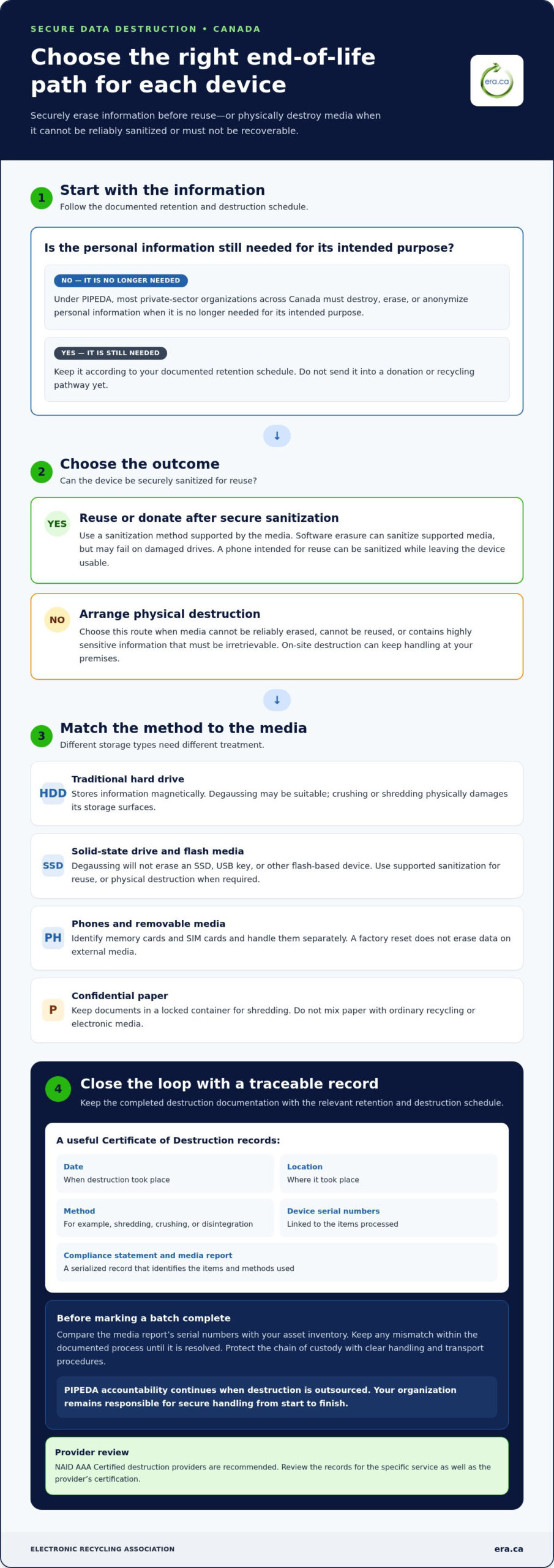
A business device can support a donation or recycling pathway only after its stored information has been securely erased or physically destroyed. For secure data destruction in Canada, businesses should follow documented retention and destruction schedules and ensure information cannot be reconstructed. PIPEDA applies to most private-sector organizations across Canada and requires personal information to be destroyed, erased, or anonymized when it’s no longer needed for its intended purpose.
Deleting files or emptying a recycle bin isn’t enough, but destroying every device can also waste equipment that could still serve a community organization. The practical choice depends on whether the media can be securely sanitized for reuse or requires physical destruction.
This guide explains how to arrange on-site hard-drive destruction, what a Certificate of Destruction should document, how to shred confidential paper alongside digital media, and how to prepare usable computers for charitable donation. It also compares secure wiping with physical destruction, helping you protect records while giving suitable equipment a second life.
Key Takeaways
- Set a documented retention and destruction schedule so records are kept only as long as needed and then securely destroyed.
- Plan on-site media destruction for sensitive drives, and record the destruction method, date, location and device serial numbers.
- Protect the chain of custody with clear handling and transport procedures, then retain the Certificate of Destruction with your compliance records.
- Keep confidential paper in a locked container until shredding, and select a destruction method suited to each type of media.
- Separate devices for reuse from those requiring physical destruction; securely sanitize reusable equipment before preparing it for donation.
Looking for Professional Data Destruction Services?
Choose a process that leaves your organization with clear evidence of what was destroyed and how. Under PIPEDA, most private-sector organizations across Canada must destroy, erase, or anonymize personal information when it’s no longer needed for its intended purpose.
Destruction Certificates and Media Reports
A Certificate of Destruction documents the destruction of confidential information on paper or hard drives. For a useful compliance record, look for the destruction date and location, the method used, device serial numbers, and a compliance statement. These details connect the certificate to a specific destruction event instead of leaving a general statement without context.
Ask for a serialized certificate and a media report identifying the items processed. Match each hard-drive serial number on the report to the equipment your organization released. The written destruction certification should state what was destroyed and which methods were used, such as shredding, crushing, or disintegration. Keep these records with the relevant retention and destruction schedule.
Provider Certification and Compliance Records
NAID AAA Certified destruction providers are recommended for secure, traceable, standards-compliant destruction. Treat certification as one part of your review, then examine the records for the specific service. A certificate and media report should let your organization trace each listed drive to its documented destruction method, date, and location.
For a clear audit trail, decide which records your organization will retain before destruction takes place. A practical sequence is to identify the media, record serial numbers, document the chosen method, and file the completed certificate and media report. PIPEDA accountability continues when shredding is outsourced, so your organization remains responsible for secure handling from start to finish.
Build the documentation into your retention and destruction schedule. First, identify records that have reached the end of their required retention period. Then record which media contains that information and whether it requires erasure or physical destruction. Keep the completed certificate with the schedule entry so the decision and outcome remain connected.
For example, if a batch includes several hard drives, compare the media report with the asset inventory before closing the record. Keep any item involved in a mismatch within the documented process rather than marking the batch complete. This reconciliation step makes serialized records more useful during internal reviews.
Paper records need a traceable process too. Record the date and method of destruction, and retain the related certificate with the organization’s compliance records. When recycling equipment, keep destruction documentation separate from records about equipment that remains in use or is prepared for reuse. Clear records provide practical peace of mind and help demonstrate how your organization handled information at the end of its lifecycle.
On-site physical destruction of hard drives and other media
In Canada, businesses can use electronic wiping, degaussing, or physical destruction for digital media, and shredding for paper records. For drives that must not be recoverable, physical destruction is the most direct option.
On-site destruction brings the process to your premises, where staff can prepare devices and observe their handling. It can suit organizations managing sensitive records that are no longer needed, particularly when removing drives from the workplace would add handling steps.
Choose a method that fits the storage technology. Degaussing erases magnetic media, such as traditional hard drives, but cannot erase solid-state drives, USB keys, or other flash-based devices. Software erasure can sanitize supported media, but may fail on damaged drives. Physical destruction can be appropriate when media contains highly sensitive data or cannot be reliably erased.
Hard drives and SSDs need different treatment. A hard drive stores information magnetically, so degaussing may be suitable; crushing or shredding physically damages its storage surfaces. An SSD stores data on flash memory, so degaussing won’t erase it. Physical destruction is an option when an SSD cannot be reused or its information must be irretrievable.
Phones combine internal storage with removable media. Before disposal, identify any memory cards or SIM cards and handle them separately. A factory reset does not erase data on external media. For a phone intended for reuse, sanitization can remove stored information while leaving the device usable; for a device containing especially sensitive records, physical destruction may be more appropriate.
Paper records need a separate process. Place confidential documents in a locked container for shredding rather than mixing them with ordinary recycling. Keep paper and electronic media in distinct groups so each receives the appropriate method and can be documented clearly.
Prepare an on-site destruction session with a simple sequence:
- Identify each device and separate hard drives, SSDs, phones, and removable media.
- Match the media to its required outcome: reuse after sanitization or disposal after physical destruction.
- Keep items together by type, and record which devices are ready for destruction.
- Separate confidential paper for shredding, and retain the records of the completed work.
Physical destruction is described as the only 100% secure way to ensure data cannot be retrieved or reconstructed. For organizations arranging on-site hard-drive destruction, matching the method to the media helps protect sensitive information while keeping reusable devices out of the destruction stream.
What is a Certificate of Destruction?
Businesses can assess a Canadian data destruction service by reviewing its handling process, tracking controls, and completed destruction records. A secure chain of custody connects each data-bearing item to its collection, transport, destruction, and final documentation.
Chain-of-Custody Tracking
Chain-of-custody tracking records how electronic devices and other data-bearing materials move through each stage. Start with an inventory that identifies each drive by serial number, then compare it with the items recorded at collection and destruction. A Certificate of Destruction should identify the destruction date and location, method, device serial numbers, and a compliance statement.
Look for records that connect the item received with the item destroyed. For example, a hard drive listed in an organization’s asset inventory should appear in the collection record and final media report. Capturing serial numbers helps show that the record covers that specific device, rather than an unspecified group of equipment.
Custody During Transport
Transport creates a gap between an organization’s facility and the destruction site, so custody controls matter before departure. Tamper-evident containers can show whether material was accessed, while tracked transport records document its movement. Screened and bonded handlers are also identified as chain-of-custody controls for sensitive information.
Before electronic media leaves, record which items go into each container and who assumes custody. On arrival, compare the received inventory with the dispatch record. If a serial number is missing from either record, resolve the discrepancy before closing the destruction file.
Use a defined handoff process rather than relying on an informal transfer. Assign a staff member to prepare the inventory, seal the container, and record the collection handoff. The receiving handler should document the container’s arrival and connect its contents to the destruction record. These steps make custody visible while data remains on the storage media.
Outsourcing does not remove an organization’s accountability. Under PIPEDA, businesses that outsource shredding remain accountable for ensuring information is handled securely from start to finish. Retain the inventory, transport record, and completed certificate together so an internal review can trace the material from the facility to destruction.
Review the final documentation for completeness before closing the file. Confirm that every listed device has a serial number, the method and location are recorded, and the stated destruction date matches the event. For paper, describe the material and its destruction method in the records, since paper has no device serial numbers. A consistent record set supports compliance and gives staff a clear account of how sensitive information was handled.
Paper shredding and hard-drive destruction
Paper files and digital drives need destruction methods suited to their materials. Businesses can use shredding, crushing, or disintegration for confidential records and storage media. Keep the two streams separate: paper belongs in a locked container before shredding, while hard drives and other devices need a method designed for electronic media. This separation helps staff track what was destroyed and what remains available for reuse.
A hard drive can hold substantial information in a compact device. A single 1 TB hard drive can store millions of documents, so deleting files or formatting the drive doesn’t provide the same result as destroying its storage media. Crushing can punch an irreparable hole through a drive, while shearing can slice it into smaller pieces. Shredding reduces drives to fragments, making it easier to confirm the device is no longer intact.
Digital media destruction must account for more than traditional hard drives. SSDs, USB keys, and other flash-based storage don’t rely on magnetic surfaces, so methods intended for magnetic media, such as degaussing, won’t erase them. Match the method to the device type, and identify mixed media rather than treating every drive alike. For equipment intended for reuse, secure erasure may preserve the device; physical destruction is appropriate when the media must not remain usable.
For confidential paper, place documents in a locked container until they’re collected for shredding. Avoid leaving files beside open recycling bins, where pages could be seen or removed before destruction. Separate paper by business unit or records category when that helps your organization reconcile what was released. After processing, retain the destruction record with the relevant compliance file.
The cost of hard-drive destruction in Canada depends on the work involved. Larger operations with detailed reporting requirements, physical destruction needs, or unusual logistics may have associated costs, and the team will outline any fees up front. When planning the service, describe the media types and approximate volume, and indicate whether you need on-site destruction.
- List the hard drives, SSDs, and other media separately.
- Keep confidential paper in a locked container until shredding.
- Choose destruction for media that must not remain usable.
- Compare the completed media record with the devices released.
A Certificate of Destruction should record the method, date, location, and device serial numbers. Keep it with the inventory so your organization can trace each drive from release to destruction. This record also distinguishes destroyed media from equipment erased for reuse, supporting a clear account of how paper and electronic records were handled.
Secure data destruction for reuse donations
Canadian businesses preparing electronics for donation or resale should sanitize stored information before devices leave their control. Deleting files or emptying a recycle bin doesn’t remove the data; it may remain recoverable. Choose an erasure method suited to the storage type and reuse plan, then separate devices that require physical destruction.
Start by deciding which equipment can be reused and which contains information too sensitive to remain on the media. For reusable devices, sanitization permanently removes stored data while leaving the storage media available for use. For a drive that cannot be sanitized reliably, or a device that must not return to service, physical destruction is the appropriate route.
Before erasing, back up business files that must be retained and disconnect the device from online accounts. This helps prevent accidental loss and removes the device’s connection to services tied to the organization. A factory reset alone isn’t complete sanitization: external storage, including memory cards and SIM cards, must be handled separately.
Overwrite and secure erase methods can prepare magnetic and other media for reuse or disposal. The described overwrite method uses three or more series of random binary code passes to prevent previous data from being read. Repeated overwriting can shorten the life of solid-state flash media and interfere with reuse, so consider the storage type before choosing this method.
Crypto erase removes the encryption key, leaving encrypted data on the media unreadable and unrecoverable. It is suitable for encrypted hard drives, SSDs, and other flash-based storage only when encryption was used from the beginning of the media’s life cycle. If the device was encrypted later, crypto erase doesn’t meet this condition.
Use a simple preparation sequence before donation or resale:
- Identify the device, its storage type, and any removable media.
- Back up needed files, then disconnect the device from online accounts.
- Sanitize reusable media with a method suited to its storage technology.
- Physically destroy media that must not remain recoverable.
- Keep a record showing whether each device was erased for reuse or destroyed.
This separation supports both information protection and environmental reuse. Devices that pass sanitization can be directed to another user, while unsuitable equipment can enter a recycling pathway. Don’t send a device for donation until its internal storage and removable media have been addressed.
Prepare business devices for reuse donation by separating reusable equipment from media requiring destruction.
Electronic Recycling Association (ERA): Free electronics recycling
Electronic Recycling Association (ERA) helps Canadian businesses manage unwanted electronics through free electronics recycling, secure data destruction, electronics pickup, and charitable computer donations. Turn to ERA when retiring equipment that contains stored information or when usable computers could support a community organization.
Separate devices for donation from equipment requiring recycling, and arrange data destruction for media that needs secure handling. This approach supports information protection while helping usable computers reach charitable organizations. Electronics pickup can help businesses move equipment out of the workplace as part of the process.
To plan the next step for business equipment, contact Electronic Recycling Association (ERA).
Make your equipment’s next step count
Make equipment retirement a deliberate choice: protect the information it holds, then direct each device toward its most suitable next use. A practical secure data destruction plan in Canada can support this decision while helping your organization handle business equipment responsibly.
Electronic Recycling Association (ERA) offers secure data destruction, free electronics recycling, and electronics pickup. These services can help when you’re preparing business equipment for recycling or deciding how to handle devices that still have use beyond your organization. Choose the next step that fits your equipment and information-handling needs.
Contact Electronic Recycling Association (ERA) to discuss your business equipment. A thoughtful process can protect sensitive information and help usable electronics contribute to a stronger community.
Frequently Asked Questions
How can I dispose of unwanted electronic devices and media (e-waste)?
Separate equipment for reuse from items that need recycling, and address stored information before devices leave your control. Remove personal accounts and handle removable media separately. Businesses can arrange electronics pickup or depot drop-off; Electronic Recycling Association (ERA) offers free electronics recycling and charitable computer donations. Keep an inventory of released equipment, especially if devices contain business records, so your organization can track what leaves and how it will be handled.
Is deleting the same as sanitization?
No. Deleting a file or moving it to a recycle bin removes its visible reference, but the information may remain recoverable. Sanitization permanently removes data from storage so it can’t be recovered or accessed, while the media may remain reusable. For example, a laptop prepared for donation needs a suitable sanitization process, not just a cleared desktop or emptied folder.
Is hard drive shredding necessary if I’ve wiped the data?
Not always. If a drive has been successfully sanitized using a method suited to its storage type, it may be reused without physical destruction. Shredding is an option when the media contains highly sensitive information, is damaged, or must not return to service. Consider the device’s condition, storage technology, and intended next use before choosing between reuse and destruction.
What Does a Hard Drive Destruction Service Cost in Canada?
The cost depends on the case and is provided after a quote request. Factors include the number and type of drives, whether destruction is on-site, and the handling and logistics involved. ERA provides secure data destruction, including on-site hard-drive destruction. For most standard donations and pickups, ERA does not charge a fee; larger operations with detailed reporting requirements, physical destruction needs, or unusual logistics may have associated costs, outlined up front.
What about physical destruction of the device?
Physical destruction damages storage media so it can’t be used as an intact device. It may suit a drive holding highly sensitive records or hardware that cannot be reliably sanitized. The method should match the storage type: degaussing works on magnetic media, not SSDs or flash-based storage. Before destroying an entire computer, separate components intended for reuse from media requiring destruction.
What is device sanitization?
Device sanitization permanently removes stored data so it can’t be recovered or accessed, while allowing the storage media to remain reusable. The method depends on the storage technology and device condition. For encrypted storage, crypto erase removes the encryption key, but it’s suitable only if encryption was used from the beginning of the media’s life cycle. Handle external cards and SIM cards separately.
What Canadian privacy laws and regulations govern secure data destruction, including PIPEDA and provincial laws?
For secure data destruction in Canada, organizations need to consider the privacy rules that apply to their information and operations. PIPEDA applies to most private-sector organizations across Canada. Provincial laws can also apply: Ontario’s PHIPA covers organizations handling personal health information, while Quebec’s Law 25 is identified as imposing retention and destruction duties. Identify the applicable requirements for each record type before setting its destruction process.
What are the requirements for destroying personal information under Canadian privacy laws?
A secure data destruction process in Canada should begin with the organization’s retention schedule. Under PIPEDA, personal information must be destroyed, erased, or anonymized when it’s no longer needed for its intended purpose. Then select a method suited to paper or electronic media and retain records of the work. Outsourcing destruction doesn’t remove an organization’s accountability for secure handling from start to finish.