


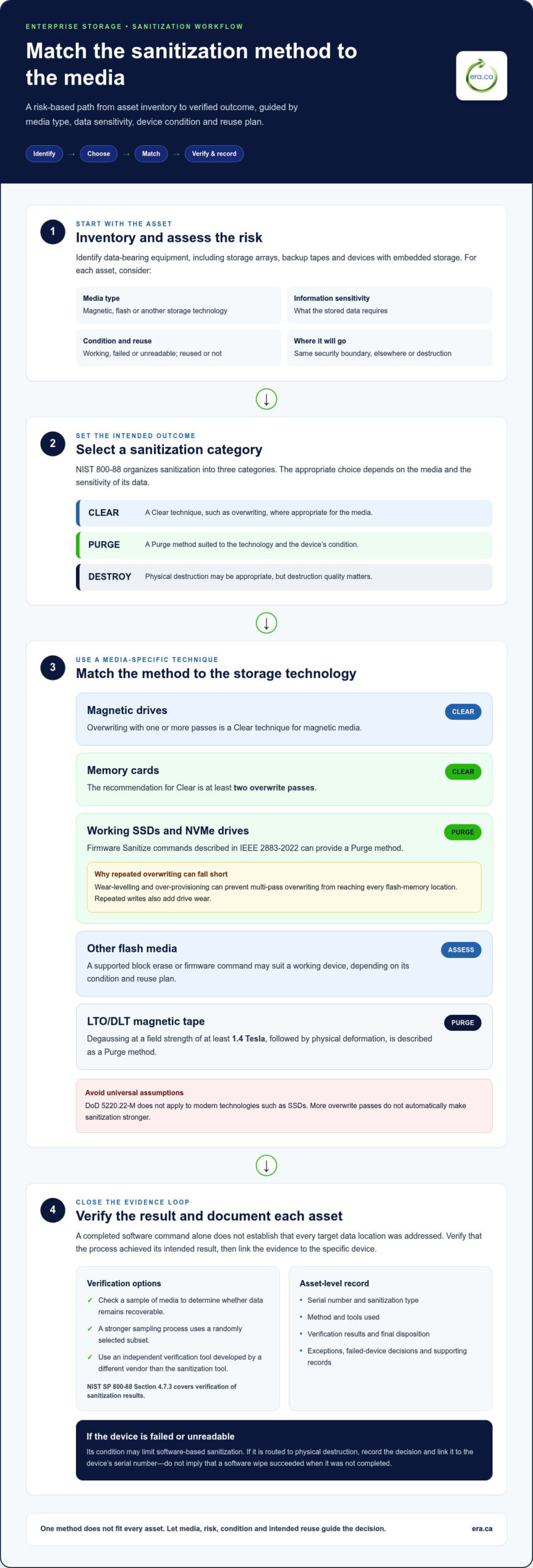
Physical destruction doesn’t automatically mean data is unrecoverable. The NIST 800-88 sanitization standards for enterprise storage organize sanitization into Clear, Purge and Destroy, with the appropriate method depending on the media and the sensitivity of its data. According to the National Institute of Standards and Technology, these are the three sanitization categories.
Treat retired drives as a security risk: a method suited to a magnetic hard drive may not work for an SSD, and large shred fragments can leave data recoverable. Choosing the right approach means considering the device, its condition, whether it will be reused and the organization’s policy, rather than assuming one wipe or destruction method fits every asset.
This guide explains what NIST SP 800-88 Rev. 2 recommends for different media types, when cryptographic erase may apply, and how verification and documentation support a defensible process. It also examines the limits of physical destruction, so you can make informed decisions about storage equipment before it is reused, donated or recycled.
Key Takeaways
- Match the sanitization method to the media type, information sensitivity, device condition and intended reuse rather than applying one method to every asset.
- Account for SSD wear-levelling: repeated overwriting may not reach all stored data, so the method should suit the drive’s technology.
- Use cryptographic erase only when the drive’s encryption was properly enabled and managed; plaintext operation can make this method insufficient.
- Build verification and asset-level records into the process so you can document what was sanitized, how, and with what result.
- Physical destruction can still leave data recoverable if fragments are too large for the storage density, so destruction quality matters.
What are Recommended Sanitization Techniques as per Media Type?
Build an enterprise program by identifying media, assessing data sensitivity, selecting a suitable method, then verifying and documenting the outcome. The NIST 800-88 sanitization standards for enterprise storage offer a framework for making those decisions according to media type and risk.
Matching Methods to Media and Data Risk
Choose media sanitization methods based on the device, information sensitivity, media condition, reuse plan and internal policy. Techniques that work for magnetic drives may not reach every flash-memory location. For example, a working drive approved for internal reuse may need a different outcome from damaged media containing sensitive information that will leave organizational control.
Start by inventorying data-bearing equipment, including storage arrays, backup tapes and devices with embedded storage. Classify the information, then identify whether each asset will remain within the same security boundary, move elsewhere or be destroyed. These decisions help determine whether Clear, Purge or Destroy is appropriate. The NIST 800-88 sanitization standards for enterprise storage help teams structure this risk-based choice instead of applying one technique to every asset.
Techniques for Magnetic and Flash Media
Sanitization techniques differ because magnetic and flash-based media store data differently. Matching the method to the technology matters: overwrite can suit magnetic media, while repeated passes may miss data on an SSD. For working SSDs and NVMe drives, firmware Sanitize commands described in IEEE 2883-2022 can provide a Purge method.
For magnetic media, overwriting with one or more passes is a Clear technique. For memory cards, the recommendation is at least two overwrite passes for Clear. More passes do not automatically make sanitization stronger. Wear-levelling and over-provisioning can prevent multi-pass overwriting from reaching every flash-memory location, while repeated writes add drive wear.
For LTO/DLT magnetic tape, degaussing at a field strength of at least 1.4 Tesla, followed by physical deformation, is described as a Purge method. For flash media, a supported block erase or firmware command may suit a working device, depending on its condition and reuse plan. DoD 5220.22-M does not apply to modern technologies such as SSDs, so don’t treat it as a universal benchmark.
Apply the decision consistently throughout the asset lifecycle. Record each device’s media type, chosen method and outcome, then verify that the process achieved its intended result. A failed or unreadable drive may need another approach because its condition can limit software-based sanitization. This helps teams make defensible disposal decisions and avoid methods unsuitable for the storage technology.
What is Inadequate Data Sanitization?
Keep a Certificate of Media Disposition and asset-level records showing what happened to each device. Include its serial number, sanitization type, method, tools used and verification results. These details connect the recorded action to the target data and the specific asset.
Sanitization is inadequate when an organization cannot show that its chosen method worked for the media or demonstrate what happened to an asset. A completed software command alone does not establish that every target data location was addressed. Device-level records provide a traceable account for internal reviews, audits and disposal decisions.
Build records around individual assets, not just batch totals. A certificate covering a group of drives can make it difficult to identify which device was sanitized, especially when equipment moves between locations. Record each serial number and link it to the sanitization activity, method and tool, responsible operator or process, and verification outcome.
NIST SP 800-88 Section 4.7.3 covers verification of sanitization results. Verification options include checking a sample of media to determine whether data remains recoverable. A stronger sampling process uses a randomly selected subset and an independent verification tool developed by a different vendor than the sanitization tool. Record the sample selection and results, so reviewers can understand the evidence behind the conclusion.
Keep supporting records with the certificate. These can include asset inventories, chain-of-custody records, sanitization logs, exceptions, failed-device decisions and final disposition. For example, if an unreadable drive is routed to physical destruction, document the decision and link it to the device’s serial number. This avoids implying that a software wipe succeeded when it was not completed.
Retention should follow the organization’s records schedule and the rules that apply to its information. For healthcare engagements with HIPAA-equivalent rules, certificate retention is at least 6 years. That period is specific to those engagements, not a universal retention period for every Canadian organization. Government and private-sector teams should align their records with applicable obligations and internal policy.
Use a consistent certificate template, restrict access to sensitive records and maintain a clear link between each device and its final outcome. If a reviewer asks whether target data could be recovered, asset-level documentation helps the organization assess the method, verification and disposition together.
What is NIST 800-88, and What Does “Media Sanitization” Really Mean?
NIST SP 800-88 offers guidance for making access to stored data infeasible for a given level of effort. Its current revision, Rev. 2, was published in September 2025.
Clear, Purge, and Destroy Categories
According to the National Institute of Standards and Technology, NIST SP 800-88 identifies Clear, Purge, and Destroy as its data sanitization categories. Each describes a different approach to preventing access to target data. The distinction matters because organizations need to match their disposal decision to the information’s sensitivity, the media, and whether the device will be reused.
Clear uses logical techniques to protect against ordinary recovery through the device interface. For example, overwriting magnetic media can serve as a Clear method when the asset will be reused within the same security boundary and its data has a low classification. Clear does not mean every possible laboratory recovery method has been defeated.
Purge uses techniques intended to make recovery infeasible, including specialized device commands or degaussing where appropriate. A supported firmware Sanitize command on a working SSD is one example. Destroy makes the media unusable, using methods such as shredding or burning for hard-copy storage. These categories help teams distinguish reuse from disposal.
Sanitization Outcomes
Clear, Purge and Destroy describe different sanitization outcomes, not interchangeable labels for deleting files. The device’s destination and data sensitivity determine the outcome an organization needs. A drive moving to another user within the same security boundary may need different treatment from media leaving organizational control.
After Clear, a device may remain usable, but the method aims to prevent access through normal interfaces. Purge aims to make target data infeasible to recover while potentially preserving the media for reuse. Destroy removes the media from service by physically damaging it, reducing the chance of data access.
NIST’s Section 4 decision flow helps organizations select a technique for storage media. Begin by identifying the information and media, then assess sensitivity, device condition and intended disposition. Consider whether the media will be redeployed, transferred beyond the security boundary, or retired. Those distinctions shape the appropriate outcome, not a blanket preference for the strongest-sounding method.
NIST SP 800-88 is guidance, not a universal legal requirement for Canadian organizations. Applicable obligations depend on the organization, information and governing rules. Treat the guidelines as a structured basis for policy: define acceptable methods, assign responsibility, and document the sanitization decision. That program-level approach helps connect each device’s treatment to its risk and final disposal.
Keep the categories precise. Deleting a file or performing a quick format may not constitute sanitization, while physical destruction alone does not show that a suitable process was used. Record the selected category and method alongside the device’s disposition. This gives reviewers a clear account of whether the media was prepared for reuse, purged for transfer or destroyed at end of life.
Cryptographic Erase for self-encrypting drives
Cryptographic erase, also called crypto erase, makes encrypted data inaccessible by erasing the encryption key. It can be a logical sanitization method for a self-encrypting drive when encryption protected the stored data. The drive’s hardware remains intact, so this differs from shredding or other physical destruction.
The key question is whether encryption was active for the data being sanitized. A self-encrypting drive can operate in plaintext mode, making cryptographic erase insufficient. If target data was written without encryption, removing a key cannot make that plaintext data inaccessible. A device’s encryption capability alone does not establish that cryptographic erasure is suitable.
Assess the drive’s configuration and history before choosing a method. Establish whether encryption covered the data, whether the relevant keys were managed by the drive and whether the erase command applies to the intended storage. For example, a drive that changed from plaintext to encrypted operation may still contain earlier data that key erasure does not address.
Use a supported crypto erase function and confirm that the command completed. The result depends on the drive’s implementation and encryption state, not simply on selecting an erase option in software. Keep the asset identity, command outcome and verification evidence together to show which device was treated and how.
Cryptographic erasure does not physically damage the media. It can preserve a working self-encrypting drive for reuse, but the drive remains a functioning asset. A magnetic or flash drive that cannot complete its erase command needs a different sanitization decision. The media type, condition and intended disposition all affect the next step.
Separate the confidentiality goal from the disposal goal. If the organization needs to protect encrypted target data while retaining usable hardware, crypto erase may fit. If encryption status is uncertain, the drive operated in plaintext mode or the device is faulty, key erasure does not address those gaps. A different Purge method or physical destruction may be needed, depending on the risk and media condition.
Describe cryptographic erase accurately in enterprise records. Record it as a key-based sanitization action, not as overwriting or physical destruction. Note whether the drive was self-encrypting, the encryption state considered, the command result and any verification performed. This distinction helps reviewers understand why the method was chosen and what it did to the data and device.
Crypto erase is conditional, not a universal shortcut for every encrypted drive. Treat encryption status as a decision point, then weigh the drive’s condition, confidentiality needs and reuse plan. If the drive operated in plaintext mode, cryptographic erase alone is insufficient, regardless of its self-encrypting hardware.
Physical destruction and data recovery risks
Physical destruction does not automatically make target data unrecoverable. NIST media sanitization guidance warns that conventional shredding can leave information recoverable if fragments are too large for the storage density. Match destruction quality to the media, then verify and document the result.
Storage media holds information in small physical areas, so a fragment that looks unusable may still retain data. High-density media can pose a greater recovery challenge when shredding produces large pieces. The outcome depends on the destruction method and the media being processed. A record that says only “shredded” does not show whether recovery of the target data has become infeasible.
Particle size is one consideration, but NIST SP 800-88 Rev. 2 doesn’t mandate specific sizes. Destruction operations may use particle sizes such as 6 mm, 2 mm or 0.5 mm. These are examples, not universal pass-or-fail thresholds. The appropriate result depends on storage density, media construction, information sensitivity and the organization’s disposal policy.
Device condition also affects the decision. Failed or unreadable drives are commonly routed to physical destruction because software commands may not reach stored data. For example, an SSD that cannot complete a firmware Sanitize command needs another disposition method that addresses its confidentiality risk. Destruction can prevent reuse, but the physical process must still reduce the media sufficiently.
Destruction also raises a custody question. An asset may pass through collection, transport and processing before its final disposition. Record the device identity, custody transfers, destruction method and completion evidence. If a drive is missing from the inventory, a certificate for the remaining batch cannot establish what happened to that specific device.
Choose a destruction process based on the actual storage media, not its appearance after processing. A magnetic platter and an SSD have different constructions, so the same fragment size may not present the same recovery risk. Document why the selected process fits the media and the sensitivity of its target data. This rationale makes the decision easier to understand in a later review.
Distinguish physical destruction from successful data sanitization in your records. Document the asset, chosen method, outcome and verification evidence, then reconcile these details against the inventory. NIST guidance focuses on making access to target data infeasible for a given level of effort. Evaluate destruction against that outcome, not its appearance alone.
For retired drives that require secure data destruction, arrange secure data destruction as part of a documented end-of-life process. Keep inventory and disposition records connected, so each storage device has a traceable outcome.
Electronic Recycling Association (ERA): Free electronics recycling
The Electronic Recycling Association (ERA) helps organizations manage retired electronics once they have decided how to protect their data. Its secure data destruction supports end-of-life handling, and free electronics recycling provides a route for equipment ready to leave service. ERA’s electronics pickup service can help move equipment into the next stage of its lifecycle.
Computers suitable for reuse can support community needs through charitable donations. Separate assets by their intended outcome and keep sanitization records aligned with each device’s disposition. This connects responsible data handling with practical reuse and recycling, rather than treating every retired device as waste.
For electronics ready to leave your organization, contact ERA or visit era.ca to discuss the next step.
Make secure retirement part of the asset lifecycle
Set responsibility for retired equipment before devices reach end of life. When procurement, IT, privacy and records teams share a clear handoff, sanitization decisions can be made before storage media leaves organizational control. Use the NIST 800-88 sanitization standards for enterprise storage as a reference point for that process, while aligning decisions with your organization’s data sensitivity, reuse plans and documentation practices.
For the next stage, the Electronic Recycling Association (ERA) offers secure data destruction, free electronics recycling and electronics pickup. These services connect information protection with responsible equipment handling. Choose the route that fits each asset’s condition and intended disposition, and keep its records with the inventory history.
Contact Electronic Recycling Association (ERA) to discuss the next step for your retired electronics. A thoughtful handoff supports both responsible data management and a more useful future for equipment.
Frequently Asked Questions
What are the NIST 800-88 Guidelines?
NIST SP 800-88 is guidance for building a media sanitization program and selecting methods for information-bearing media. Its current revision is Rev. 2, published in September 2025. Organizations can use it to frame internal policies, roles and decision-making rather than treat it as a universal Canadian legal requirement. For a practical starting point, map the guidance to your organization’s data classifications and asset-disposal process.
How to Select an Appropriate Media Sanitization Method?
Select a method by considering the media technology, information sensitivity, device condition and intended disposition. For example, a working drive approved for internal reuse may need different treatment from a damaged device leaving organizational control. Also account for retention obligations before sanitizing records. This helps prevent an otherwise effective sanitization action from removing information that still needs to be retained.
So, How Does NIST 800-88 Help Protect Against Unauthorized Data Access?
NIST SP 800-88 helps organizations make access to stored data infeasible for a given level of effort by structuring method selection and program controls. It supports decisions about how media is treated before reuse, transfer or disposal. The guidance cannot replace sound access controls during a device’s active life, but it helps address data exposure when equipment changes hands or leaves service.
What Documentation Should You Request?
Request records that link each asset to its final sanitization and disposition. Useful evidence includes a device identifier, method and tool used, verification outcome and chain-of-custody information. Compare certificate identifiers with the retirement inventory, especially when equipment moves in batches. If a record describes only a batch total, it may be difficult to establish what happened to a specific drive.
What Problem Does NIST 800-88 Solve?
NIST 800-88 addresses the risk that deleted or retired data remains accessible on storage media. A device can appear empty or unusable while still holding recoverable information. The guidance gives organizations a framework for deciding how to handle that risk across reuse and disposal. It also encourages a consistent program, so sanitization isn’t left to ad hoc choices made during equipment retirement.
What Types of Storage Media Does NIST 800-88 Apply To?
NIST SP 800-88 applies to information-bearing electronic media, not only standalone computer drives. An enterprise inventory can include storage arrays, backup tapes, removable cards and devices with embedded storage. Modern environments also involve logical sanitization for storage in computing environments such as the cloud. Listing less obvious assets, such as network equipment with internal storage, helps prevent overlooked data during retirement.
What is Sanitization Verification?
Sanitization verification checks whether the selected action achieved its intended result. It can include reviewing command outcomes, inspecting process records or testing a sample of media for recoverable data. For example, an organization can independently examine a randomly selected subset rather than relying solely on the tool that performed the sanitization. Record the evidence and any exceptions alongside the affected assets.
What does NIST SP 800-88 Rev. 2 require for media sanitization?
Rev. 2 guides organizations to establish a media sanitization program and use the latest relevant standards for techniques, rather than relying on outdated method descriptions. It emphasizes program controls, decision-making and validation of sanitization effectiveness from a confidentiality perspective. It doesn’t prescribe one universal technique for every device. Organizations should define how their policy addresses media identification, method selection, validation and disposition.